16 English
English
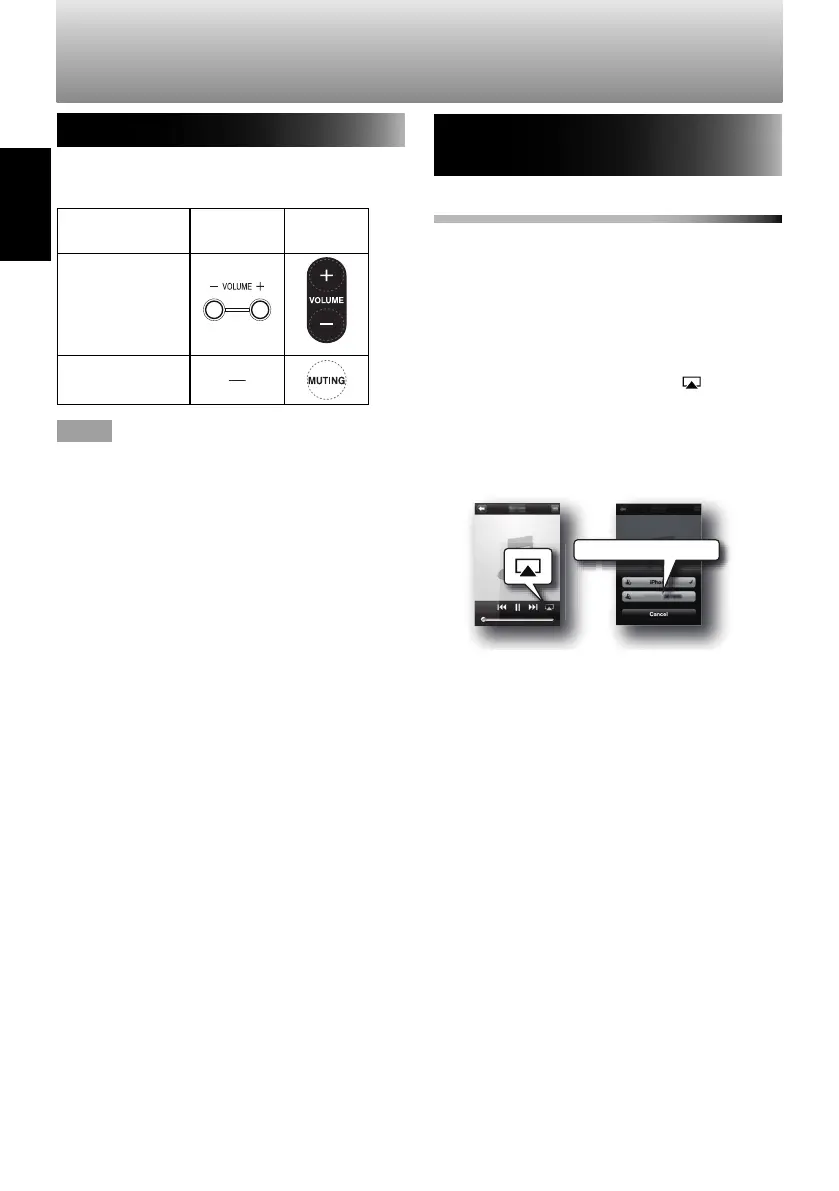
Operating AirPlay/DLNA devices
AirPlay/DLNA devices can be operated using
the System or the remote control.
Operation System Remote
control
Adjust the
volume
Mute
NOTE
• For DLNA compatible devices, operation
from the System may have different results
or may not be possible, depending on the
DLNA application used.
Playing audio from AirPlay/DLNA
devices
To play audio using AirPlay
1
Open the "Music" application on your
iPod touch/iPhone/iPad and display the
"Now Playing" screen.
• For computers, open iTunes.
• See the instruction manual for your
device for more details.
2
Tap or click the AirPlay icon ( ), and
select "SP-AP1 xxxxxx".
• This procedure may differ depending on
the application used. For details, see the
help section of the application.
SP-AP1
P-AP
SP-AP1 xxxxxx
3
Play audio.
The audio will be output through the
System.
• When using AirPlay, press and hold [USB
6
] to start/pause playback.
Using AirPlay/DLNA (continued)
SP-AP1[E]04.indd16SP-AP1[E]04.indd16 2013/10/1614:192013/10/1614:19
Downloaded from www.vandenborre.be


 To Next Page