17English
English
To play audio from DLNA devices
Playing audio using a DLNA application.
1
Open a DLNA compatible application.
• See the instruction manual for your
device for more details.
2
Specify the location of the file you wish
to play, and select "SP-AP1 xxxxxx" as the
audio output destination.
• This procedure may differ depending on
the application used. For details, see the
help section of the application.
3
Play audio.
The audio will be output through the
System.
Playing audio using Windows Media Player
12.
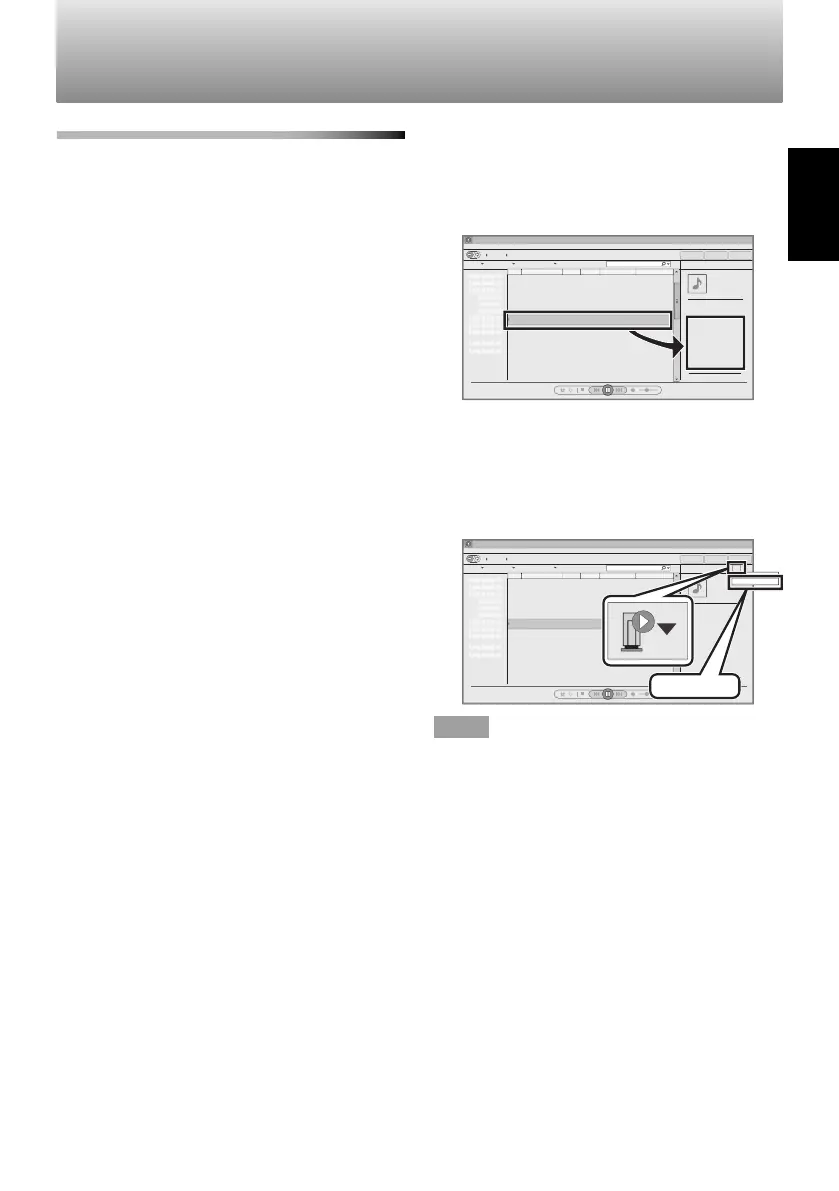
1
Open Windows Media Player 12.
2
Select the file to play, drag it to the right
side of the player and drop it.
Windows Media Player
6 Song for you 3:20
3
Click the "Remote play" icon, and select
the speaker (SP-AP1 xxxxxx).
4
Play audio.
The audio will be output through the
System.
SP-AP1 xxxxxx
SP-AP1 xxxxxx
Windows Media Player
6 Song for you 3:20
NOTE
• "xxxxxx" indicates the last 6 characters of the
System's MAC address. To check the MAC
address, see "Connecting via a wireless LAN
router without WPS (SSID connection)" on
page 11.
SP-AP1[E]04.indd17SP-AP1[E]04.indd17 2013/10/1614:192013/10/1614:19
Downloaded from www.vandenborre.be


 To Next Page