KANEXPRO MX-HDBASE4x4-4k
10 | P a g e
4.1.2 EDID Management
MX-HDBASE4X4-4K features EDID management to maintain compatibility between all
devices. It can be controlled via EDID learning and EDID invoking.
EDID Learning (from output):
One input port learns the EDID data of one output port
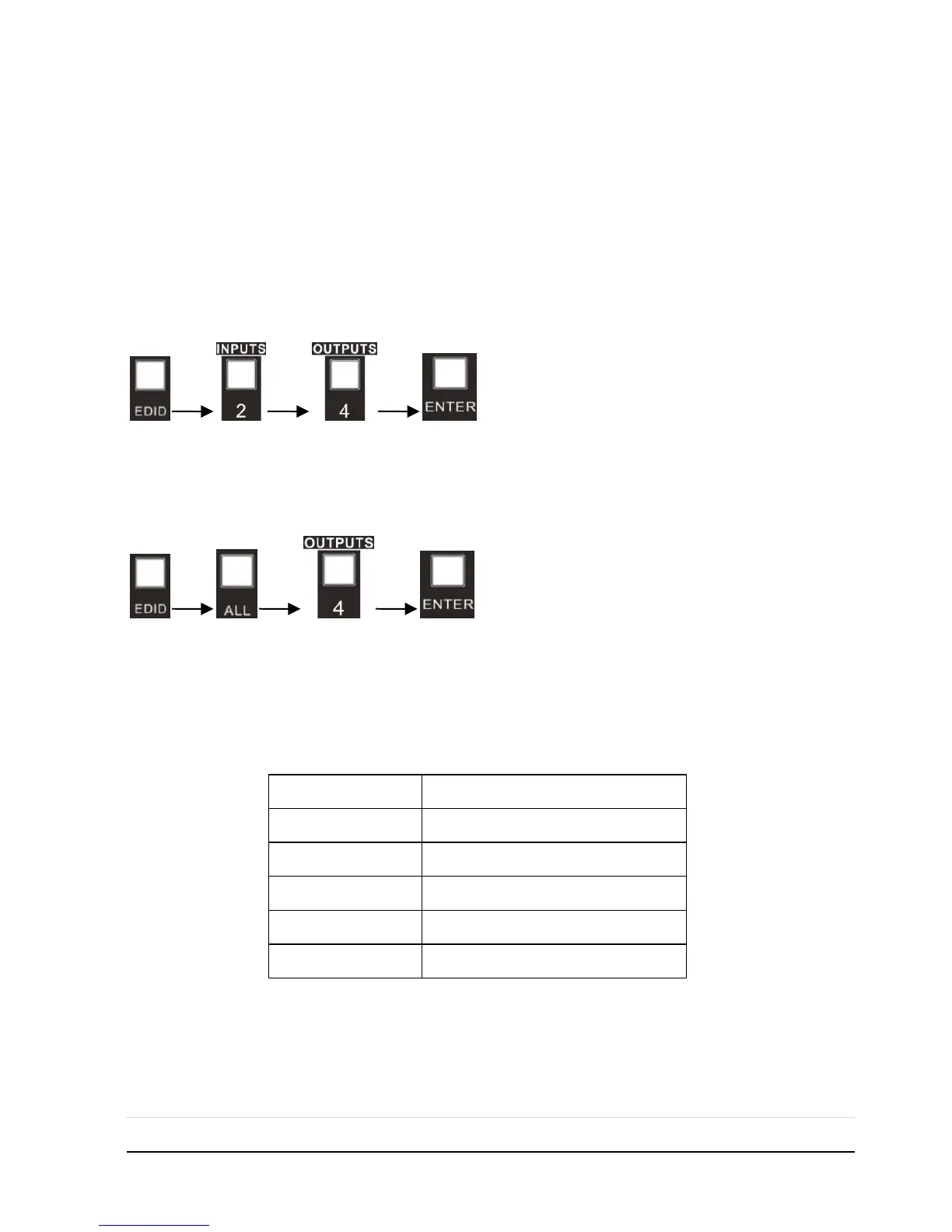
Operation: Press “EDID”, “INPUTS”+“OUTPUTS”+“ENTER”.
Example: Input 2 learns EDID data from output 4
All input ports learn EDID data from one output port
Operation: Press “EDID”, “ALL”+“OUTPUTS”+“ENTER”
Example: All input ports learn EDID data from output 4
Note: Indicators of the pressed buttons will blink green for three times if the conversion
is done, then it will be off. If the conversion failed, they will be off immediately.
EDID invoking:
There are five types of embedded EDID data. The chart below illustrates the detailed
information of the embedded EDID data:
Press and hold “EDID” for 3 seconds to enter EDID invoking mode, in this mode, use
output buttons 1/2 to switch among the 5 embedded EDID data. Then press “ENTER”
to confirm invoking.
Format: Press and hold “EDID” for 3 seconds, “INPUTS”+“OUTPUTS 1/2”+“ENTER”.



 To Next Page