KANEXPRO MX-HDBASE4x4-4k
30 | P a g e
Note: Log in as user access main interface only.
4.4.3 GUI Update
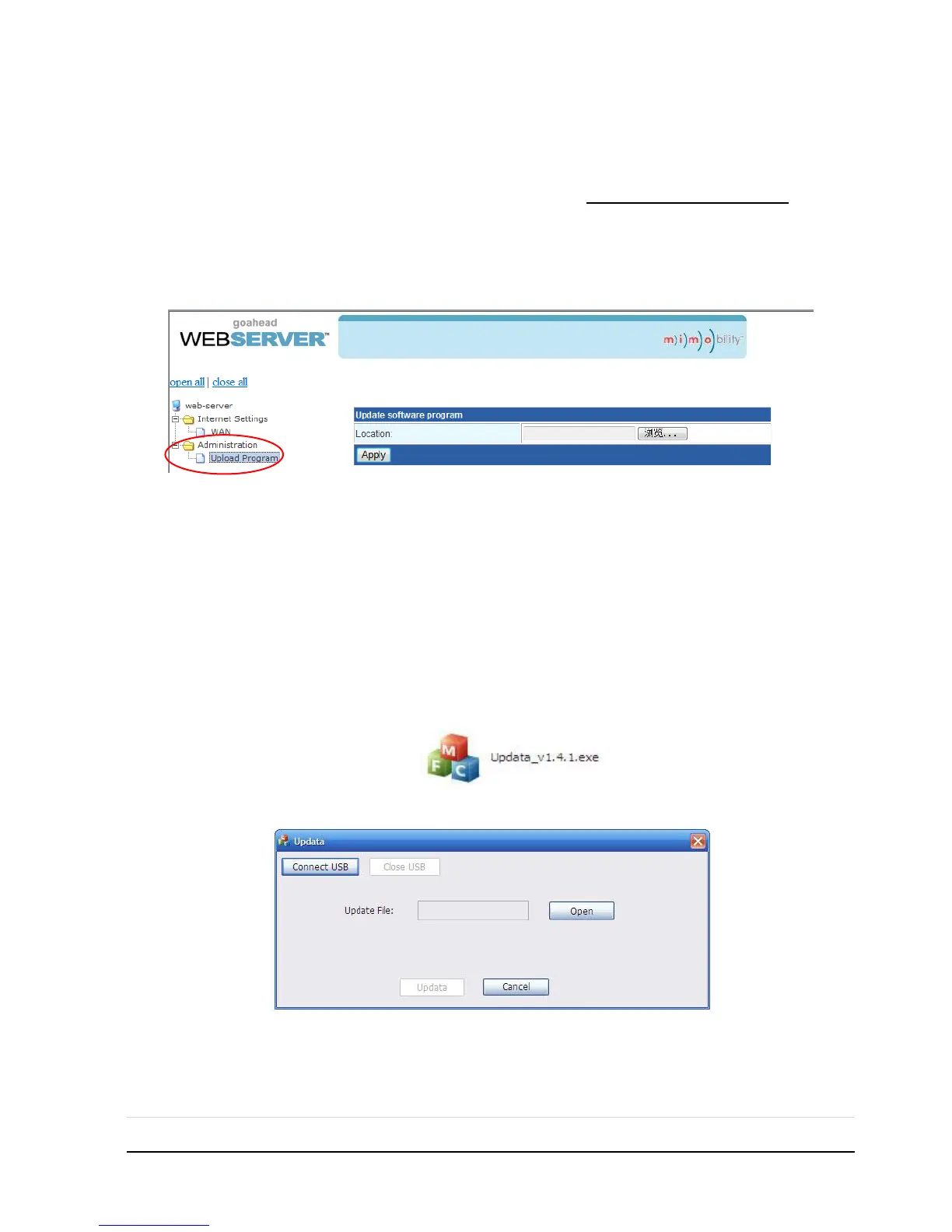
GUI for MX-HDBASE4X4-4K supports online update in http://192.168.0.178:100. Type
the username and password (the same as the GUI log-in settings, modified password
will be available only after rebooting) to log in the configuration interface. After that,
click Administration at the source menu to get to Upload Program as shown below:
Select the desired update file and press Apply, it will start upgrading then.
4.5 Firmware Update via USB
MX-HDBASE4X4-4K boasts a USB port for online firmware upgrade on the front panel.
Follow these steps to upgrade firmware:
Step1. Copy the upgrade software and the latest upgrade file (.bin) to PC.
Step2. Connect the USB ports of MX-HDBASE4X4-4K and the PC via USB cable.
Step3. Double-click the update software icon (see as below).
It will enter the upgrade interface shown as below:
Step4. Click Connect USB.
Step5. Click Open to load the upgrade file, then click Updata to start firmware
upgrading.



 To Next Page