24
| Kaye LTR-150 - Dry Block & Liquid Bath All-in-One Temperature Calibrator
5.1.4 Surface Temperature Insert
A special optional surface insert is used for calibrating surfacetemperature sensors. This makes calibration
fast and easy.
The surface insert is hollow from the bottom and longer than the adapter sleeve.
For reference sensors, three boreholes are located directly under the surface
The two threaded boreholes in the border are for the accompanying exchange
tool, while the third hole is used for the External Reference Probe to measure the
insert.
Inserting:
The surface insert is inserted into the metal block with the aid of the
insert exchange tool.
Removing and cleaning:
Let the calibrator cool before you remove the surface insert.
Pull the surface insert out of the metal block with the help of the
exchange tool.
Clean the surface insert and the metal block.
5.2 Setting Calibration Function
Once the desired calibration insert has been installed, the Calibration Function must be set via the
touchscreen.
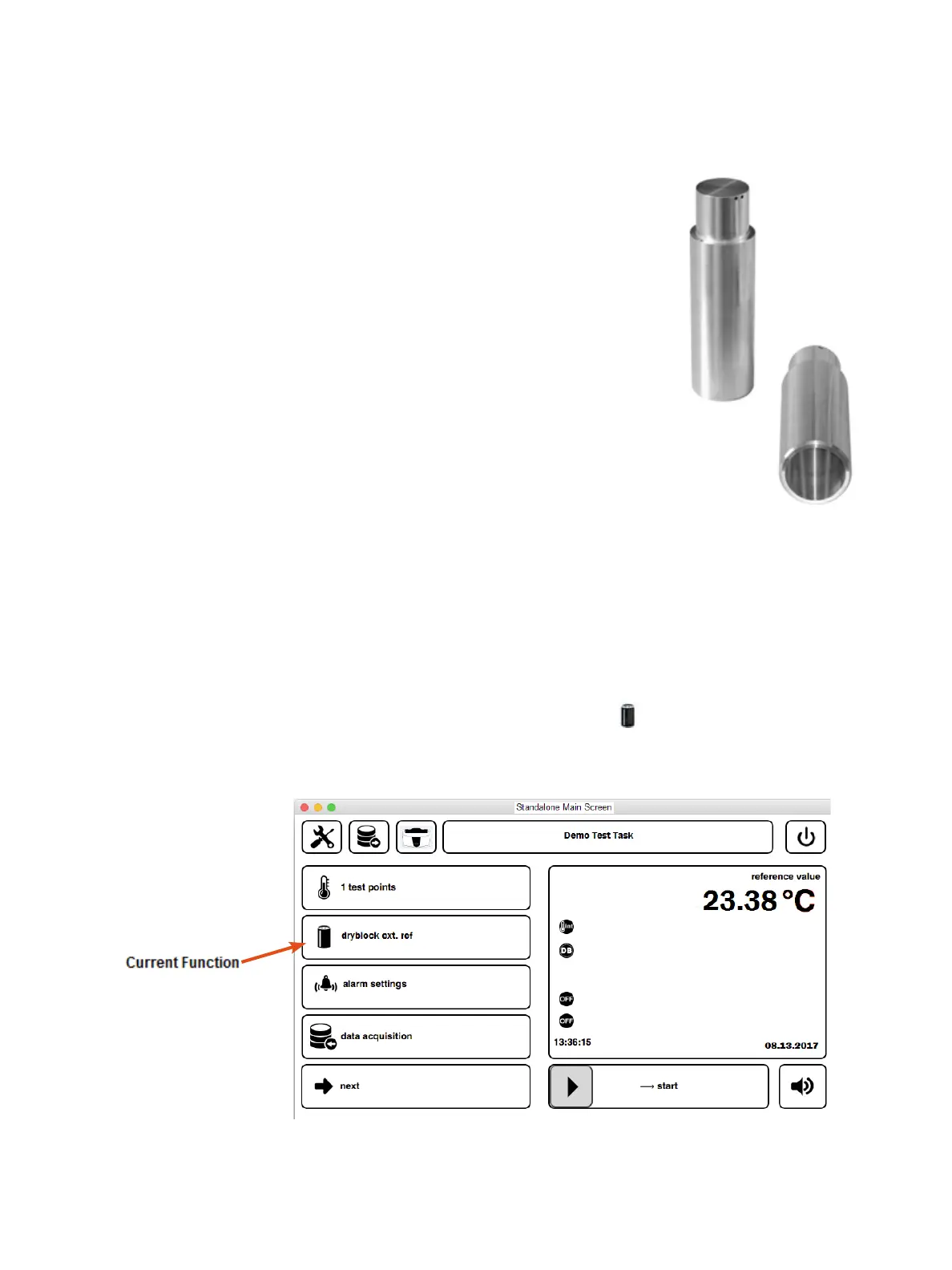
From the Standalone Main screen, tap on Current Function icon on the left which will bring up
the Select Function screen.
Chapter 5. Preparing for Calibration


 To Next Page