28
| Kaye LTR-150 - Dry Block & Liquid Bath All-in-One Temperature Calibrator
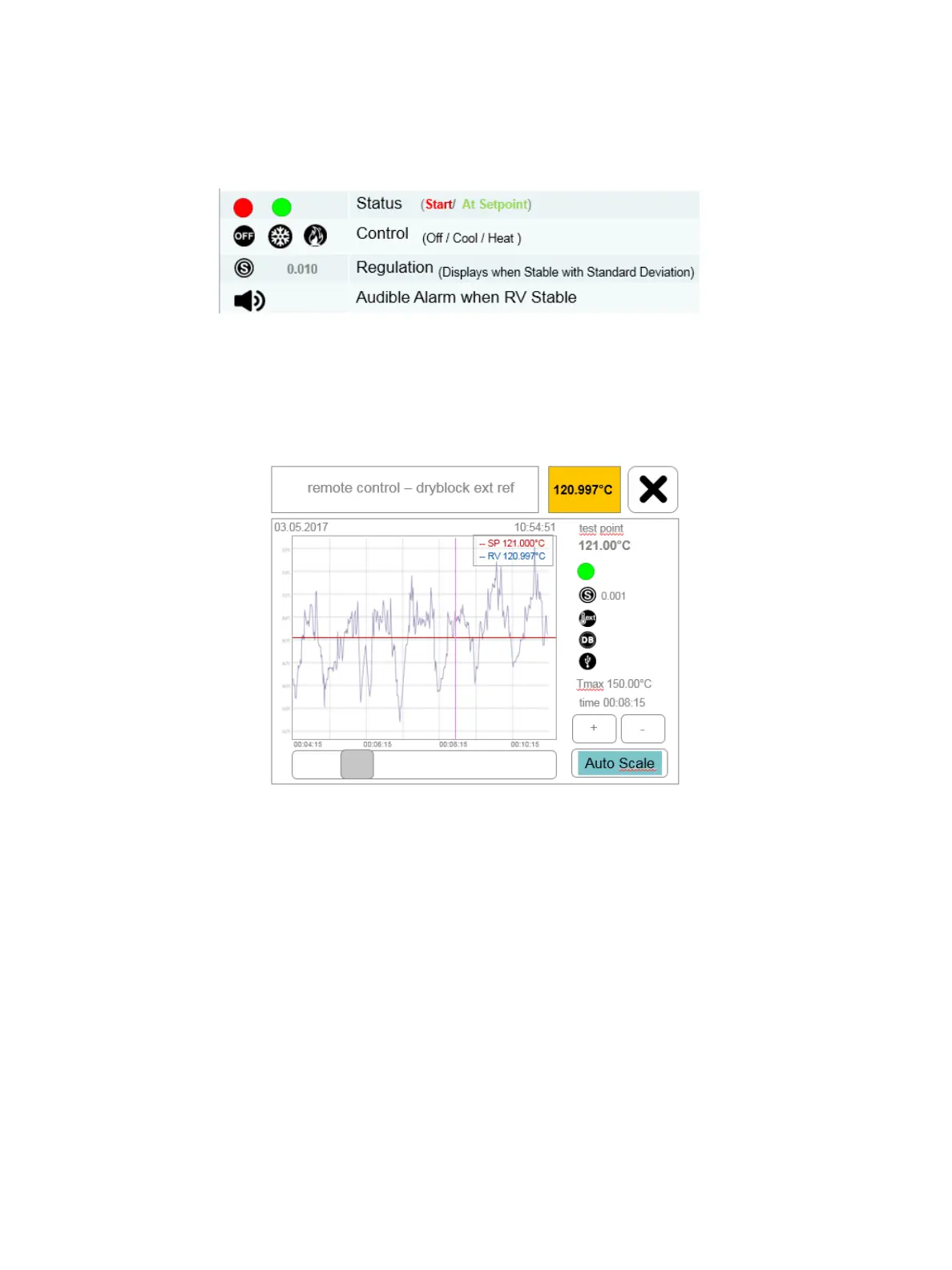
• During the automatic calibration process the LTR-150 Remote Control screen will provide the following
status information:
• During the automatic calibration process the LTR-150 Remote Control screen will also display and
graph the set point (red), and the External Reference Probe value (blue), in digital and graphical format.
• The graph displays the reference value (RV in blue) and target test point (SP in red).
• User can zoom in or out the graph by tapping on the plus or minus icons.
• User can also scroll back to the start of test to view the historical trend by tapping down and sliding
the grey box immediately to the left of the Auto Scale box. To return to current time and temperature,
simply release hold of the grey box.
• Following completion of testing, allow the LTR-150 to return to ambient conditions before carefully
removing the thermocouples and IRTD before powering off the unit. Never attempt to remove sensors
immediately following testing at elevated temperatures (≥45°C) or below freezing as the former can
cause personal injury while the latter could potentially damage the sensors should ice form around
the sensors. Note: the LTR-150 will be left programmed at the low set point as defined in the Kaye
validation software.
Chapter 6. Automatic Calibration Mode


 To Next Page