Q.2.60 March 2019
Page 15
© Copyright 2019 KE2 Therm Solutions, Inc., Washington, Missouri 63090
KE2 Compressor Sequencer OEM pn 21768
Quick Start Guide
Seng Up Groups
If using any Aux Relay Boards, the groups and Aux
Relay Boards must be setup before operation can
begin.
Once connected to the controller either locally,
using the IP address of the controller, or remotely
through KE2 Smart Access, the home page will be
displayed.
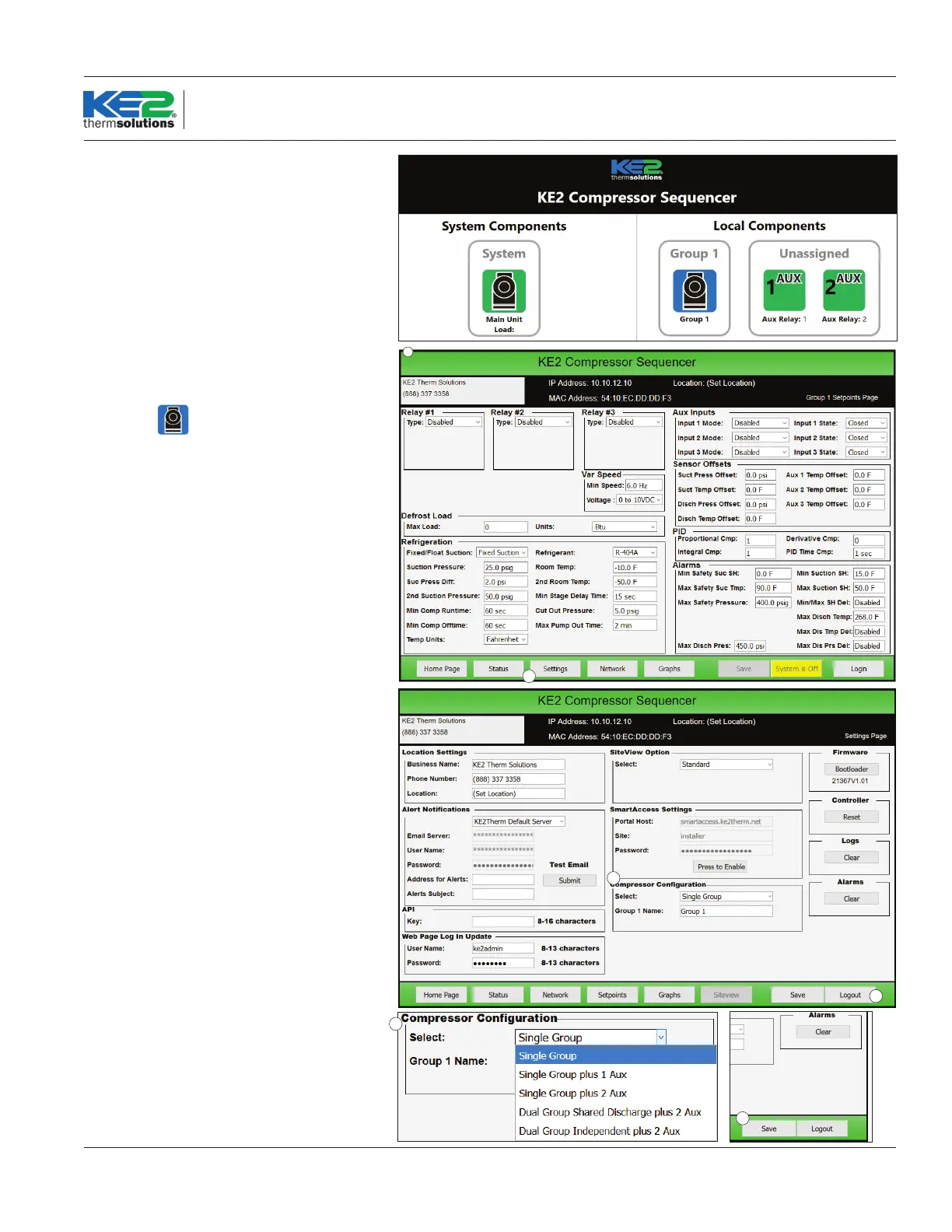
❶ Depending on the number of Aux Relay boards
connected to the controller, one or two Unas-
signed Aux Relay boards may appear on the
screen.
❷ Click on the
icon under Group 1.
❸ This will load the Setpoints page for Group 1.
❹ Next, click on the Settings page. Then click Login.
Enter the default username and password:
Username: ke2admin
Password: ke2admin
Click submit.
Once logged in, changes to the controller set-
tings are now permitted.
❺ Instead of Login, the button in the lower right
hand of the screen will now say Logout.
❻ Under Compressor Conguration, select the
correct application from the list:
❶
❸
❹
❺
❻
❼ Select the correct setup for the application
and number of Aux Relay Boards,
❽ then click Save.
❼
❽



 To Next Page