© Copyright 2019 KE2 Therm Solutions, Inc., Washington, Missouri 63090
Q.2.60 March 2019
Page 34
KE2 Compressor Sequencer OEM pn 21768
Quick Start Guide
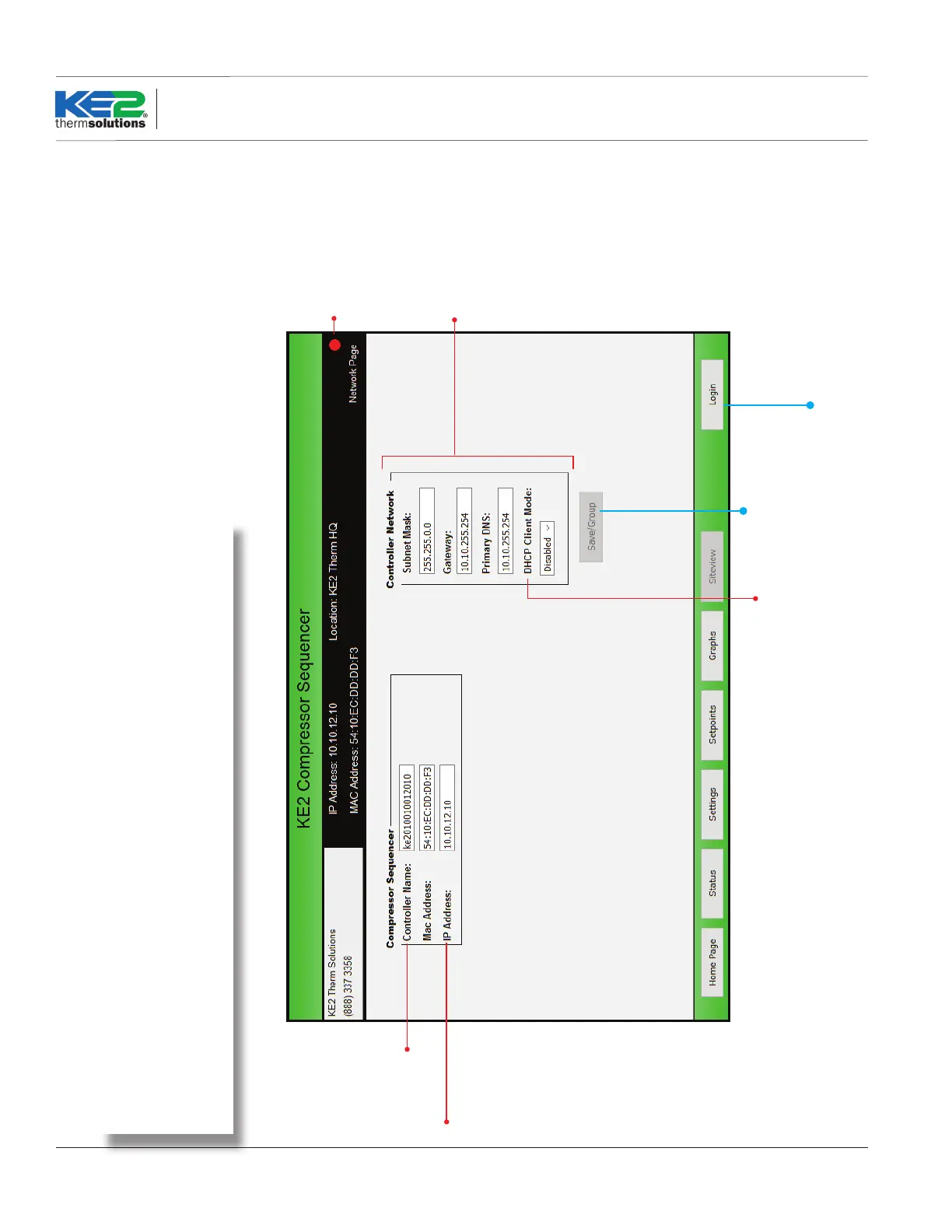
IP Address may be
changed to match
the onsite network.
Typically the subnet
mask, gateway and
primary DNS should
also be changed.
Network settings may be
changed to match customer’s
environment.
DHCP Client Mode is
Enabled or Disabled
Enabled - IP is Dynamic
Disabled - IP is Static
Shows Internet connection status:
Red = Unable to reach Internet
Yellow = Some Internet services
unavailable
Green = Good Inernet connection
NOTE: Do not modify the
Controller Name.
Change “Location” on the
Settings page to easily
identify controllers.
Prevents unauthorized access to the
controller. User must enter User
Name and Password to make
changes to the Network Setup page.
Saves changes to the
controller’s network.
Description:
Allows users to change the controller’s network settings, in order to add controllers to an existing
customer network.
Network Page
Network Page



 To Next Page