© Copyright 2019 KE2 Therm Solutions, Inc., Washington, Missouri 63090
Q.2.60 March 2019
Page 36
KE2 Compressor Sequencer OEM pn 21768
Quick Start Guide
Description:
Allows the user to setup the controller, and to customize the controller to meet specic application needs.
The KE2 Compressor Sequencer OEM begins in System O Mode. The user must congure relays and
refrigeration setpoints to ensure the system will run properly, then turn the system on.
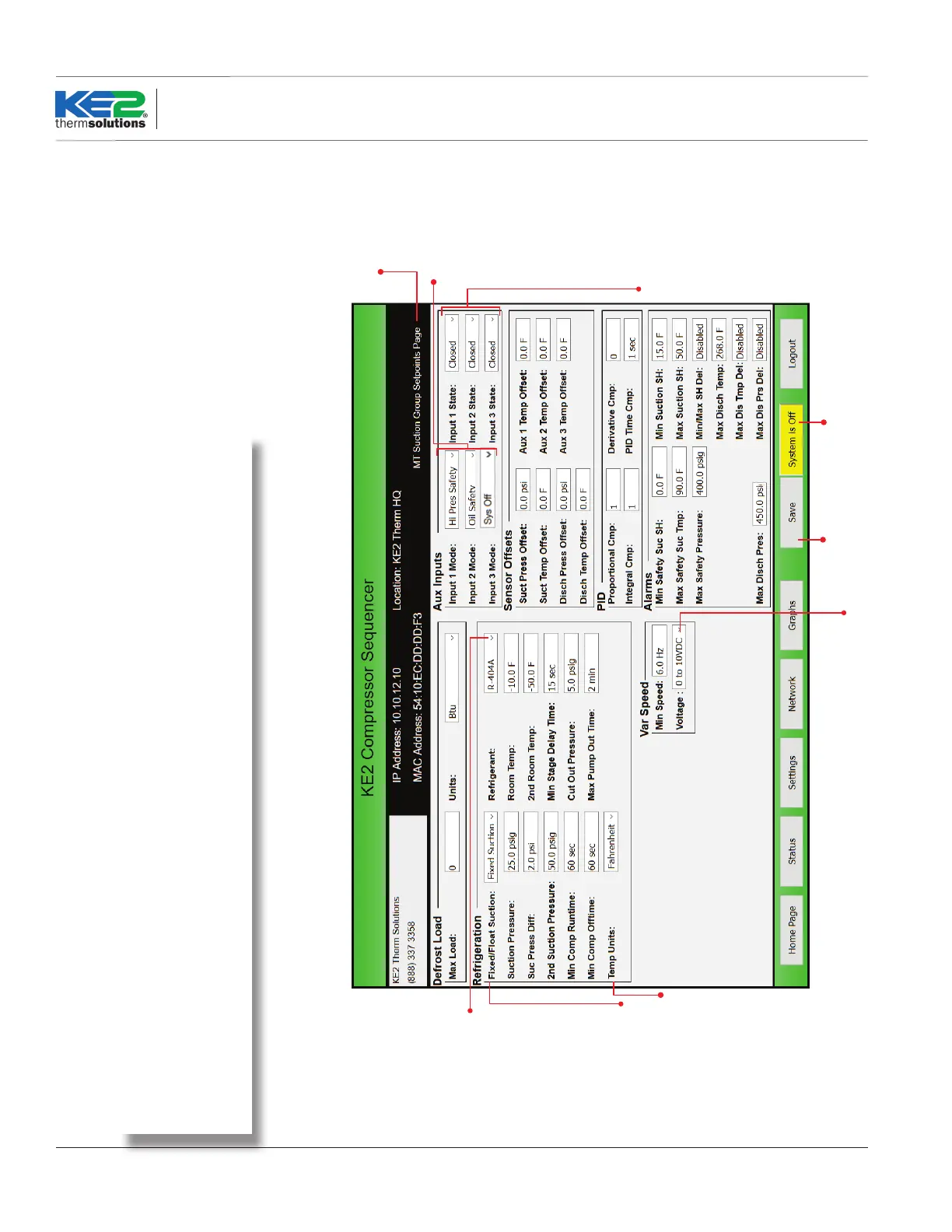
The screenshot below shows the Setpoints page when one or two Aux Boards are used. Note when two suction
groups are used, each suction group will have its own Setpoints page
Setpoints Page -
Main Board + Aux Relay Board(s)
Input 1, 2 or 3 Mode
Disabled
In Cmp Temp
Room Temp
Monitor
HG Defr Req
2nd Pres
2nd Tmp
Comp Module
Hi Pres Safety
Oil Safety
Sys Off
Selectable Inputs
Fahrenheit
Celsius
0 to 10 VDC
0 to 5 VDC
R-404A
R-507
R-407A
R-407C
R-422A
R-422D
R-134a
R-22
R-717
R-438A
R-408A
R-409A
R-407F
R-410A
R-744
R-448A
R-449A
R-450A
R-513A
Indicates whether system is
running or pumped down.
Click to put system into
Shows which Suction
Groups setpoints are
being displayed.
Fixed Suction Pressure
Float Suction Pressure
Determines if the
Input is active when it
detects an Open or
Closed circuit, and a
Digital Input is
assigned as the input
function.
Saves changes to
the Setpoints page.
User must be
logged in to save.
Setpoints Page -
Main Board + Aux Relay Board(s)



 To Next Page