© Copyright 2019 KE2 Therm Solutions, Inc., Washington, Missouri 63090
Q.2.60 March 2019
Page 32
KE2 Compressor Sequencer OEM pn 21768
Quick Start Guide
Basic (Port 25)
KE2 Therm Default Server
Update firmware.
Refer to Q.5.6 KE2
Bootloader Guide.
Standard
SiteView MANAGER
Required to Login to make changes
to Settings page. See page 33.
Remotely reboots
the controller.
Use to verify proper e-mail
configuration. Click Save
button
(bottom right of page)
before testing
Removes all data
stored by controller.
Do not use unless
instructed to by KE2
Therm.
Resets controller’s
alarms and alarm
conditions.
Customer information is
displayed
Use to verify
proper API
configuration
Defines the controller
location for KE2 Smart
Access and alarm
notifications
Customer may input their
company information
Select rack configuration and rename groups
(ex. MT Suction Group, LT Suction Group etc.):
Single Group
Single Group plus 1 Aux
Single Group plus 2 Aux
Dual Group Shared Discharge plus 2 Aux
Dual Group Independent plus 2 Aux
Site and Password may be
changed by customer to create a
unique KE2 Smart Access login
for accessing the controller
remotely through KE2
SmartAccess.
Use to customize the User Name
and Password from the default
setting. The credentials are
necessary to change Setpoints,
Settings and Network options from
the MasterView screens.
Use to receive e-mail/text alerts
Subject for e-mail/text alerts
Description:
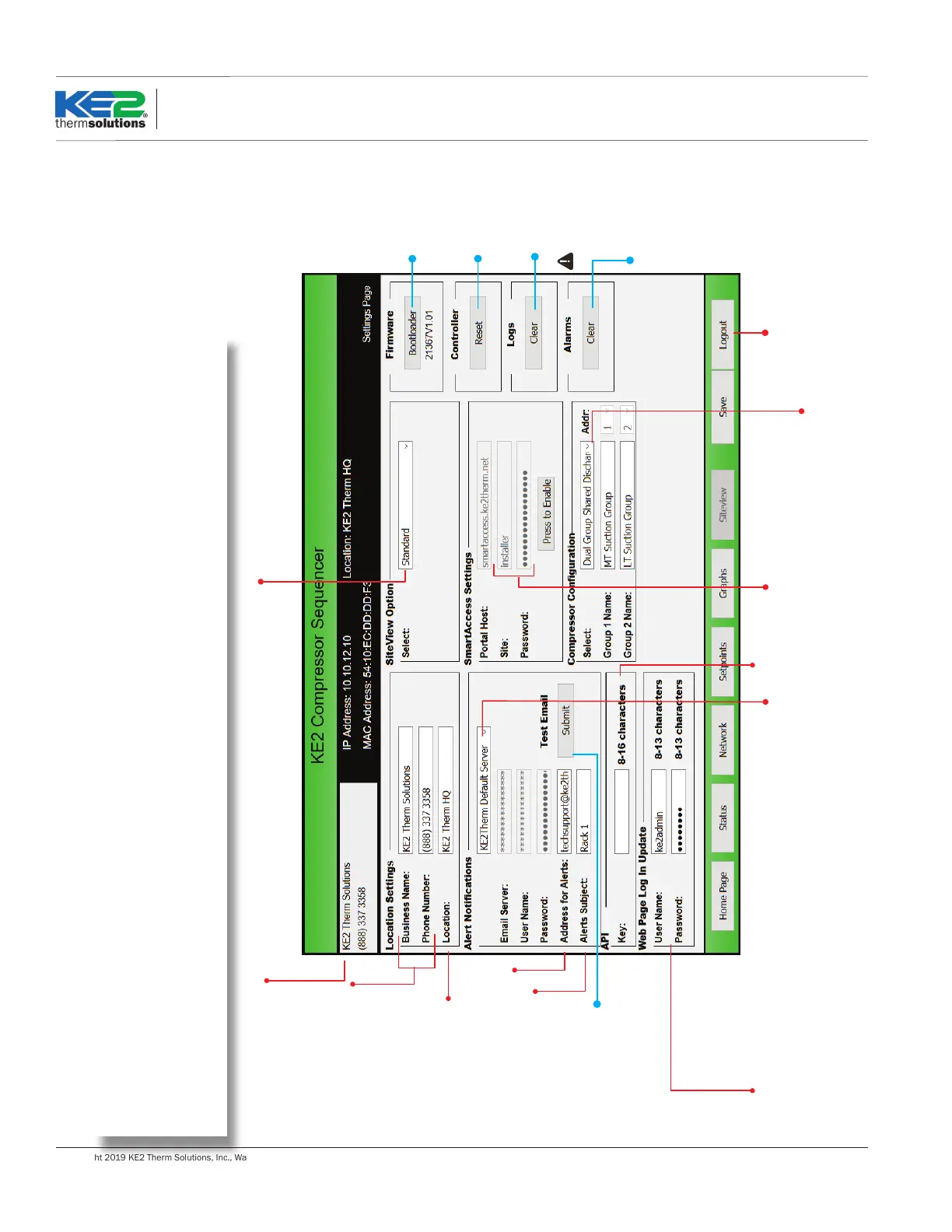
The Settings page is where compressor (rack) conguration is saved. This must be set before the system can run. The Settings page also
contains controller conguration for e-mail and web access.
It also allows installers to customize the MasterView with their company information, shown under Location Settings. The Settings page
includes the buttons to update the controller, reset power to the controller, send a test e-mail, clear data collected, and clear alarms.
Sengs Page
Sengs Page



 To Next Page