© Copyright 2019 KE2 Therm Solutions, Inc., Washington, Missouri 63090
Q.2.60 March 2019
Page 30
KE2 Compressor Sequencer OEM pn 21768
Quick Start Guide
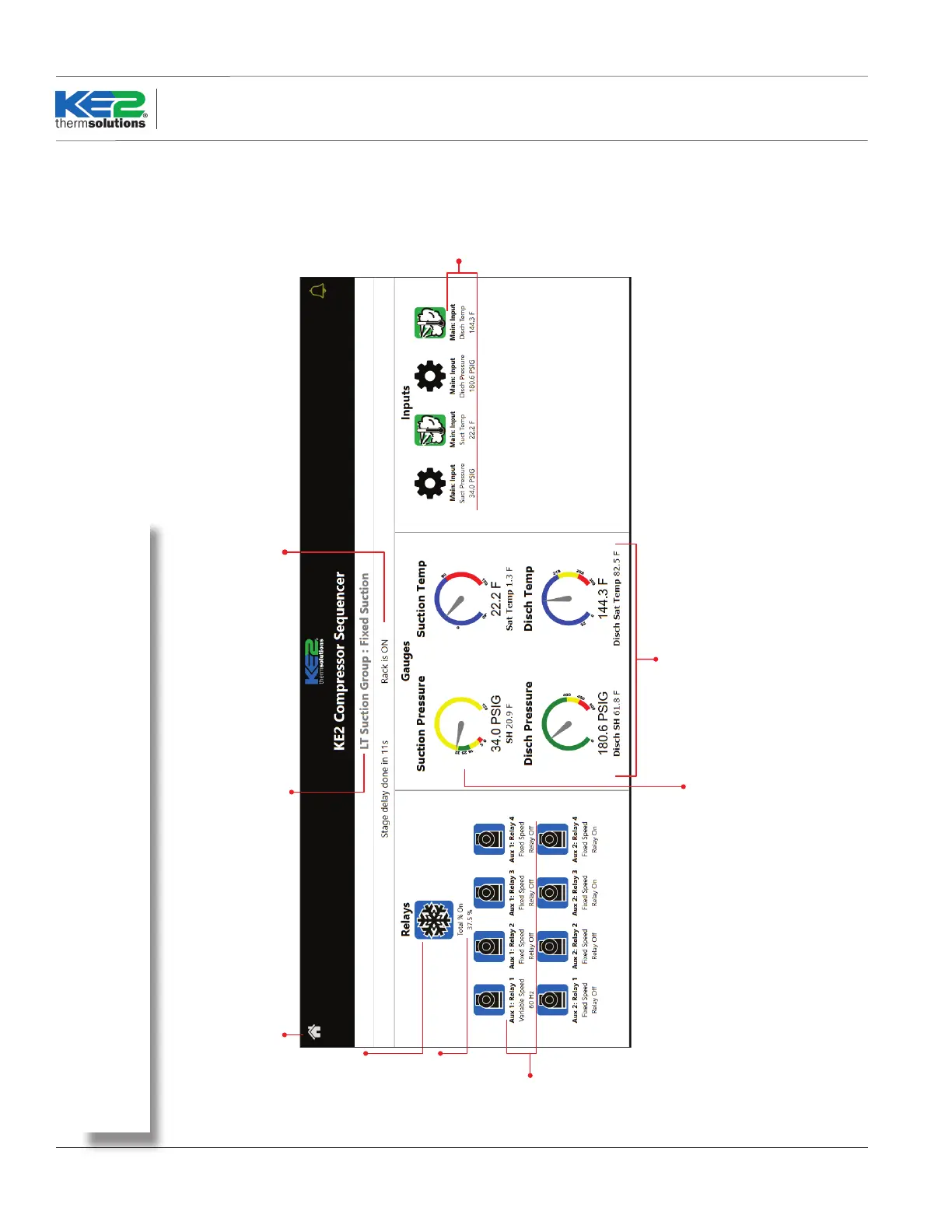
Returns to the Home page.
Status bar: shows current status of group,
and seconds to countdown to the next stage.
Click to go to
Setpoints page
for that
suction group.
Group’s name and control method.
Click on the bar to expand or collapse
the view for that suction group
Status of
each relay
Click on Suction Pressure
dial to zoom in.
Total % of
compressor
capacity used
for the suction
group.
Scroll down to view the next group.
Sensor & Digital
Input values
updated in
realtime.
Sensor & System Information
Gauge color:
Green = Pressure in range
Blue = Temperature in range
Yellow = Out of optimal range
Red = Alarm range
Description:
Real time system performance information for the Main Board and any Auxiliary Relay Boards.
Status Page - Main Board
Status Page - Main Board



 To Next Page