EasyManua.ls Logo

KEENCUT Evolution E2 - User Manual

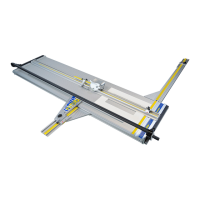
KEENCUT Evolution E2
22 pages
Print Icon
To Next Page IconTo Next Page
Loading...
Evolution E2
Inspired Design – Precision Engineering
USER INSTRUCTIONS
Thank you for choosing the Keencut Evolution E2. Every effort
has been made to bring you a precision engineered product
with the promise of many years of valuable service. In order to
obtain maximum benefit from your machine please read these
instructions carefully. For advice and assistance or replacement
parts please contact your distributor or Keencut.
Keencut Limited, Baird Road, Willowbr
ook Industrial Estate, Corby
, Northants, ENGLAND NN17 5ZA.
Telephone: 01536 263158 Fax: 01536 204227 E-mail: info@keencut.co.uk
www.keencut.co.uk
KC-EDITION 7168-01/12
Question and Answer IconNeed help?

Do you have a question about the KEENCUT Evolution E2 and is the answer not in the manual?

KEENCUT Evolution E2 Specifications

General IconGeneral
BrandKEENCUT
ModelEvolution E2
CategoryCutter
LanguageEnglish

Summary

Before Set Up

Checking the Bench for Installation

Verifying worktop flatness and alignment for cutter installation.

Securing the Cutter Bar

Steps to place and secure the cutter bar onto the installed brackets.

Set Up

Check & Adjust the Cutting Groove Alignment

Adjusting the cutting groove for optimal straightness and alignment.

Adjust Base Straightness

Fine-tuning the cutter base straightness using front and rear grub screws.

Mount Cutter Bar to Bench

Securing the cutter bar to the workbench using wood screws and hexagon screws.

Operation

Insert and Align the Material

Positioning and aligning material correctly for cutting.
Related product manuals