ES749 Flow Computer
59
FLOW INPUT
6.8
FLOW INPUT
(Continued)
The owmeter pipe expands depending on the temperature of the uid.
This affects the calibration of the owmeter.
This submenu allows the user to enter an appropriate correction
factor. This is given by the manufacturer of the owmeter. This factor
converts the changes in the measuring signal per degree variation from
calibration temperature. The calibration temperature is entered into the
ow computer to 70 F / 21 °C.
Some manufacturers use a graph or a formula to show the inuence
of temperature on the calibration of the owmeter. In this case use the
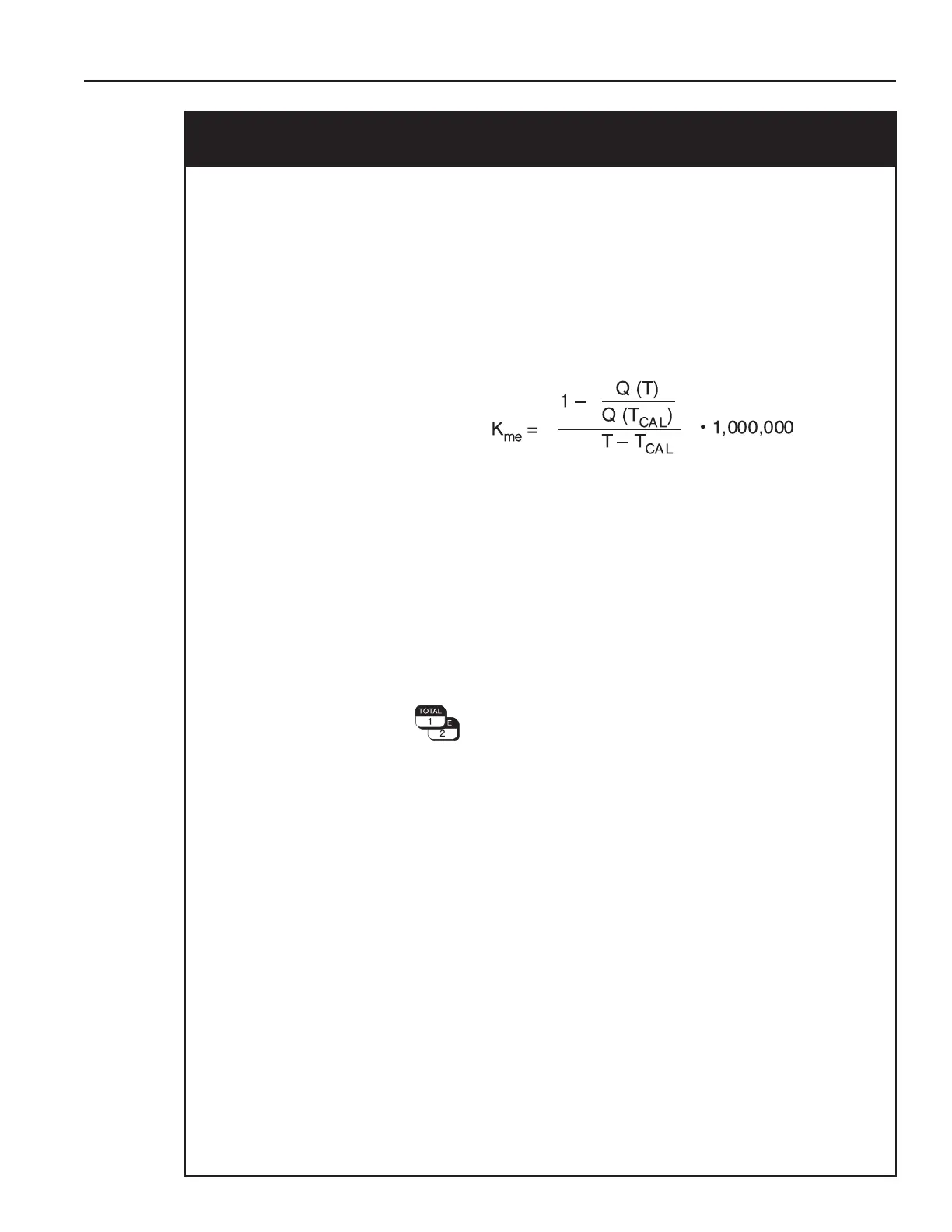
following equation to calculate the meter expansion coefcient:
K
ME
Meter expansion coefcient
Q(T) Volumetric ow at temperature T resp. T
CAL
T Average process temperature
T
CAL
Calibration temperature
Note:
• This correction should be set in either the owmeter or in
the ow computer.
• Entering the value "0.000" disables this function
• Value can be calculated from Fa factor
Input:
Number with oating decimal point:
0.000...999.9 (e-6/°X)
Display: 27.111 (E-6/oF)
METER EXP. COEF.
METER EXP. COEF.



 To Next Page