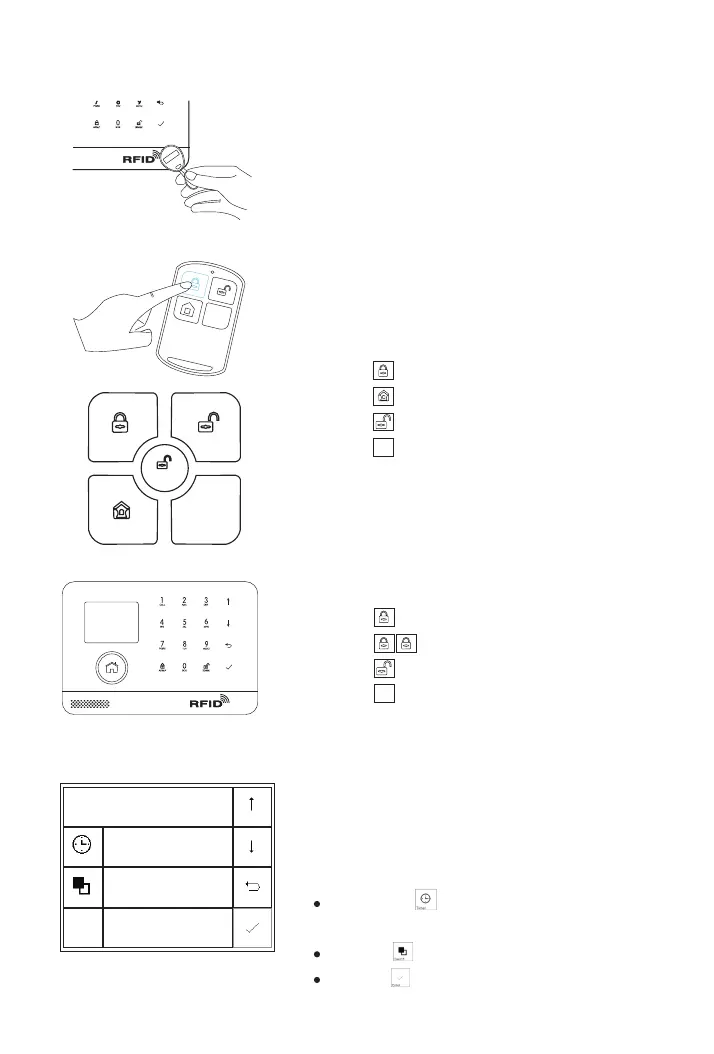
RFID tag
Tap the tag on the panel to:
Disarm in case of arm mode.
Arm in case of disarm mode.
SOS
Disarmed
SOS
Remote Control or App
Press to away arm .
Press to home arm.
Press to disarm.
Press to trigger an emergency alarm.Press to trigger an emergency alarm.
SOS
Panel
Press to away arm.
Press to home arm.
Press to disarm.
Press to trigger an emergency alarm.Press to trigger an emergency alarm.
Arm Timer
Timer
Switch
Function
Backspace
Cancel
Enter
08:00
on
Schedule
You can set a arm schedule and a
disarm schedule to arm or disarm the
system automatically at a daily time.
Go to Menu>Timer>Arm Timer/
/Disarm Timer and enter
Scroll to , Enter the Daily Arm/
Disarm time (in 24-hr)
Scroll to , select ‘on’ to enable the schedule
Press to save your schedule.
22
S
OS



 To Next Page