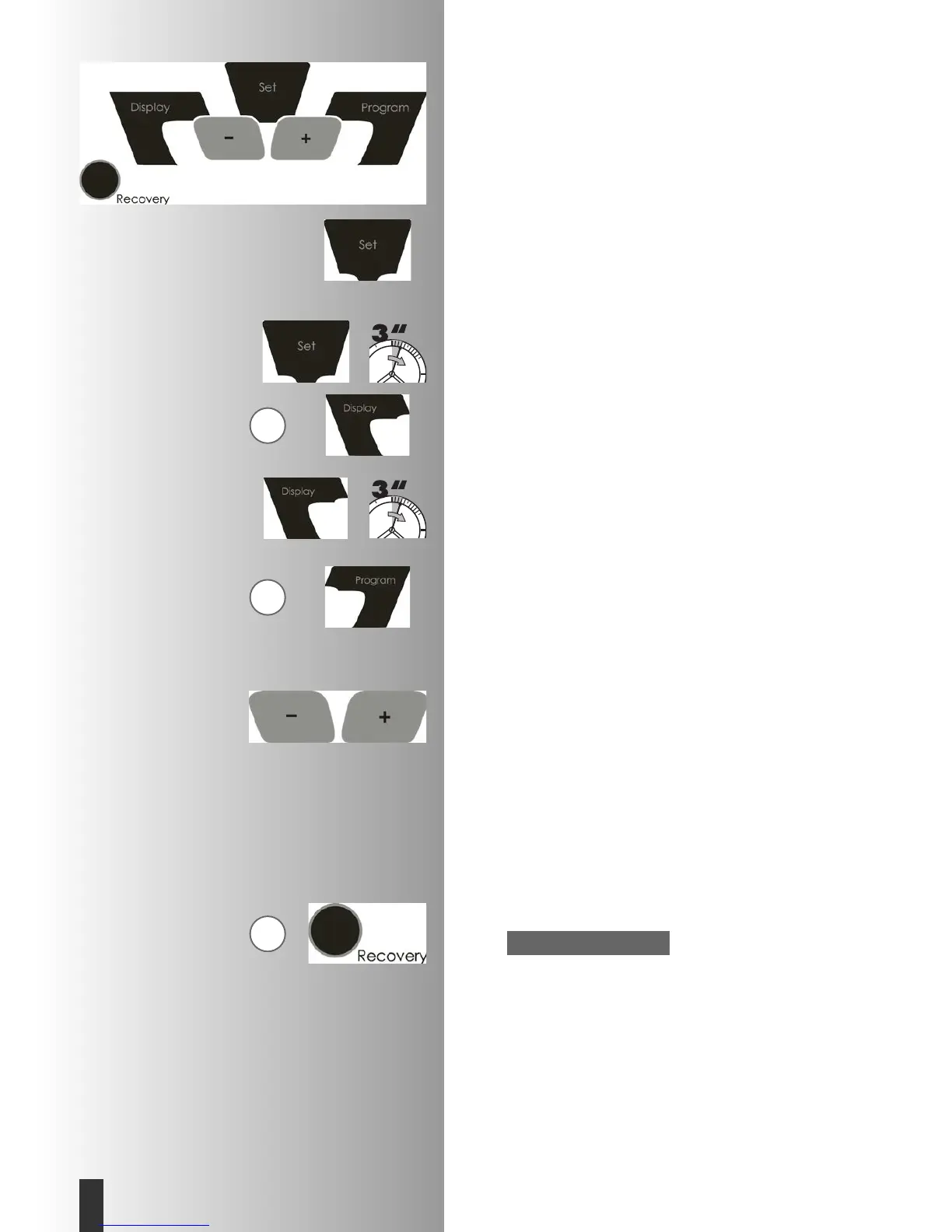
Brief instructions
Function zone
The six buttons are explained briefly below.
Their purpose is described more exactly in the various sec-
tions of these instructions.
SET (press briefly)
This button is for displaying the input data. The set data are
confirmed for use.
SET (press longer)
This cancels the display (reset).
Exception: when all segments are displayed, display ”indi-
vidual settings“ with display: Reset +/-
Display (press briefly)
This button switches the current middle display to the next
display zone or switches the automatic display change off.
Display (press longer)
Automatic display change.
Display:
SCAN
Program
This button is used for selecting the various programs:
Press again > next program
Press longer > program run-through
Minus – / plus + buttons
These buttons are used for changing the figures in the
various menus before beginning exercise, and for changing
the resistance during exercise.
• continue “Plus“
• back “Minus“
• longer press > fast change
• “Plus“ and “Minus“ pressed together:
• resistance goes to stage 1
• programs go to starting point
• figure input goes to off
RECOVERY
This button is used for starting the recovery-pulse function.
Other functions of the buttons are explained at different
points in the instructions.
Pulse measurement
The pulse is measured by means of the chest strap provi-
ded. See appropriate instructions.
Note:
Training and Operating Instructions
22
GB
G
G
G







 To Next Page