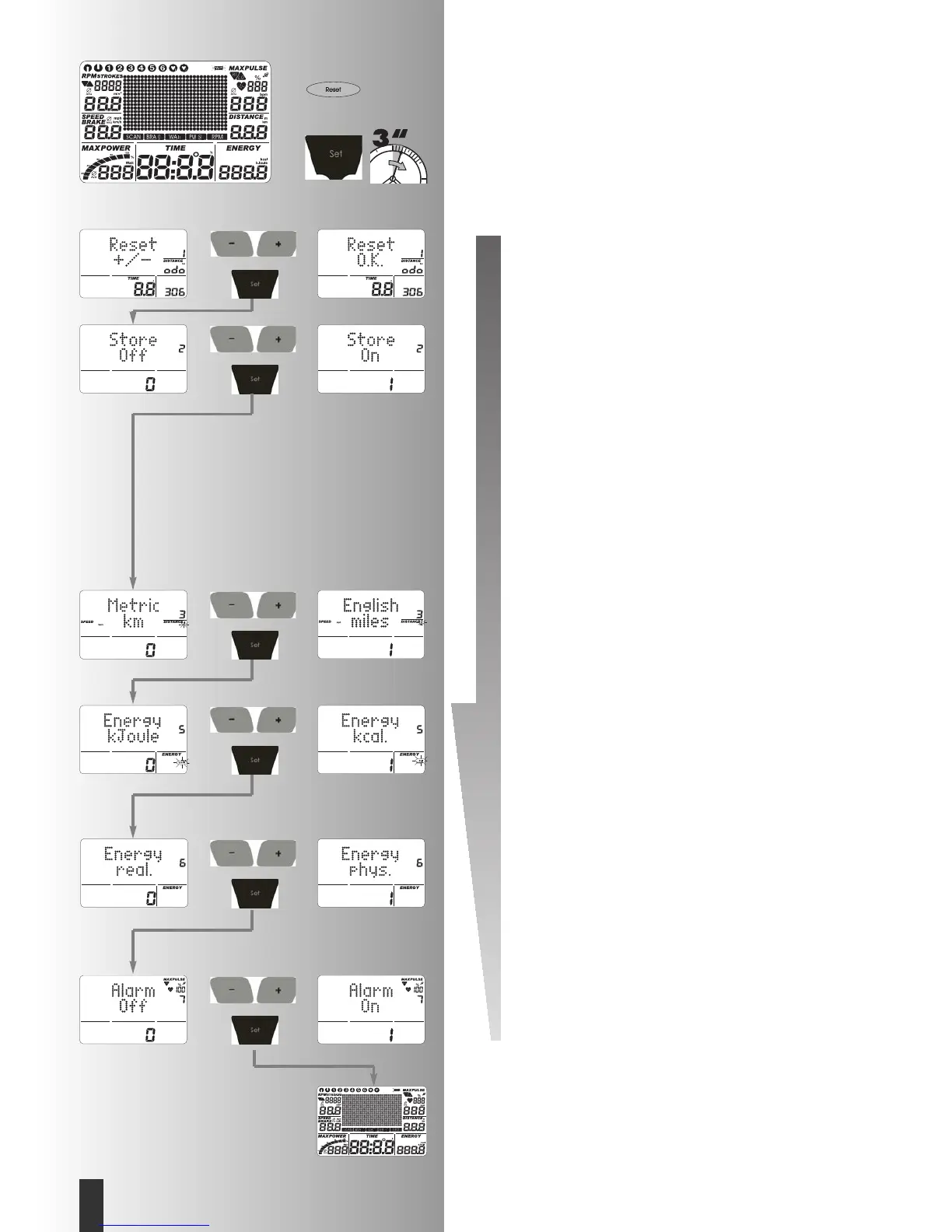
Individual settings
Proceed according to the diagram opposite: Press “Reset“
Display:
all segments
Now press “SET“ and keep pressed: Menu: Individual
Settings
Display:
Reset +/–, Total km and exercising time.
1. Delete Total km and exercising time
Press “Plus“ + “Minus“ together.
Function: Cancel display: “Reset O.K.“
Press “Set“: display goes to next setting
Display:
Store
Or:
Delete total km and exercising time and press “SET“
only.
Display:
Store
2. Storing settings
Press “Plus“ or “Minus“
Settings for Time, Energy, Distance, Age, Target Pulse
are stored permanently.
Function:
ON = Storage after “Reset“ also
Off = Storage up to next “Reset“
Press “Set“:
Goes to next setting.
Display:
Metric or English
3. Display of unit in kilometres / miles
Press “Plus“ or “Minus“
Function: Select display in kilometres or miles
Press “Set“. Selected unit is accepted and display goes
to next setting.
Display:
Energy.
4. Display of energy consumption in kJoules / kCa-
lories
Press “Plus“ or “Minus“
Function: Selection of display for energy consumption.
Press “Set“: Selected unit is accepted and display goes
to next setting.
Display:
Energy
5. Display of mechanical / human energy expended
Press “Plus“ or “Minus“
Function: Selection of display of energy expended.
real.: The energy expended by the person exercising with
16.7% efficiency.
phys.: The energy converted by the apparatus, calculated
purely physically.
Press “Set“: Selected unit is accepted and display goes
to next setting.
Display:
Alarm
7. Alarm signal when maximum exceeded
Press “Plus“ or “Minus“
Function: acoustic alarm ON/OFF.
Press “Set“: Selected setting is accepted and “restart“
of display.
Training and Operating Instructions
32
GB







 To Next Page