36 TOS7200
Panel Memory
This tester allows a maximum of 10 types of panel settings to be stored in internal memory
and recalled if necessary.
Storing in panel memory
1
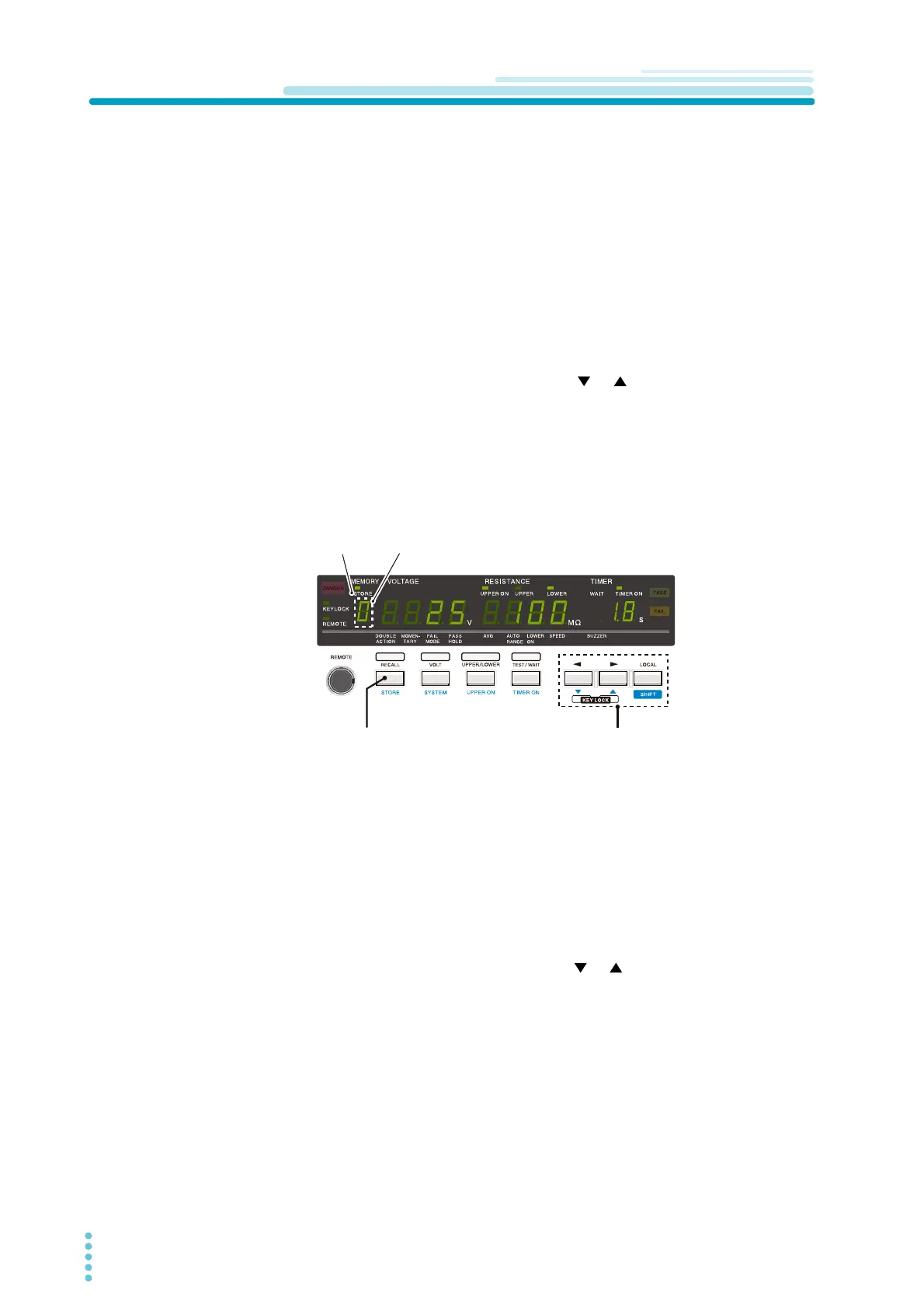
With the SHIFT key held down, press the STORE key to enter the store
mode.
The STORE LED lights up and the memory number’s 7-segment LED blinks.
2
With the SHIFT key held down, press the or key to select the memory
number at which the panel settings are to be stored.
3
With the SHIFT key held down, press the STOP switch.
The STORE LED goes off and the tester exits store mode.
If only the STOP switch is pressed, the STORE LED goes off and the tester exits
store mode, but panel settings are not stored.
Recalling a panel memory
1
Press the RECALL key to move the cursor to the memory number’s 7-
segment LED.
The memory number LED blinks, indicating that the cursor is positioned at that
LED.
2
With the SHIFT key held down, press the or key to select a memory
number.
The panel settings stored in that memory location will then appear.
MEMORY
VOLTAGE
RESISTANCE
TIMER
MEMORY VOLTAGE RESISTANCE TIMER
STORE LED
Memory number
STORE key For selection of
a memory number



 To Next Page