
 Need help?
Do you have a question about the Kinetico KPRO COMPACT and is the answer not in the manual?
Welcome and overview of the equipment for commercial use.
Important safety instructions and precautions to be read carefully.
Explanation of how the water treatment process flows through the system.
Describes the electronic controller and its management of system functions.
Importance of regular maintenance for water quality.
Addresses external leaks, suggesting professional service.
Troubleshooting for no water output, checking supply and sensors.
Solutions for reduced water output, checking inlet and filters.
Potential causes and solutions for overproduction issues.
Identifies causes for taste/smell issues and suggests checks.
Explains white water is often air bubbles and self-resolving.
Possible causes for continuous drain noises.
Steps to troubleshoot when the equipment fails to power on.
Addresses intermittent operation issues.
Diagnoses issues with the drain valve or check valve.
Details the primary functions and capabilities of the water treatment system.
Specifies optimal environmental and water quality parameters for operation.
Lists essential conditions for the equipment to function correctly.
Provides instructions and guidelines for installing the equipment.
Outlines procedures for initial setup and ongoing maintenance.
Instructions for safely unpacking the equipment and accessories.
General guidance on the installation process for osmosis equipment.
Step-by-step guide for installing the CF and RO filters.
Procedures for starting the system after installation.
Explains the necessity of rinsing filters to remove dust.
Steps to ensure system integrity and proper operation sequence.
Guidance on rinsing the system and checking water quality.
Details recommended maintenance schedules for components.
Key specifications including pressure, TDS, temperature, and hardness.
Explains the water flow and process within the equipment.
Describes the display and indicators for system status.
Explains the meaning of different LED colors for water quality.
Describes the LED indicator for active water dispensing.
Details various operational functions like flushing and start-up.
Provides a guide to identifying and resolving system errors or issues.
Explains how filter life is indicated and managed.
Overview of system status indicators for protection and warnings.
Describes indicators on the device ring and droplet symbol.
A table mapping program numbers to pretreatment and filter lifetimes.
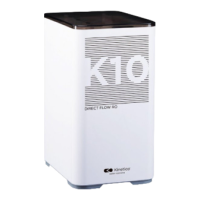
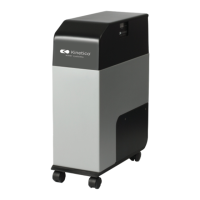
This document outlines the operation, maintenance, and troubleshooting for the Kinetico RO KPRO Compact direct flow reverse osmosis system, designed for commercial HORECA use.
The Kinetico RO KPRO Compact is a water treatment system that utilizes reverse osmosis to reduce concentrations of salts and other dissolved substances in water. It's specifically engineered for commercial applications, ensuring high-quality water for various uses. The system processes mains water through a multi-stage filtration process. Initially, water passes through a sediment and carbon filter, which retains suspended particles, chlorine, its derivatives, and other organic substances. A solenoid valve controls the flow of water into the equipment.
Following the initial filtration, the water is directed to reverse osmosis membranes. The system incorporates a pump to increase water pressure, which is essential for the reverse osmosis process to occur effectively. The treated water, now purified, is then available for consumption. Any reject water, containing excess salts and dissolved substances, is directed to the drain for disposal.
The equipment features an electronic controller that efficiently manages its functionality, status indications, and various security systems. This controller provides information about the system's operational states and helps ensure optimal performance. The device is designed for direct flow, meaning it produces purified water on demand without the need for a storage tank.
The Kinetico RO KPRO Compact is designed for ease of use and integrates several features to ensure safe and efficient operation. When the device is stopped, it ceases operation via a maximum pressure switch. A minimum pressure switch acts as a safety system, protecting the pump from inlet pressure loss by stopping it and preventing dry operation.
For periods of absence longer than a week, users are advised to close the water inlet tap, drain the equipment, and disconnect it from the power supply. Upon return, the power supply should be reconnected, the inlet valve and tap opened, and water allowed to run for at least 5 minutes before use.
The system includes a user interface with indicators for various statuses. A "water quality light" indicates the quality of dispensed water, using different colors (blue for right TDS, purple for medium TDS, red for high TDS). This light also flashes to indicate flushing in progress or maintenance requirements. Filter life indicators for both the CF pre-filter and RO membrane are present, changing color (blue, lilac, red) to signal normal life, upcoming maintenance, or expiration. An "OFF" button allows the user to stop the device, putting it into standby.
The device also features an external interface that can be wall-mounted and offers 12 different settings, allowing for customization based on specific water conditions and usage requirements. This external device replicates the status of the filters and water quality indicator LED, providing convenient monitoring.
The system performs several automatic flushing cycles to maintain membrane efficiency and water quality:
Regular maintenance is crucial for guaranteeing the quality of the water supplied by the Kinetico RO KPRO Compact. This maintenance should be carried out by qualified technical personnel. The manual provides a recommended maintenance frequency for consumable items.
Key maintenance aspects include:
 General
| Type | Reverse Osmosis |
|---|---|
| System Type | Under Sink |
| Stages | 4 |
| Daily Production | 50 gallons |
| Storage Tank Capacity | 2.5 gallons |
| Dimensions | 14.5" W |
| Weight | 9 lbs |
| Warranty | 1 year |




 To Next Page