Using this procedure the installer can delete all the previously programmed radio remote controls from the memory.
The programming procedure terminates automatically in any case 10 seconds after the last transmission.
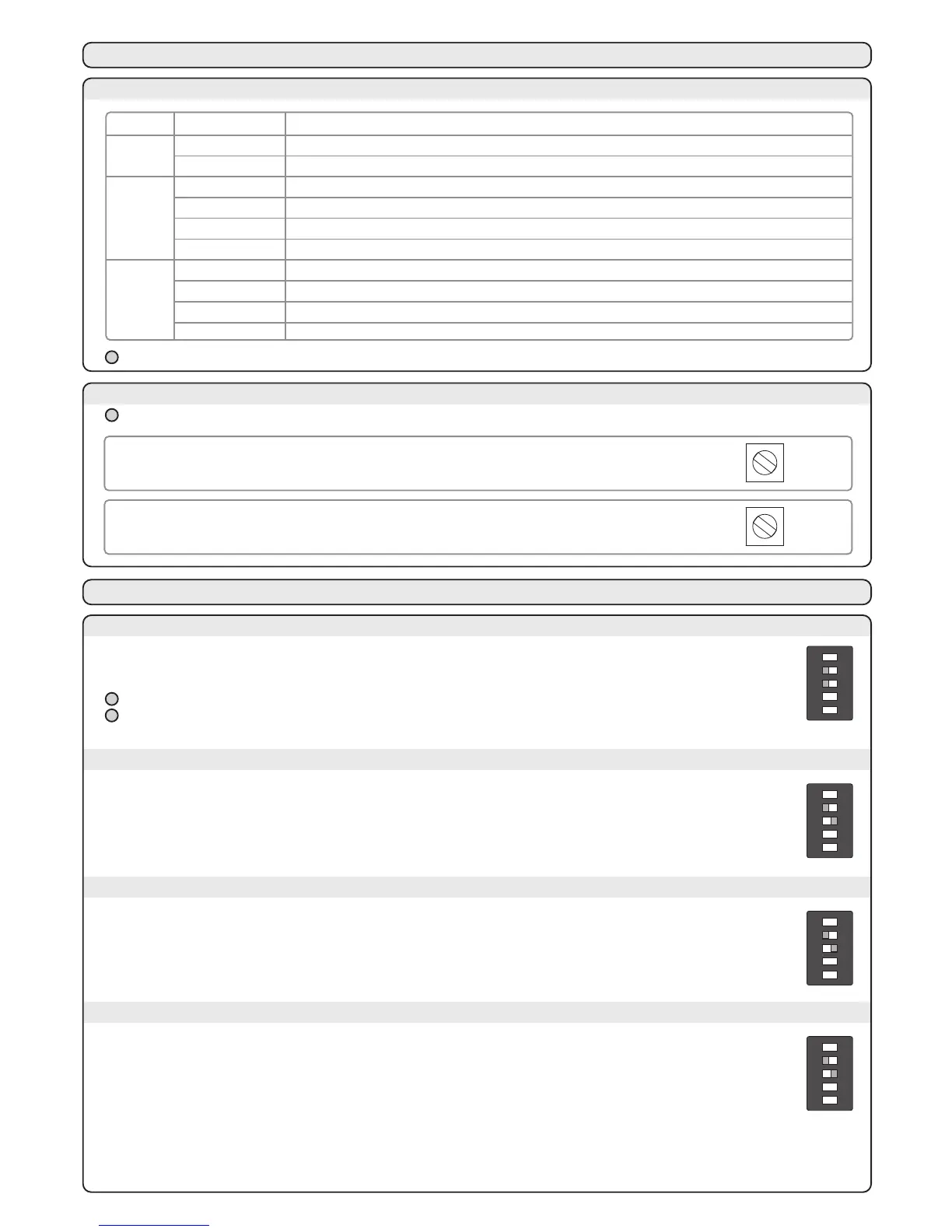
6C - PEDESTRIAN OPENING START CHANNEL PROGRAMMING PROCEDURE
ON
1 2 3 4 5
ON
led RAD
RAD
2 s
led RAD
led RAD
led RAD
RAD
1 s
6D - DELETING ALL THE CODES
Hold down button
RAD for
3 seconds.
The red led RAD begins to flash rapidly
Press button RAD
again within 6 seconds to
confirm the deletion
The red LED blinks fast,
then it turns off
led RAD
RAD
3 s
led RAD
RAD
1 s
Power/Speed (“FORZA” trimmer):
Regulation from 50% to 100% of the power to the motors.
This parameter will also weigh on the manoeuvre speed.
7B - TRIMMER
Hold down the START button located on the electronic board, the control unit opens the door until the end of
opening stroke is reached or the button is released.Hold down the RAD button located on the electronic board,
the control unit closes the door until the end of closing stroke is reached or the button is released.
In this mode, if a command is given via radio or through the “START” input, the control unit:
- when the automation is closed: it executes a total opening
- during an opening operation: the movement of opening continues
- when the automation is open: it remains opened and it reduces to zero the time of pause
- during a closing operation: it reopens totally
The closing happens after the time of pause (default 90 s, customizable following the procedure in paragraph 10).
In “dead man” mode the run set and the radio programming are disabled
A variation on the setting of “FORZA” trimmer (power/speed) requires the repetition of the learning procedure
7 - CONTROL UNIT SETTING
7A - DIP-SWITCHES SETTINGS
DIP
1
2 - 3
4 - 5
Operation safeties for pedestrian access
Not active safeties in opening
Dead man’s switch mode
Automatic closing mode
Step by step mode (open \ stop \ close \ stop)
Step by step mode with automatic closing mode
No proggraming radio
Courtesy light radio channel programming procedure
START radio channel programming procedure
Pedestrian opening radio channel programming procedure
DIP STATUS FUNCTIONING
OFF
ON
OFF - OFF
OFF - ON
ON - OFF
ON - ON
OFF - OFF
OFF - ON
ON - OFF
ON - ON
In dead man mode the run set and the radio programming are disabled
The dead-man mode can be used only during the programmation
8 - OPERATION MODES
8A - DIP 2 OFF \ DIP 3 OFF - DEAD MAN'S SWITCH MODE
8B - DIP 2 OFF \ DIP 3 ON - TIME AUTOMATIC CLOSING MODE
FORZA
Obstacle sensitivity (“OBS” trimmer):
Regulation of intervention time from 0.1 to 3 seconds.The lower the trimmer is regulated, earlier
the central will stop the automation in case of impact of the wing against an obstacle.
OBS
ON
1 2 3 4 5
ON
1 2 3 4 5
In this mode, if a command is given via radio or through the “START” input, the control unit:
- when the automation is closed: it executes the total opening
- during an opening: it executes the stop
- when the automation is open: it executes the closing
- during a closing operation: it executes the stop
The automatic closing is disabled.
8C - DIP 2 ON \ DIP 3 OFF - STEP BY STEP MODE
ON
1 2 3 4 5
In this mode, if a command is given via radio or through the “START” input, the control unit:
- when the automation is closed: it executes the total opening
- during an opening: it executes the stop
- when the automation is open: it executes the closing
- during a closing operation: it executes the stop
The closing happens after the time of pause (default 90 s, customizable following the procedure in paragraph 10).
8D - DIP 2 ON \ DIP 3 ON - STEP BY STEP MODE WITH AUTOMATIC CLOSING
ON
1 2 3 4 5
The red led RAD comes on
Power on the control
unit and set Dip 4 to ON
and Dip 5 to ON
All the leds are in
standbymode
Press button
RAD
for 2 secondi
Make a transmission
pressing the desired
button on the transmitter
The red led RAD flashes
Press button RAD
again to exit
the procedure
The red led RAD goes off
Memorize all the
transmitters making a
transmission with the
desired button
“MEMO PROG” (For the symbols, see paragraph 18)
“MEMO PROG” (For the symbols, see paragraph 18)



 To Next Page