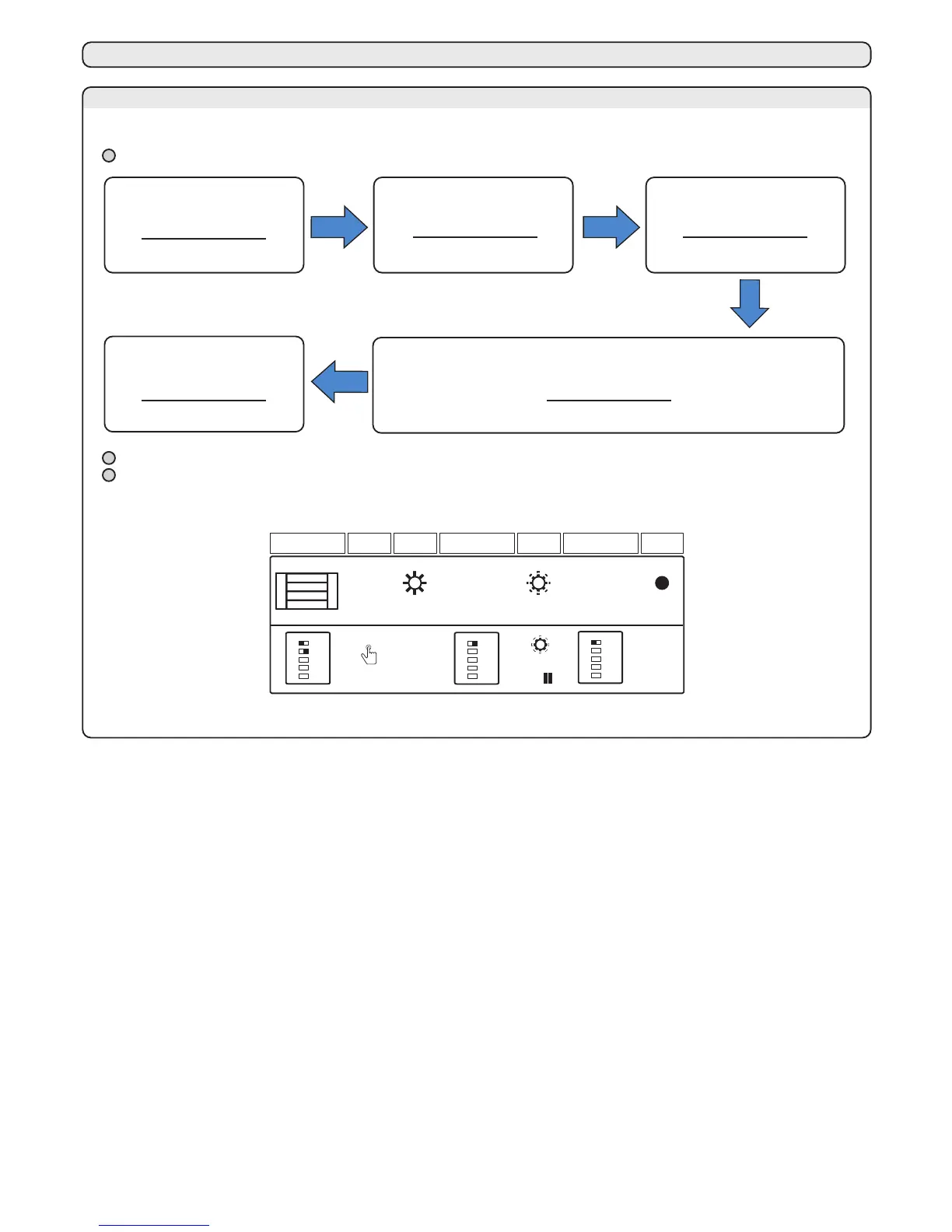
10 - PAUSE PROGRAMMATION
By following this procedure, the operator can set the pause time that occurs before the automatic closing
10A - PAUSE TIME PROCEDURE
1. Place the door in
closing position and
set DIP 1 to OFF
4. The yellow LED starts blinking.
Each flashing means 10s of pause
Both DIP 2 and DIP 3 must be set in ON. Alternatively, DIP 2 must be set in ON and DIP 3 in OFF (see paragraph 7A).
If the procedure is interrupted, the controller quits the programming mode and none modification is set.
The maximum pause is 120s. The yellow LED will blink 12 times, then will blink one more time (13th blink) and will
wait for 10s until the operator quit the programming mode (DIP selection).
led SET led SET
led SET
1 2 3 4 5
OFF
ON
SET
1 s
1 2 3 4 5
ON
1 2 3 4 5
OFF
10s
=
1
All the leds are in
standby mode
1. Set DIP 1
to OFF within
10 seconds
The yellow led turns off
2. Push the SET
button for
1 second
The yellow led switches on
3. Set
DIP 1
to ON
Yellow LED lights up
The yellow LED blinks with a 2s pulse
The pedestrian function is a partial opening, useful for sliding garage’s door. In order to set this function,
it needs to program a transmitter’s button (see paragraph 6)
11 - PARTIAL OPENING LEARNING PROCEDURE
11A - LEARNING PROCEDURE FOR THE PEDESTRIAN OPENING
The installer can set the pedestrian opening through this procedure.
11B - LEARNING PROCEDURE FOR THE PEDESTRIAN OPENING
A variation of the “FORZA” trimmer requires the repetition of the learning procedure since the operation
times, and thus the moments in which to start the slow-down, vary.
Use the “FORZA” trimmer to adjust the voltage with which the motor is powered during operation, thus adjusting its speed. This is
settable between 50% and 100% of the maximum force and can be increased by turning the trimmer clockwise. Thus if the
trimmer is set on the minimum then the speed is equal to about 50%, if adjusted in an intermediate position it is equal to 75%,
while at the maximum the speed will be the largest obtainable.
12 - TRIMMER
12A - TRIMMER FORZA
The “OBS” trimmer is used to adjust both the intervention delay after detection of an obstruction and the opposing force to be
used by the automation. This function is useful to overcome any critical points of the automation where, for a brief time interval,
there is greater power absorption by the motor.
12B - TRIMMER OBS
led SET
SET
2 s
START
1 s
led SET
led SET
START
1 s
START
1 s
The pedestrian function can be enabled only by a transmitter’s button (see paragraph 6c).
1. Place the door
in closing
position
All the leds are in
standby mode
2. Push the SET
button for
2 seconds
The yellow led switches on
3. Push the
START
button
Yellow LED lights up
6. Press the START
button to set the widening of
the pedestrian opening
Yellow LED lights up
7. The doors
stops
and recloses
Yellow LED lights up
5. The gate
begins
to open
Yellow LED lights up
4. Within 5 seconds
press a START
button again
Yellow LED lights up
8. END of the
learning
procedure.
The yellow led turns off
“MEMO PROG” (For the symbols, see paragraph 18)
“MEMO PROG” (For the symbols, see paragraph 18)



 To Next Page