11
EN
05. Once you have connected up all the cables, secure them using
cable clips.
06. To close the cover, push it back into place, making sure you hear
a “click”. Reinsert and tighten the screw to nish.
1 2
Step
SET
RADIO
START
FORCE
OBST.
PAUSE
F 1AL
MODEL : ELEVO
620
VERSION :
ERR
Auto
Check
Func
Light
disable
ON
3 4 5 6 7 8 9 10 11 12
14
13
KINGgates srl
Via A. Malignani, 42
33077 Sacile PN Italy
Flash
Phototest
S2 Photo
0 V
STOP
START
S1 Edge
Lock
Aerial
24 V
24 V
28
3.5 - Connecting ELEVO to the mains
CAUTION!
- Never cut or remove the cable supplied with ELEVO.
-
If not already available, a power socket for connecting ELEVO to
the mains must be made by qualied and experienced personnel in
strict observance of current legislation, standards and regulations.
ELEVO must be connected to the supply mains by a qualied
electrician.
To test ELEVO, just insert the plug into a power outlet, using an ex-
tension cord if necessary (g. 29).
29
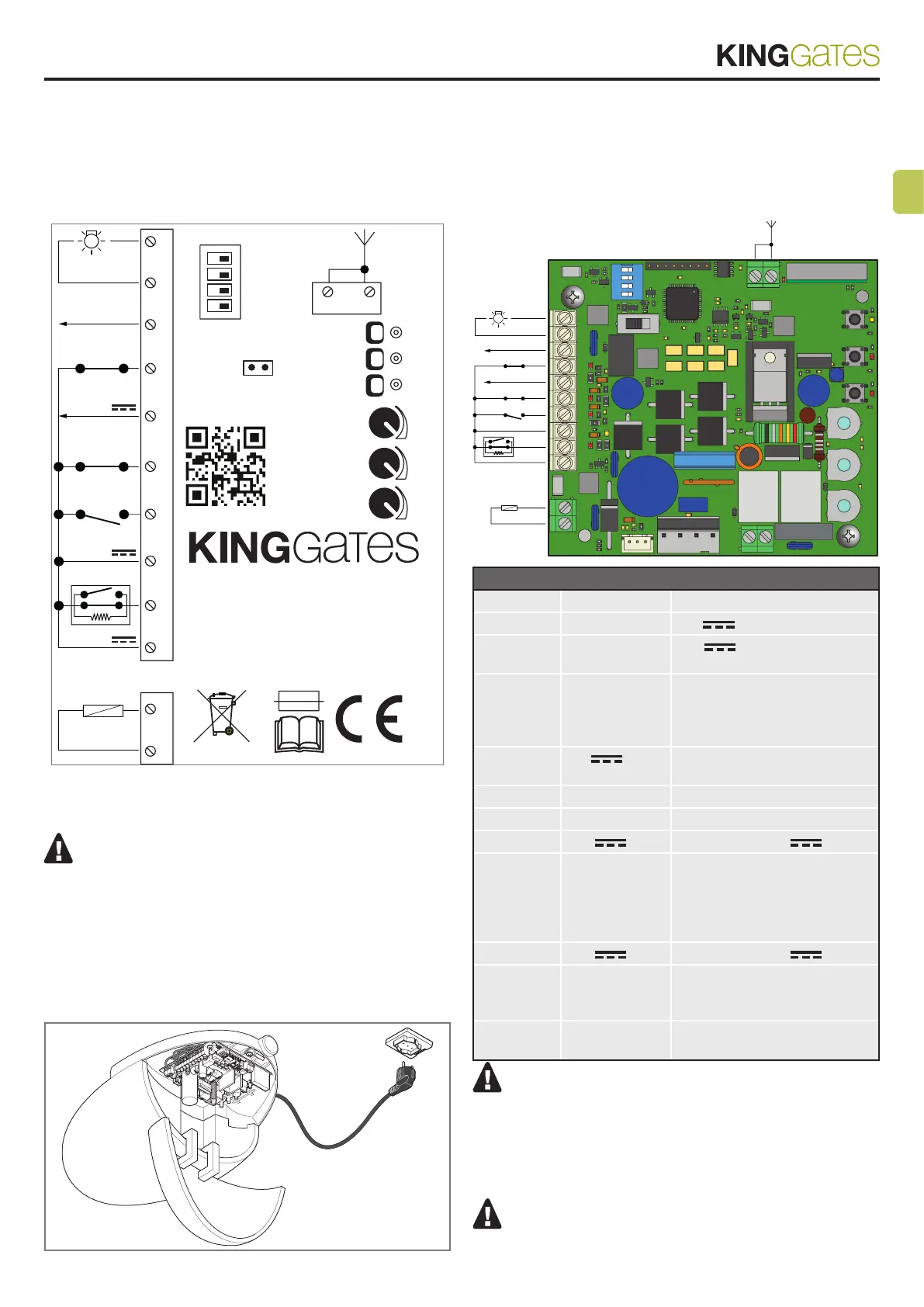
3.6 - Description of the electrical
connections
The following is a brief description of the electrical connections (table 5);
for further information, please read section 10 (“Devices connectable to
the control unit”).
1
12345678910
11 12
234
ON DIP
1314
Flash
rial
Phototest
S2 Photo
0 VDC
STOP
START
24 VDC
S1 Edge
24 VDC
Lock
Table 5
Terminals Function Description
1 - 2 Flash
24V max. 15W warning light
3 Phototest 24V output for safety
devices testing
4 S2 Photo Input for safety devices,
normally closed contact.
Function associated to dip
switch Func
5 0 V
Negative terminal for
accessories devices connected
6 Stop Stop, normally closed contact
7 Start Start, normally open contact
8 24V
Power supply 24V
9 S1 Edge Input for safety edges, normally
closed contact. Brief movement
inversion in case of obstacle
during closing and block of the
movement during opening.
10 24V
Power supply 24V
11 - 12 Lock / AUX Default: electric lock 12V
max.15W (for courtesy light
enable, see par. 13.
13 - 14 Aerial Antenna ground (13)
Antenna signal (14)
TIMER FUNCTION: if START contact is kept closed (for
instance through a timer-controlled or bistable relay), control
unit opens the door and leaves the door opened. The automa-
tion does not accept closing commands (neither automatic
nor wired) until START contact is reopened.
In this mode, dip switch 1 STEP is set to OFF and dip 2 AUTO
to ON to ensure that the gate never remains locked open.
If START contact is kept closed during the control unit
starting after a blackout, the door will immediately execute
the start command.
30



 To Next Page