15
EN
6. Programming the
door path
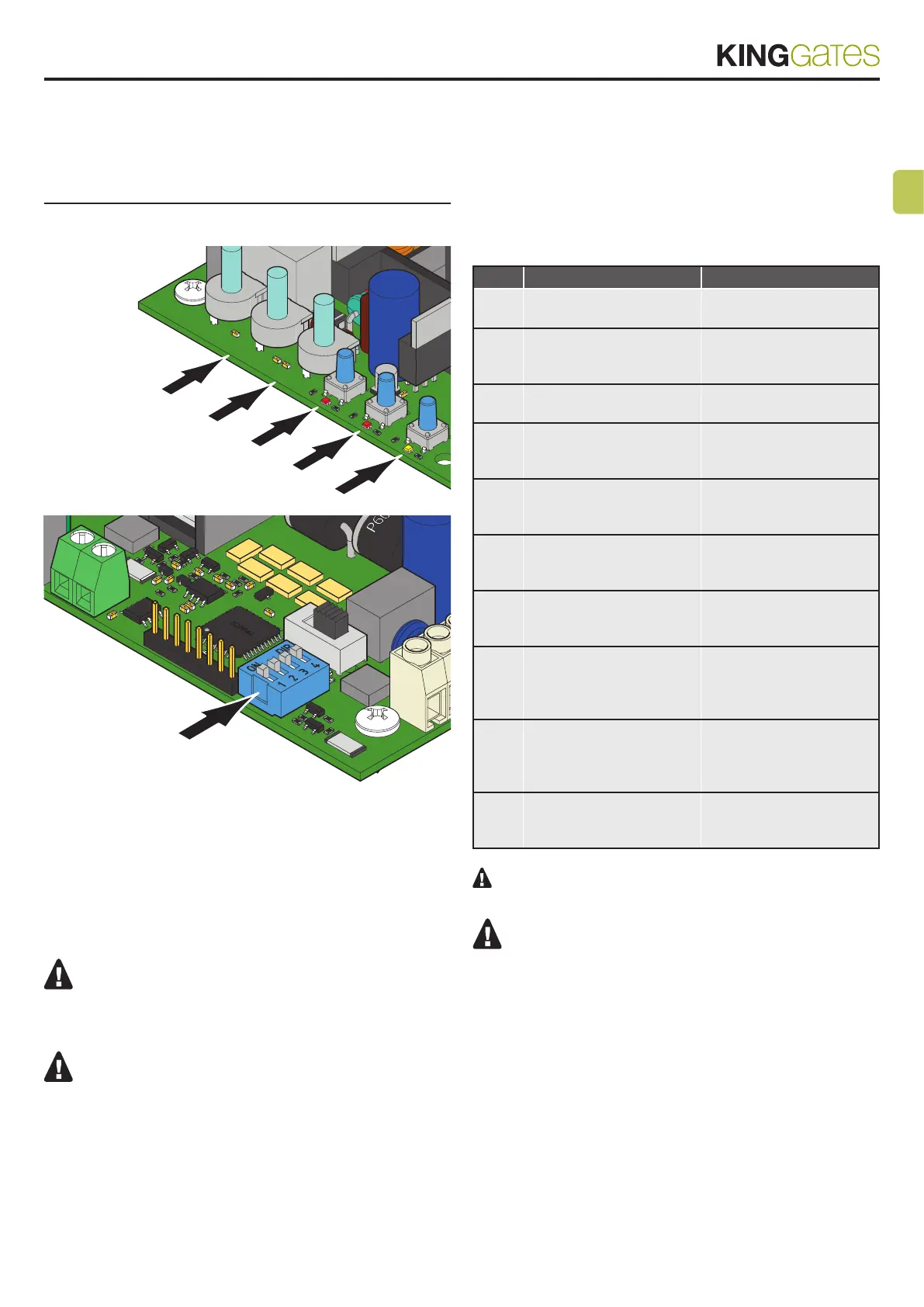
START
FORCE
ACLE
RADIO
DIP 1 & 2
To start up the system, one of the following programming procedures
must be carried out:
- basic programming of the automation’s movement: self-learning of
the manoeuvre times and slowdown start points.
- advanced programming of the automation’s movement: self-
learning of the manoeuvre times and manual setting of the slowdown
start points.
If, at the start of the following procedures, the “set”,
“radio” and “error” LEDs flash, it means that the programming
protection has been activated – see Paragraph 14.1.
To interrupt the following programming sequences at
any time, press the SET and RADIO buttons simultaneously.
6.1 - Basic programming of the
automation’s movement
Through this procedure, the control unit memorizes working times
and power required for opening and closing the system.
The slowdown points are automatically set to ensure a correct
arrival to the end of gate path.
- For excluding slowdown, see paragraph 6.2.
STEP ACTION RESULT
1
MOVE THE DOOR TO
HALF WAY POSITION
2
PRESS THE SET BUTTON
FOR 1 SECOND
The yellow “set” LED
flashes (if not, consult
Paragraph 14.1)
3
PRESS THE SET FOR
1 SECOND
The yellow “set” LED turns
on in the fixed mode
4
THE DOOR PERFORMS
A PARTIAL OPENING
MOVEMENT
The yellow “set” LED stays
on in the fixed mode
5
THE DOOR PERFORMS
A FULL CLOSING
MOVEMENT
The yellow “set” LED stays
on in the fixed mode
6
THE DOOR PERFORMS
A FULL OPENING
MOVEMENT
The yellow “set” LED stays
on in the fixed mode
7
THE DOOR PERFORMS
A FULL CLOSING
MOVEMENT
The yellow “set” LED stays
on in the fixed mode
8
THE DOOR PERFORMS
A FULL OPENING
MOVEMENT WITH
SLOWDOWNS
The yellow “set” LED turns
off
9
THE DOOR PERFORMS
A FULL CLOSING
MOVEMENT WITH
SLOWDOWNS
10
END OF THE
PROGRAMMING
PROCEDURE
If the “FORCE” knob is adjusted, the automation’s move-
ment must be reprogrammed.
The red “Error” LED flashes during the automation’s
movement when a mechanical stress point is detected (this
corresponds to increased motor effort). Adjust OBSTACLE
and FORCE knobs (slightly turn them clockwise) to solve this
and check gate mechanics if necessary.
34
35



 To Next Page