24
EN
15. F.A.Q
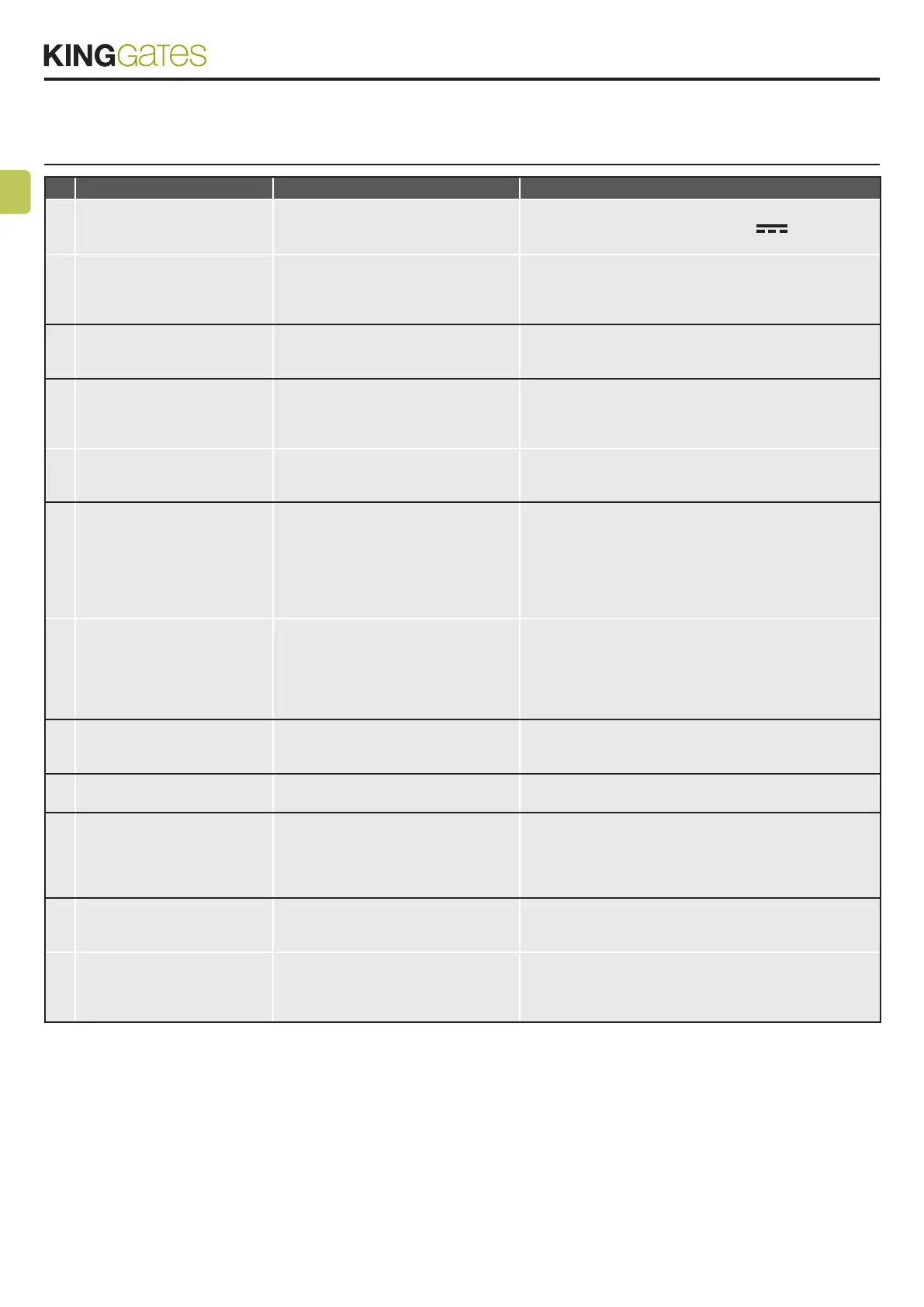
Problem Symptoms / Causes Solution
9a The control unit LEDs are
turned off
No power to the control unit. Check for mains power – see Paragraph 3.4 / 3.5.
For solar/ battery power check 24V
power to the
board.
The fuses blown. You must disconnect
power before touching fuses. Check for
no short-circuits or problems before re-
placing fuse with same value ones.
Replace the fuses. If the fuses blow up again, check for
short circuits or damages of power circuits, cables, wires,
accessories, transformer and control unit.
9b The control unit cannot enter to
programming mode
When the SET button is pressed and all
the indication LEDs ash the control unit
is in protection mode.
Deactivate the protection – see Paragraph 14.1
9c The control unit completes the
programming setup, but does
not respond to commands in
the standard operating mode
Problem with safety and/or stop circuits
if Photo and/or Stop red LEDs are off.
Those LEDs must be lit red unless the
door will not work.
Check that the “S2 Photo”, “S1 Edge” and “Stop” circuits
are closed.
Photo-test of safety devices failed. After
a command is pressed for a few sec-
onds, the red “Error” LED turns on.
Deactivate the photo-test – see Paragraph 4.1.
9d Door is moving but not all the
way to fully close and/or open.
Obstacle detection problems. The con-
trol unit detects power draw peaks dur-
ing the manoeuvre and goes into obsta-
cle mode.
1. Disengage the door from the motor(s) with manual re-
lease; check door to move free all the way. If not, please x. 2.
Turn the “OBS” knob slightly clockwise (see Paragraph 4.2) A)
make sure that control unit stops powering the mo- tor(s) at the
end of the travel. 3. If not sufcient, turn the “POWER” knob
slightly clock- wise and reprogram automation’s movement.
4. Avoid/reduce slowdown travel phase (see Paragraph 6.2)
Intervention of the safety devices.
Check that the red “S2 Photo”, red
“S1 Edge” and “Stop” LEDs remain lit
throughout the entire manoeuvre. If
there are multiple photocell pairs, these
may signal false obstacles.
Apply the bridges to “S2 Photo”, “S1 Edge” and “Stop” to
check if the problem is from the control unit or other circuits
connected to these terminals (see paragraph 10 and image
38C).
9e The radio transmitter does not
functioning
Check that LED on the transmitter is
ashing, if not replace the transmitter’s
battery
Check that radio LED of the control unit ashes while press-
ing a button on the transmitter. If yes, try to reprogram the
radio transmitter.
9f The transmitter has little range Note: transmitter’s range varies in
relation to the environmental conditions
Replace the transmitter’s battery. Connect an external
antenna (see Paragraph 10.8) if not sufcient.
9g The door does not slowing
down
Repeating the automation’s movement
programming is required
1. Repeat the automation’s movement programming (see
Paragraph 6.1)
2. If not sufcient, do the advanced programming of the
automation’s movement (Paragraph 6.2) and set a longer
slowdown area.
9h The control unit does not
make the dip-switch or knobs
adjustments
The control unit protection (lock mode)
is active.
Deactivate the control unit lock. See Paragraph 14.1
No effect with “POWER” knob or dip-
switches adjustment
To make “POWER” knob and dip-switches changes ef-
fective, it is necessary to repeat the automation’s move-
ment programming. If not possible, deactivate the cotrol
unit lock. See Paragraph 14.1.



 To Next Page