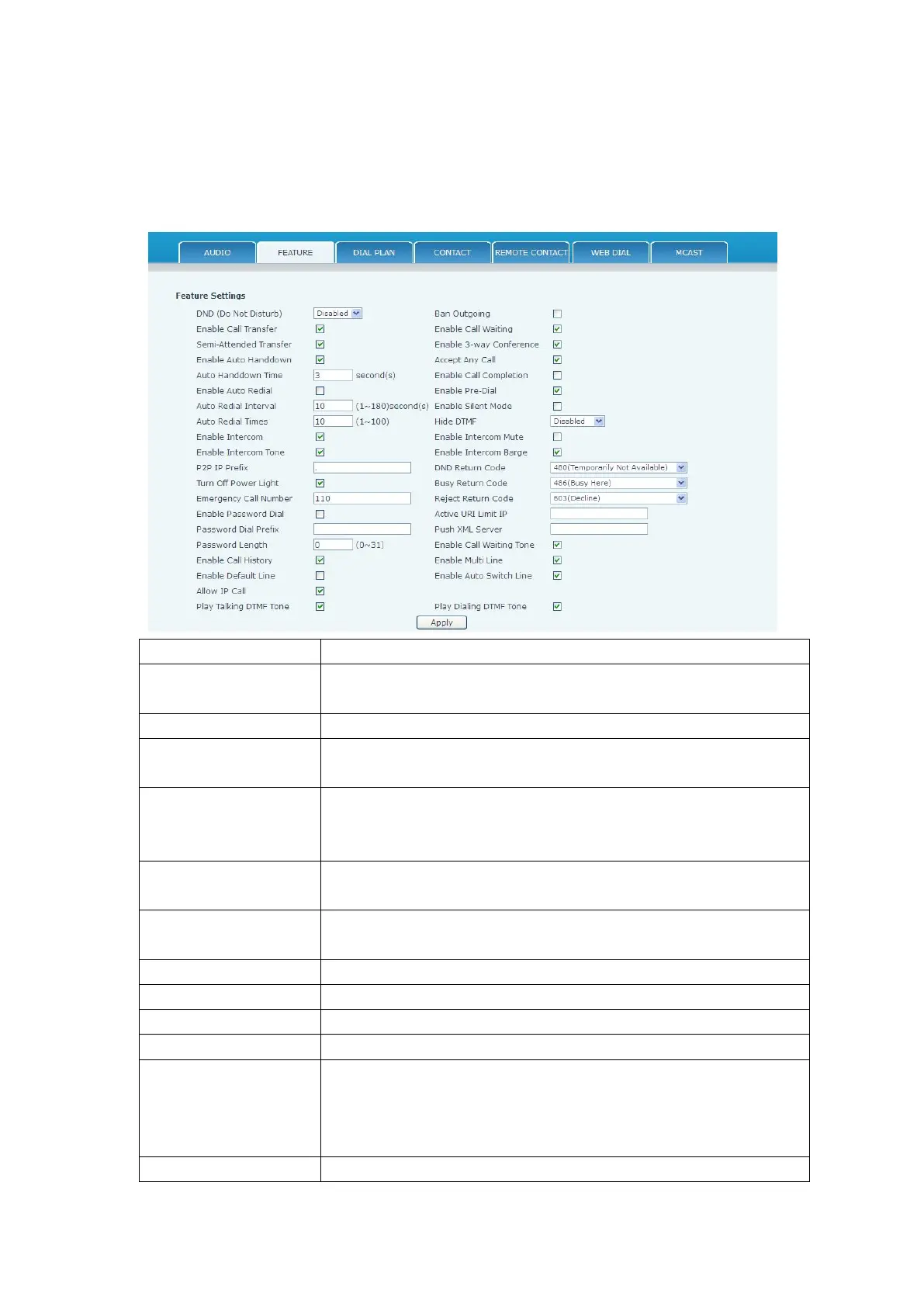
This page configures various features such as Hotline, Call Transfer, Call Waiting, etc.
DND might be disabled, phone for all SIP lines, or line for SIP
individually.
If enabled, Call Transfer is allowed.
If enabled, Semi-Attended Transfer is allowed.
If enabled in speakerphone mode, the phone will automatically hang
up and return to idle when the distant party terminates the call. In
handset mode, it will play dial tone instead of returning to idle.
Wait time before the phone performs the Auto Handdown behavior
described above.
If enabled, the phone will automatically redial a call if a busy tone is
received.
Wait time between auto redial attempts in seconds.
Maximum number of auto redial attempts.
If enabled, allows intercom calls.
If enabled, plays intercom ring tone to alert to an intercom call.
Set Prefix for peer to peer IP call. For example: You wish to dial
192.168.1.119. If the P2P IP Prefix is defined as 192.168.1., it is
only necessary to dial #119. The default is “.”. If this box is left
blank, IP dialing is disabled.
Disables Power Light if selected.


 To Next Page