Getting started
8 Square ONE Dynamics
Connecting the audio cables
Making sure that all equipment is switched off, connect your Square ONE Dynamics to the rest of your audio
equipment as shown in the following subsections. For more details on balancing, see “Balanced/unbalanced
audio” on page 37.
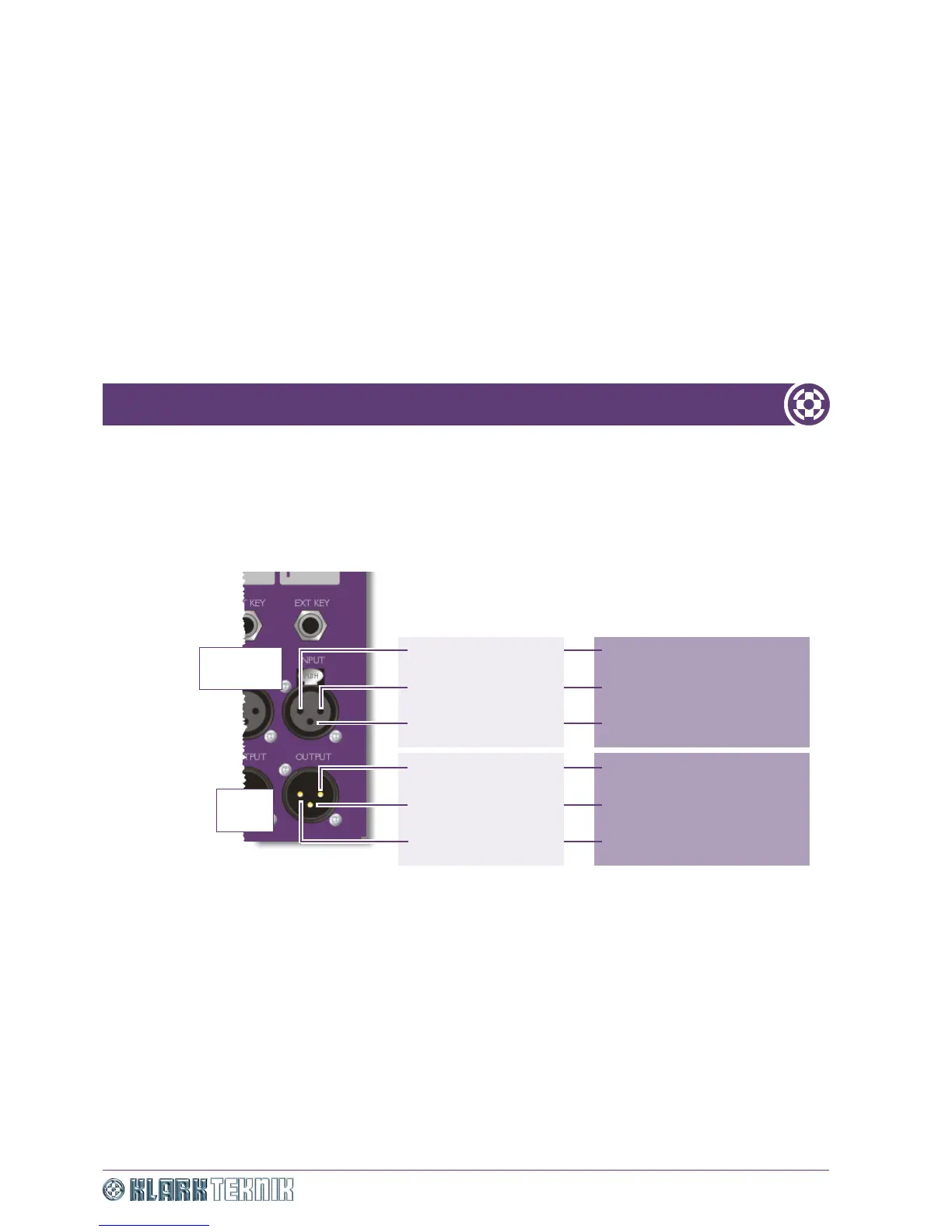
Channel I/O pin-outs
Unbalanced I/O
1
3
2
1
3
2
Female
XLR
Male
XLR
Pin 2: Hot signal
Pin 1: Screen/Ground
Pin 3: Cold signal
Pin 3: Cold signal
Balanced I/O
Pin 2: Hot signal
Pin 1: Screen/Ground
Pin 2: Hot signal
Pin 1: Screen/Ground (not
connected at unbalanced end)
Pin 3: Ground at unbalanced
end
Pin 3: Ground at unbalanced
end
Pin 2: Hot signal
Pin 1: Screen/Ground (not
connected at unbalanced end)


 To Next Page