Getting started
10 Square ONE Dynamics
Connecting to unbalanced equipment
Ideally, you will be making the best use of the Square ONE Dynamics’s low-noise high-headroom balanced
inputs by connecting to similarly balanced equipment. However, if you do have to connect to unbalanced
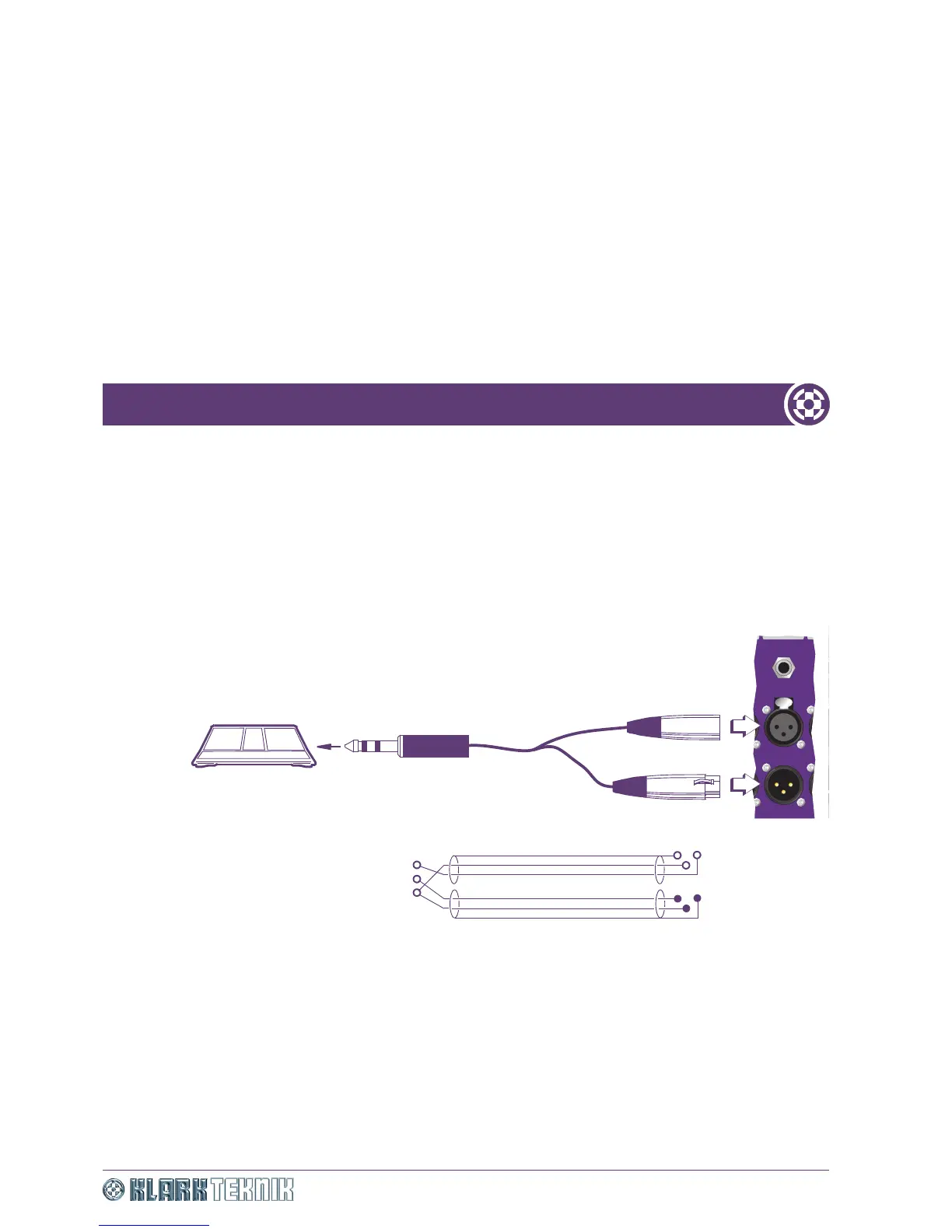
devices, the following wiring is recommended for best results (see Figure 3):
• Connect the +ve (pin 2) of the balanced connection to the +ve terminal on the unbalanced connector.
• Connect the -ve (pin 3) of the balanced connection to the common (ground) terminal on the unbalanced
connector.
• Connect the ground (pin 1) of the balanced connection, to the common (ground) terminal on the
unbalanced connector.
Figure 3: Insert send/return 1/4” TRS connector/XLRs - wiring details
Powering up the unit
To power up the unit, switch on the power at the mains power outlet. The POWER LED on the front of the
unit will illuminate to indicate that power is on.
Your unit is now ready to operate.
OUTPUT OUTPUT OU


 To Next Page