Front panel
Square ONE Dynamics 11
Front panel
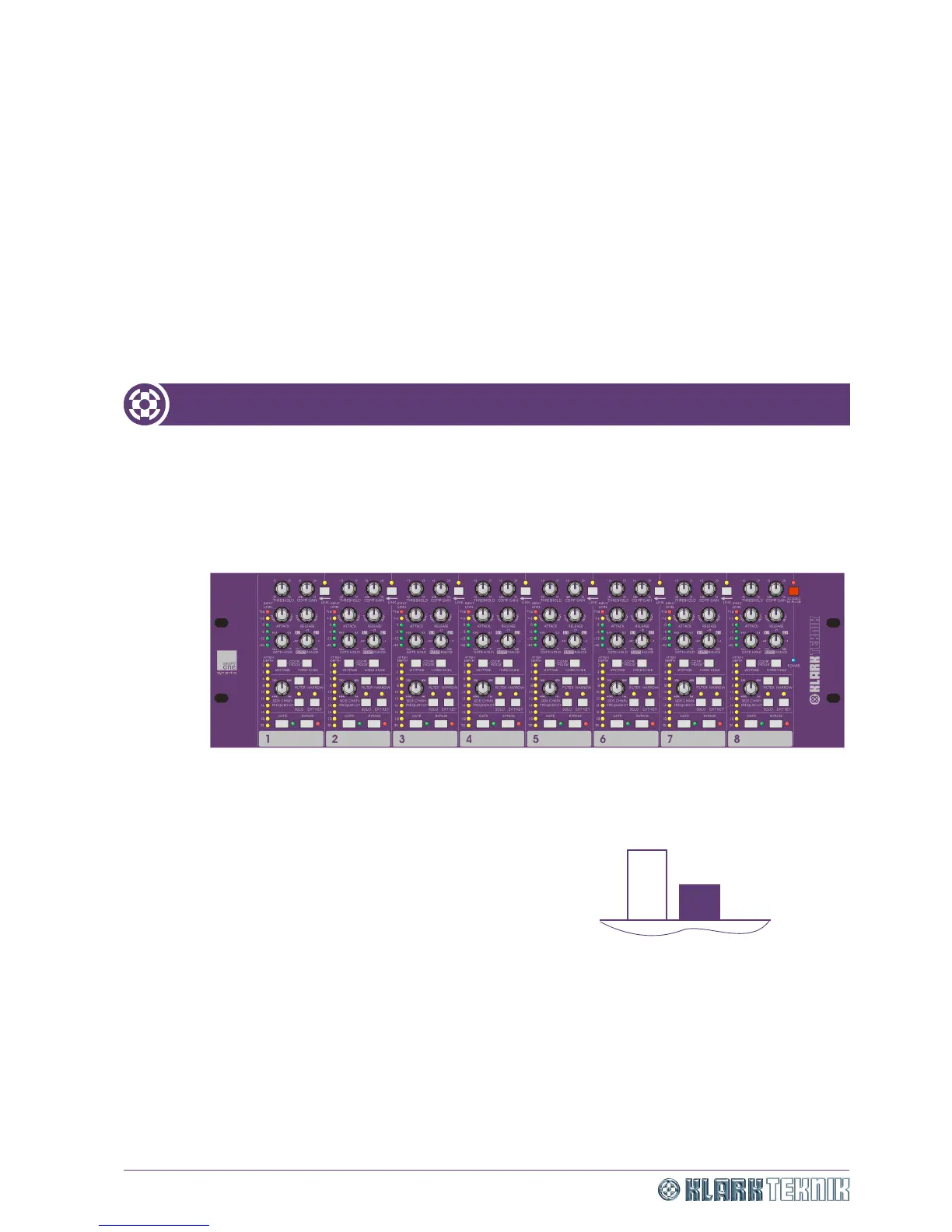
The front panel of the Square ONE Dynamics has eight similar channel sections, each with a set of controls
comprising control knobs, switches (some with LED on/off indicators) and meters. In addition, there is a
master side chain solo in place (SC SOLO IN PLACE) switch and POWER LED for power on/off indication.
Adjacent channels can be linked via intermediate LINK switches.
Figure 4: Front panel
For the scale ranges of the control knobs, please refer to “Technical specification” on page 39.
All of the switches on the front panel are of the latching
pushbutton type and have two positions, in and out, as shown
in the diagram right. To clearly identify switch settings,
switches that enable/disable functions (for example, the GATE
switch) are described as “enabled” when the switch is set to
the in position and “disabled” when set to the out position.
These switches each have an associated LED that illuminates to
show when the switch enabled. Switches that work in
combination are described as either “in” or “out”, for example,
FILTER and NARROW.
In
Out
Front of unit as
viewed from above
Switch positions


 To Next Page