Gate
28 Square ONE Dynamics
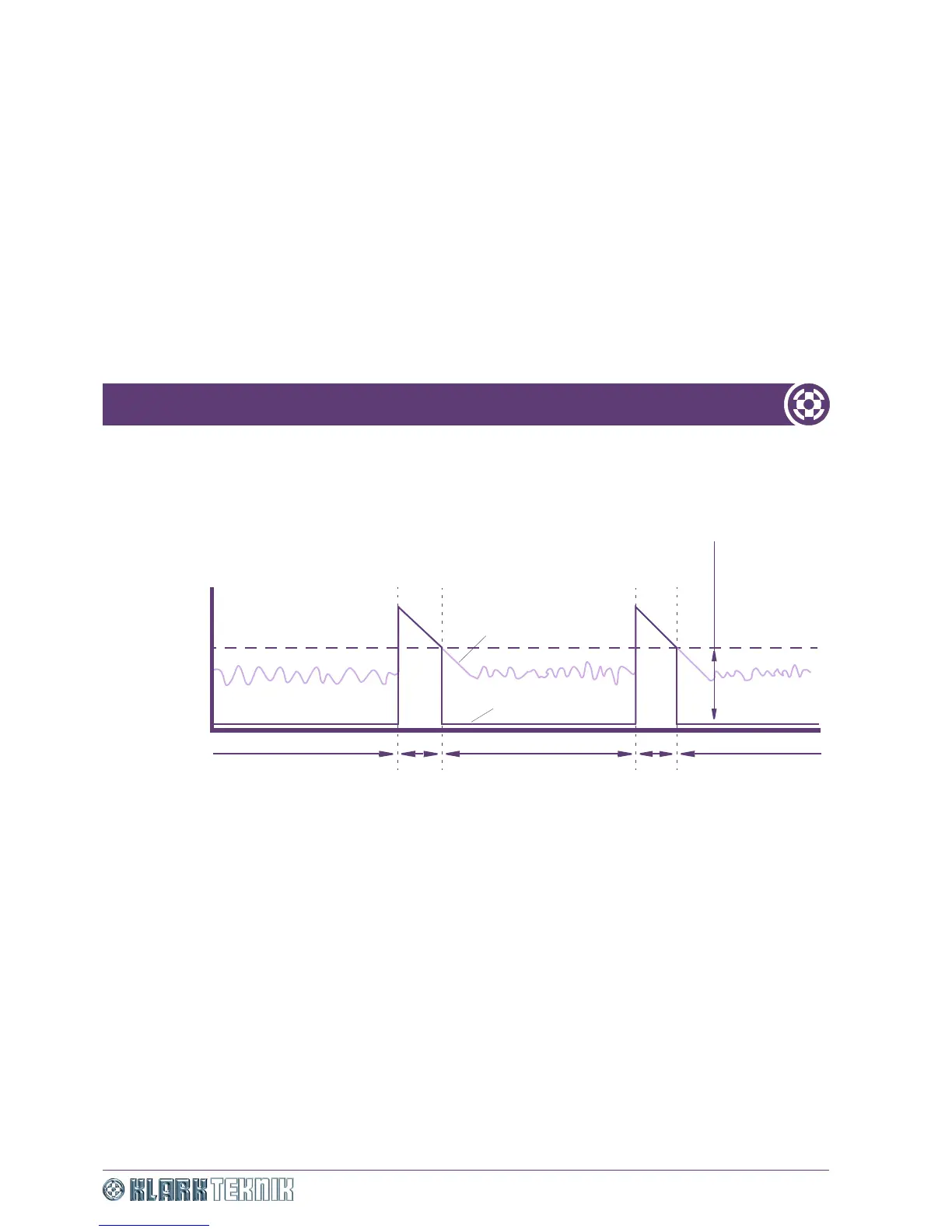
One solution to this problem is to use a noise gate on each microphone. The gate will reduce the output from
the microphone to almost zero when the drum is silent, yet will open practically instantaneously when the
drum is played. As the sound from the drum decays, the gate will close again and reject noise from the rest
of the kit.
Figure 16: Effects of noise gate on each microphone
The threshold level represents the sound level at which the gate will open. Any sound exceeding the
threshold triggers the gate. Sounds at lower levels leave the gate closed and the microphone will be almost
completely silent.
Gate operation
To use the Square ONE Dynamics in gate mode, first ensure that the GATE switch is enabled and then set the
threshold, attack, hold and release times to suit the programme. Set attenuation depth using the RANGE
control knob and use the side chain filter to tune the gate to open at a selected frequency in wide or narrow
modes. The attack characteristic of the gate is exponential, which ensures that even at extremely fast attack
settings the attack envelope seamlessly blends into the audio waveform. This prevents the creation of any
undesirable audio artifacts (clicks).
Threshold
This is the gate operating point. Signals that go over threshold will open the gate, while signals that go
below threshold will close the gate. In both cases, gate opening/closing occurs over a period of time, which
is dependent on the envelope (attack and release) control settings.
Attack
Attack is the time taken for the gate to open after an over threshold signal. The shape of the attack is fixed
and has been carefully tailored to produce a transparent gating action.
Time
Threshold level
Signal level
Gate closed
Snare
Background noise
Gate closedGate closed OpenOpen
Output signal
Signal without gating
Signal with gating
Range (attenuation
depth)


 To Next Page