A-61677 December 2013 1-5
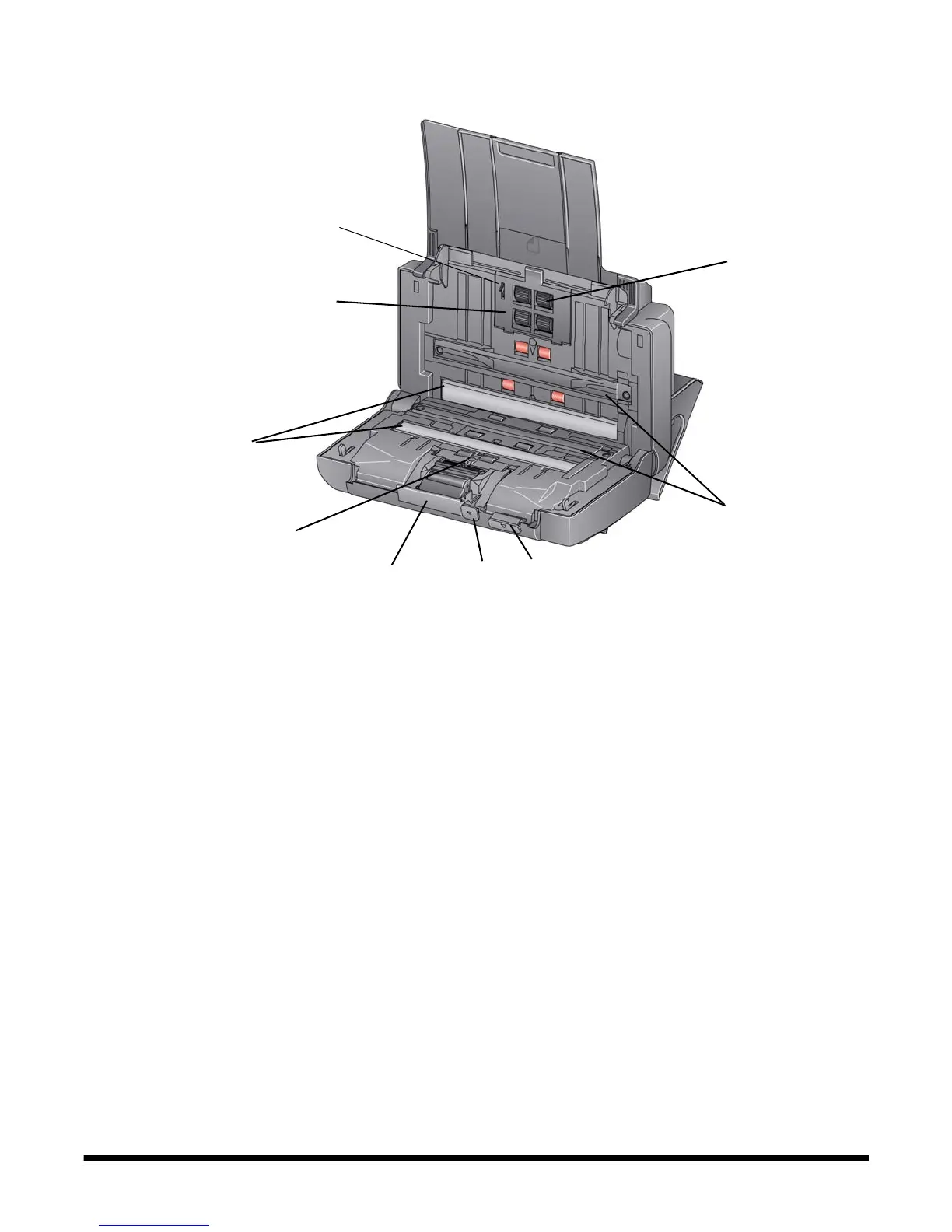
Inside view
1 Scanner cover release lever — opens the scanner to allow access
to the paper path for cleaning or clearing a document jam. The
scanner must be in the tilted position to open the scanner cover.
2 Gap release lever — allows you to manually adjust the space
between the feed module and separation module for documents that
require special handling, e.g., documents that are badly torn.
3 Separation module release lever — push the release lever down
to remove the separation module for cleaning or replacement.
4 UDDS sensor — used to detect multifeeds and document edges.
5 Imaging guides — for optimum image quality, keep the imaging
area clean.
6 Feed module cover — this cover needs to be removed when
cleaning or replacing the feed module or feed module tires.
7 Paper present sensor — detects the presence of documents in the
input tray.
8 Feed module assembly — provides smooth document feeding and
separation of various sizes, thicknesses and textures of documents.
9 Background strips — these black background strips can be
interchanged with the White Background Accessory, which can be
used if you are scanning translucent or very thin documents to
reduce black background bleed-through.



 To Next Page