26.03.1996 • KHH SEENXL13A
•For Authorized KCI Service Agents Only•
KCI Hoists Corporation reserves the right to alter or amend the above information without notice
Page 5
XL
Service Manual
CU1
KCI KONECRANES GROUP
KCI HOISTS CORPORATION
2 FRONT PANEL AND DISPLAY INFORMATION
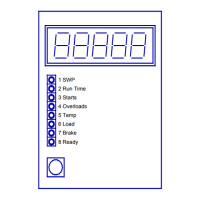
2.1 Numerical display
The 5-digit numerical display indicates the current values of the main supervisory
functions and maintenance-related information.
The numerical display is blank when hoisting motion is running.
2.2 Supervisory values: SWP, Run Time, Starts, Overloads
The first 4 green lights on CU1's front panel indicate which value is currently displayed
on the numerical display. Each value is shown for ca. 4 seconds, one after each other.
If a supervisory value is reached the supervisory warning limit, READY-led, starts blinking
(≥P2.13: 5 sec ON, 1 sec OFF,...).
[color]
1 SWP on display [green] (see chapter 3.1)
2 Run Time on display [green] (see chapter 3.2)
3 Number of Starts on display [green] (see chapter 3.3)
4 Number of Overloads incidents on display [green] (see chapter 3.4)
2.3 Safety functions: Temp, Load and Brake
The next 3 red lights on CU1's front panel indicate that the CU1 is in an alarm state (or in
warning state) and hoisting motion is (or will be) prevented. A red light on indicates by
which sensor the alarm is detected.
[color]
5 Alarm due to overheating: Temp [red] (see chapter 3.5)
6 Alarm due to overloading: Load [red] (see chapter 3.6)
7 Alarm due to brake wearing: Brake [red] (see chapter 3.8)
2.4 Indicator light: Ready
The last green Ready-light on CU1's front panel indicates the functional status of
hoisting; normally it is on continuously. In an alarm or warning state it blinks (blinking
frequency is 2 Hz in the alarm state and 1 Hz the warning state.
[color]
8 Functional status of hoisting: Ready [green] (see chapters 3.1 - 3.8)


 To Next Page