26.03.1996 • KHH SEENXL13A
•For Authorized KCI Service Agents Only•
KCI Hoists Corporation reserves the right to alter or amend the above information without notice
Page 7
XL
Service Manual
CU1
KCI KONECRANES GROUP
KCI HOISTS CORPORATION
2.9 Programming and controlling of CU1
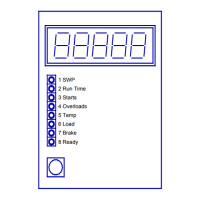
CU1 can be programmed and controlled by the blue push-button control switch on
CU1's front panel's lower left hand corner.
CU1 can be changed into the programming and controlling mode by pressing the blue
push-button continuously until the 'PAUSE'-message is displayed (ca. for 5 seconds).
In the beginning of the programming and controlling mode, CU1 asks for a password. A
password is always a three digit number from 000 to 999. The correct password is
entered by pressing the blue push-button when the corresponding digit is flashing. If
you miss the correct digit, wait until it appears the next time around. Each digit is
presented maximum of three times.


 To Next Page