Ch.3 Operation
< 44 >
DRYPRO Vstage MODEL 793 Operation Manual Ver.1.01 2005.1
12
Take out the new size, new type film package
from the carton, and place it in the Supply Tray
so that the barcode on the package aligns to the
left of the front.
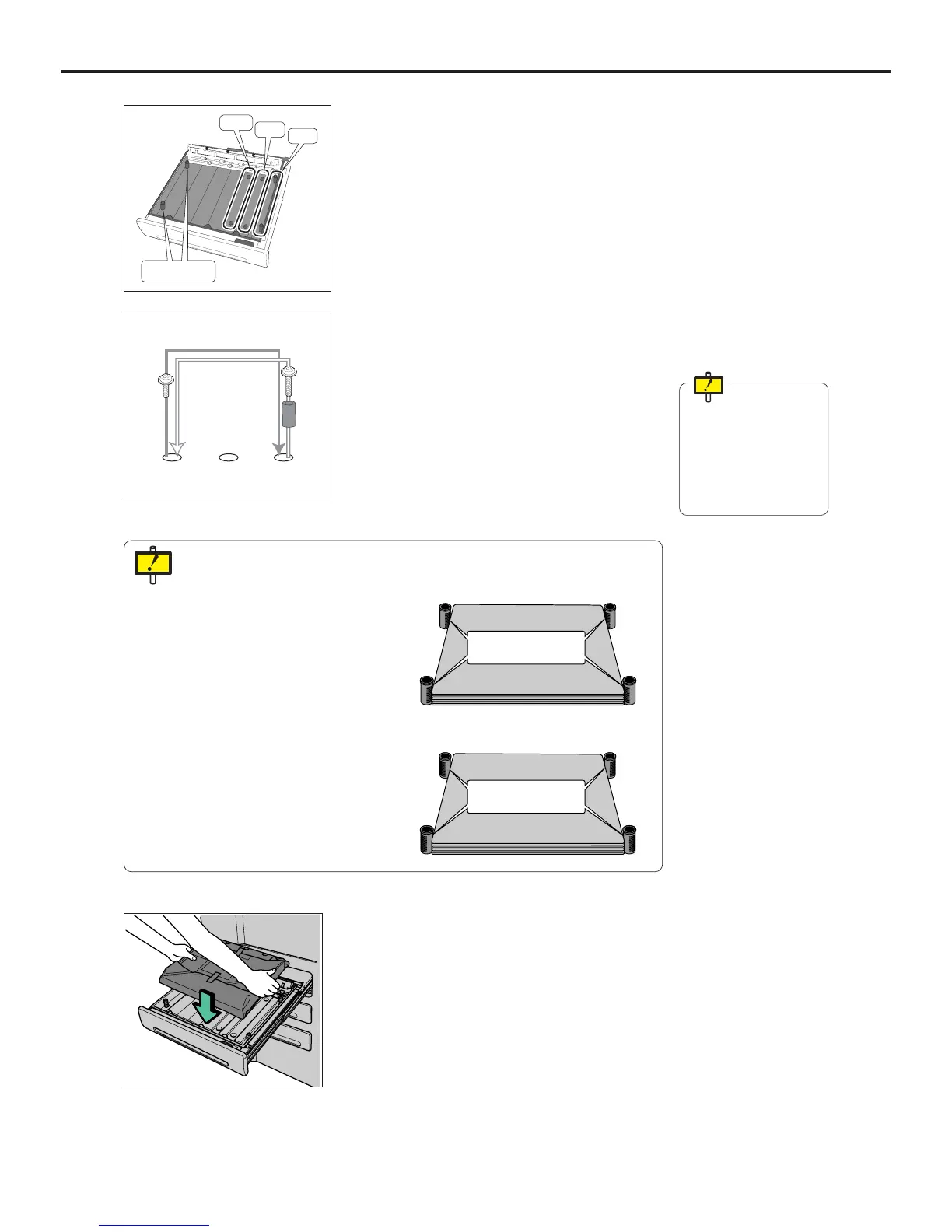
11 Attach the two short screws removed in the step
9 at the original positions.
- The original screws holes are blocked to shield the light.
10
Using the two long screws removed in the step
8, secure the side stoppers at the new position.
Make sure that all of
removed screws are
attached. Failure to
attach the screw may
cause an accidental
exposure of the film to
the light.
Original Position
New
Position
11x14
14x14
14x17
Do not remove
these two
8 Remove two long screws that secure the side
stoppers at the original position.
9 Remove two short screws that are located in the
front and back of the Supply Tray, the new posi-
tions to which the size should be changed.
Side stoppers have a smooth and a rough side. These should be used as follows:
14X11" (B, DR-B), 14X14", 14X17": The rough side should make contact with
the film.
14X11" (M) : The smooth side should make contact with
the film.
Fix the stoppers so that the rough
side makes contact with the film.
Fix the Stoppers so that the
smooth side makes contact with
the film.



 To Next Page