Ch.4 Maintenance Mode
< 93 >
DRYPRO Vstage MODEL 793 Operation Manual Ver.1.01 2005.1
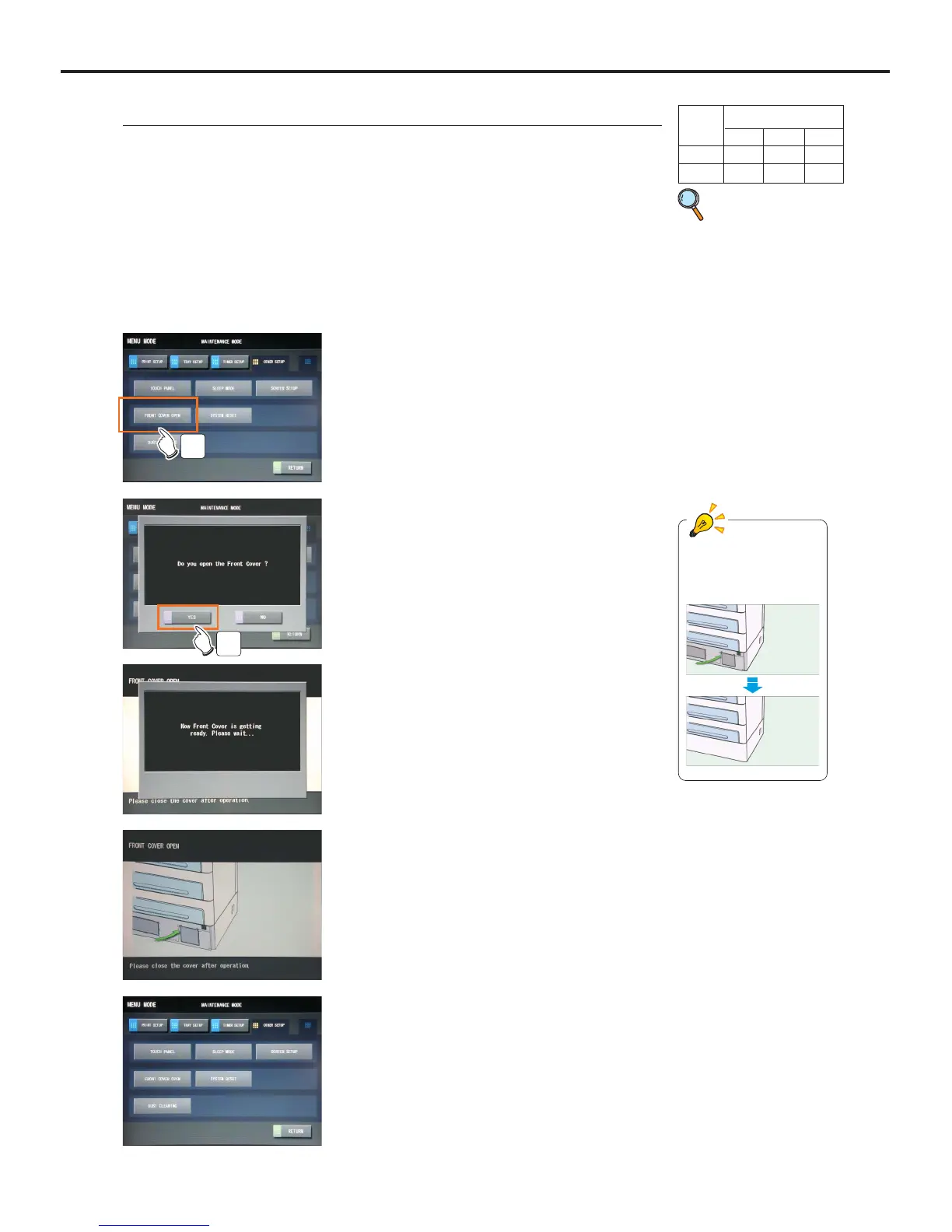
4-4-16 FRONT COVER OPEN <OTHER SETUP>
Use this procedure when the front lower cover needs to be opened due to the reason
other than a film jam.
2 Touch the [OTHER SETUP] button on the
"Maintenance" screen.
3 Touch the [FRONT COVER OPEN] button.
- A message confirming whether to open the front lower
cover will be displayed.
- Touching the [RETURN] button will shut down the
"Maintenance Mode" and return to the Normal screen.
3
1 Switch to the Maintenance Mode.
4 Touch the [YES] button.
- A message indicating that the process to open the front
lower cover is underway. Then the front lower cover
will open.
- A message in the left will be displayed while the front
lower cover is open.
4
p.52 Switching to
the Mainte-
nance Mode
5 Close the front lower cover after the work is
completed.
- A message indicating it is in preparation. Then the
screen switches to the "maintenance Mode (Other
Setup)" screen.
Animation of "Front
Lower Cover Open"
User Level
123
Disp ●
Ope ●



 To Next Page