Ch.4 Maintenance Mode
< 95 >
DRYPRO Vstage MODEL 793 Operation Manual Ver.1.01 2005.1
4-4-18 DUST CLEANING <OTHER SETUP>
In normal condition, [DUST CLEANING] button will be displayed every time when the
DRYPRO 793 reaches 2,000 prints, and touching this button allows to initiate the cleaning
of cleaning rollers. However, when the printed image shows deterioration in comparison to
that immediately after the cleaning of the cleaning rollers, or it is required to clean despite
the mammo films are not processed, cleaning of the cleaning rollers can be performed
using this function even before reaching 2,000 prints maintenance cycle.
2 Touch the [OTHER SETUP] button on the
"Maintenance" screen.
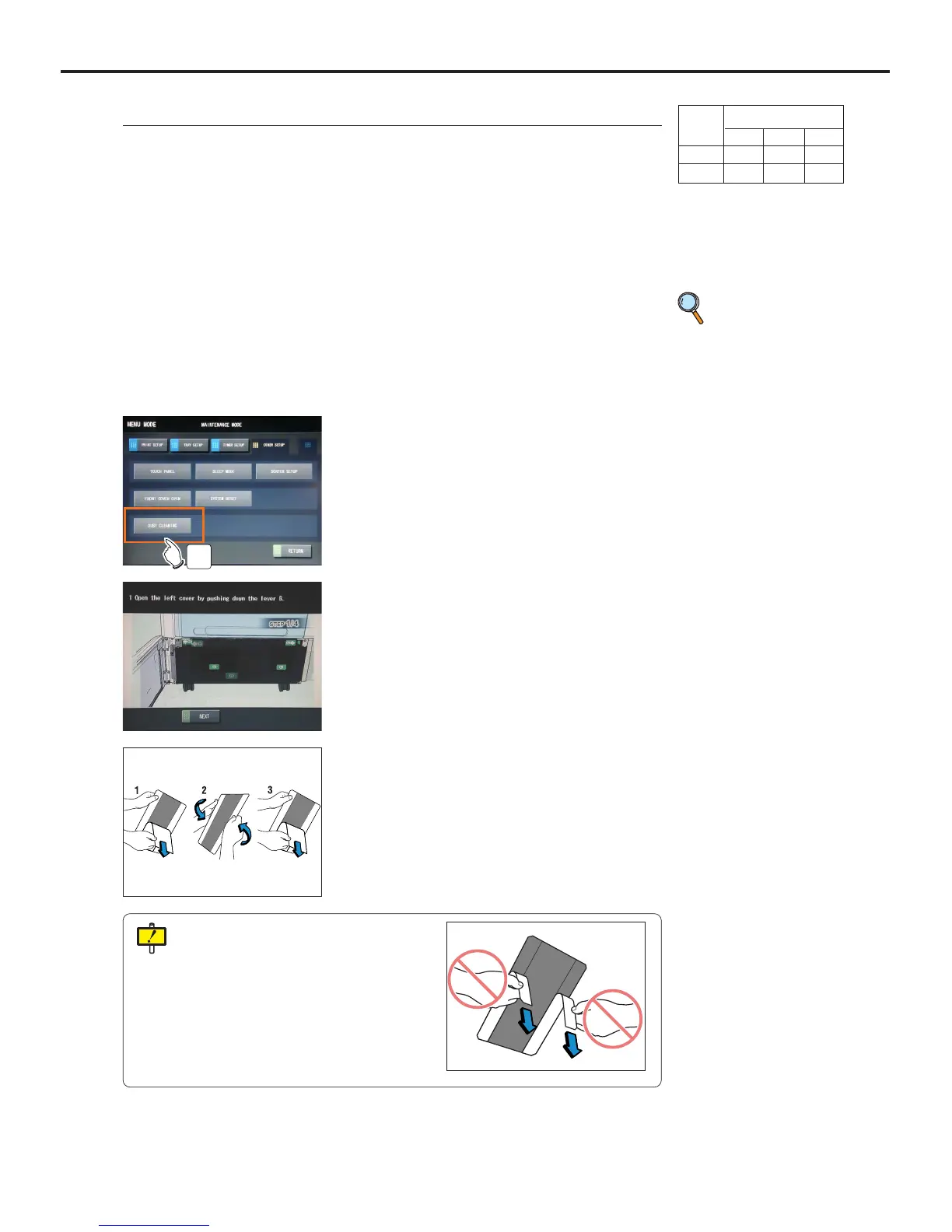
3 Touch the [DUST CLEANING] button.
- A message indicating that the process to open the front
lower cover is underway. Then the front lower cover
will open.
- An animation showing a jam removal procedure will be
displayed on the Operation Panel.
3
1 Switch to the Maintenance Mode.
4 Push the Lever B to open the Left Cover.
p.52 Switching to
the Mainte-
nance Mode
5 Remove the peeler sheet from the cleaning
sheet as shown in the figure in the left.
Peel only the peeler sheet in the center of the
cleaning sheet. Never peel that on either
edge.
User Level
123
Disp ●
Ope ●



 To Next Page