Ch.4 Maintenance Mode
< 78 >
DRYPRO Vstage MODEL 793 Operation Manual Ver.1.01 2005.1
4-4-9 FILM DATA <TRAY SETUP>
Allows to view the collected data of processed films. Data classified in film size, film type or channel,
and collected by day, week or month can be viewed.
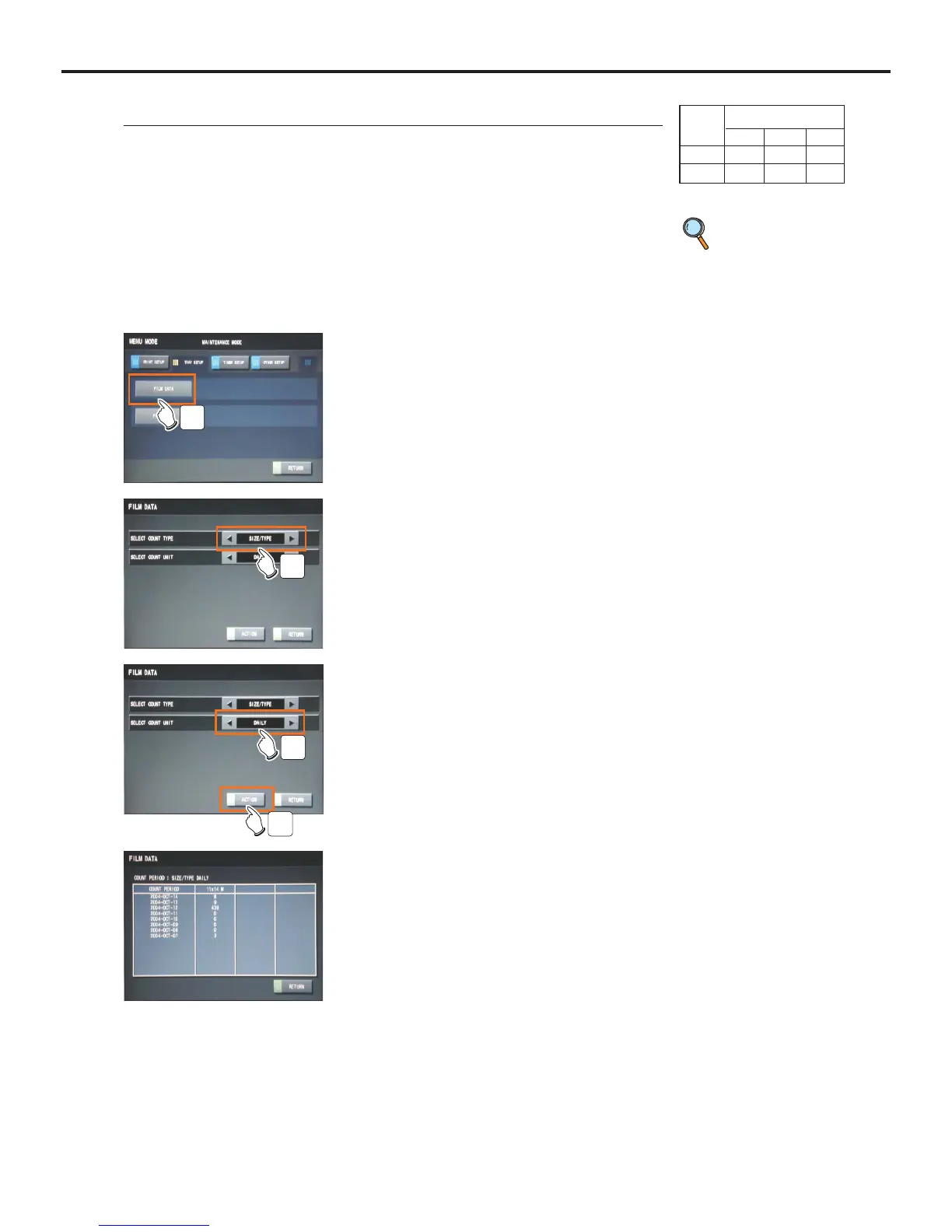
2 Touch the [TRAY SETUP] button of the "Mainte-
nance" screen.
3 Touch the [FILM DATA] button.
- "FILM SETUP" screen will be displayed.
- Touching the [RETURN] button shuts down the Mainte-
nance Mode, and returns to the Normal screen.
3
1 Switch to the Maintenance Mode.
p.52 Switching to
the Mainte-
nance Mode
4 Touch the arrow buttons [t], [s] to select the
the "SELECT COUNT TYPE" of the collection
data.
- Touch either of the arrow [t], [s] buttons to switch
between the "SIZE/TYPE" and "CHANNEL".
4
5 Touch the arrow buttons [t], [s] to select the
the "SELECT COUNT UNIT" of the collection
data.
- Touch either of the arrow [t], [s] buttons to switch
among the "DAILY", WEEKLY" and "MONTHLY".
5
6
Ex) A screen when "SIZE/TYPE" in
"SELECT COUNT TYPE", and
"DAILY" in the "SELECT COUNT
UNIT".
6 Touch the [ACTION] button.
- "COUNT PERIOD" screen specified by the condition
selected in the step 4, 5 will be displayed.
User Level
123
Disp ●●●
Ope



 To Next Page