Configuration Menu Overview62
!"
All factory default values are shown in bold.
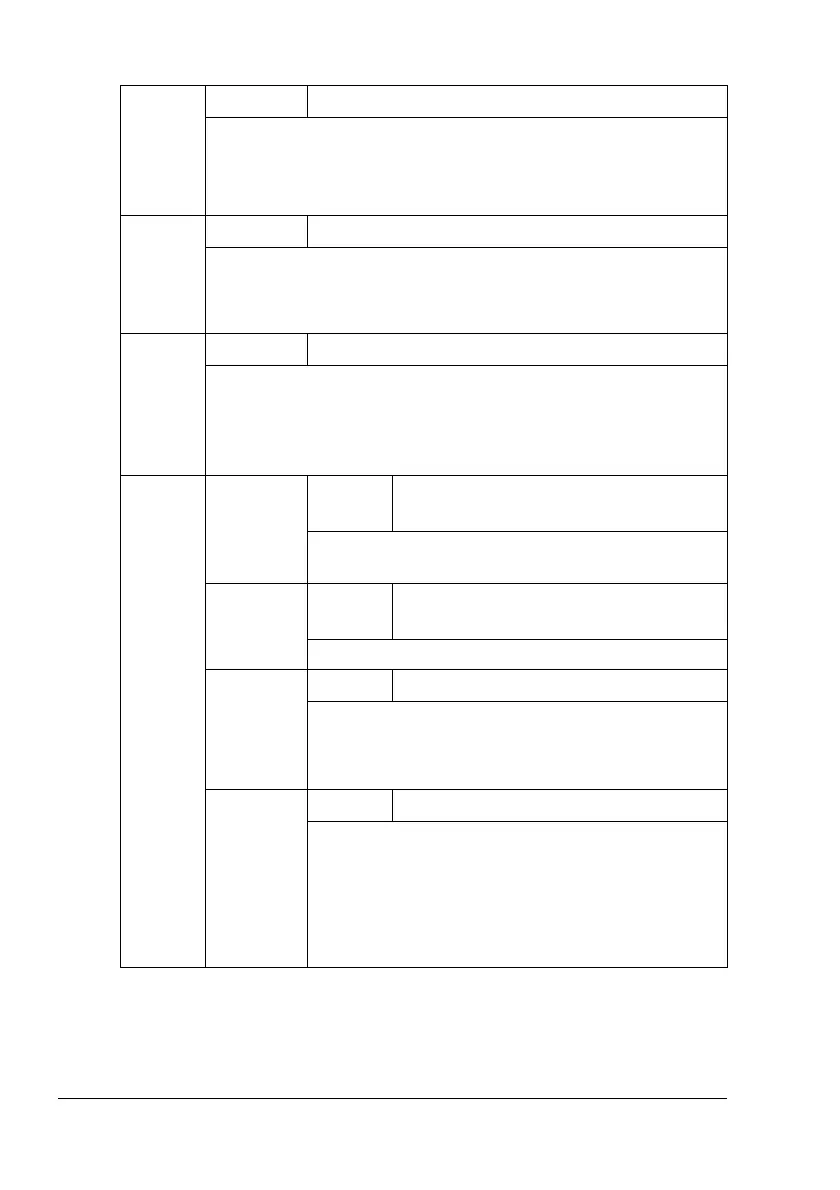
PAPER
SOURCE
Settings
TRAY1/TRAY2/TRAY3/TRAY4/TRAY5
The tray that is used can be specified.
!"
TRAY 3, 4, 5
appear only if the optional lower feeder
units are installed.
LAYOUT
Settings
1-UP/2-UP/3-UP/4-UP/6-UP/8-UP
Specify the number of images printed on a single sheet of media.
When set to
1-UP, only one image will be printed on a single
sheet of media.
PAPER
MARGIN
Settings
STANDARD/MINIMUM
If STANDARD is selected, the standard media margin size is
specified.
If
MINIMUM
is selected, the minimum media margin size is
specified.
IMAGE
QUAL-
ITY
BRIGHT-
NESS
Settings
-15%/-10%/-5%/0%/+5%/+10%/
+15%
The brightness of the printed image can be
adjusted.
CONTRAST
Settings
-15%/-10%/-5%/0%/+5%/+10%/
+15%
The contrast of the image can be adjusted.
RGB
SOURCE
Settings
DEVICE COLOR/sRGB
Specify the color space for RGB image data.
If
DEVICE COLOR is selected, no color space is
specified.
RGB
INTENT
Settings
VIVID/PHOTOGRAPHIC
Specify the characteristic applied when converting
RGB image data to CMYK data.
If
VIVID is selected, a vivid output is produced.
If PHOTOGRAPHIC is selected, a brighter output is
produced.















 To Next Page