Configuration Menu Overview72
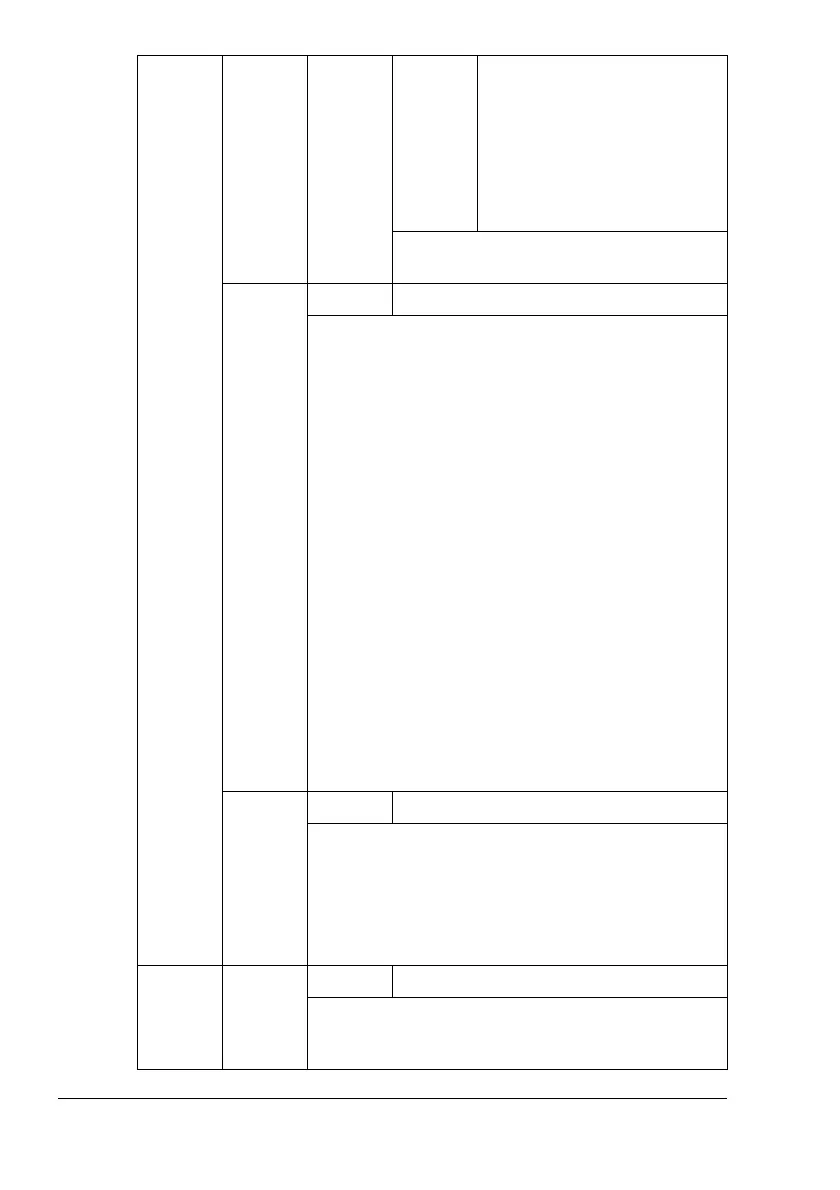
PAPER
TYPE
Settings
PLAIN PAPER/
RECYCLED/THICK 1/
THICK 2/THICK 3/
LABEL/TRANSPARENCY/
TRANSPARENCY 2/
ENVELOPE/POSTCARD/
LETTERHEAD/GLOSSY
Select the type of media that is normally
used.
DETECT
PAPER
SIZE
Settings
INCHE SIZE/MILLIMETER SIZE
Specify the detection reference for automatically
detecting the media size.
If
INCH SIZE is selected, the media size will be
detected based on inch sizes.
Tray 2:
LETTER/LETTER-R/11x17/LEGAL/EXECUTIVE/
STATEMENT/A3WIDE
Trays 3/4/5:
LETTER/LETTER-R/11x17/LEGAL/A3/A4/A4-R/
B4(JIS)/B5(JIS)/B5(JIS)-R/STATEMENT/GOVT
LEGAL/16K/11x14/D8K
If
MILLIMETER SIZE
is selected, the media size
will be detected based on millimeter sizes.
Tray 2:
A3WIDE/A3/A4/A4-R/A5/A6/B4(JIS)/B5(JIS)/
B5(JIS)-R/B6(JIS)
Trays 3/4/5:
LETTER/LETTER-R/11x17/LEGAL/A3/A4/A4-R/A5/
B4(JIS)/B5(JIS)/B5(JIS)-R/GOVT LEGAL/16K/11x14/
D8K
UNIT
OF
MEA-
SURE
Settings
INCHES/MILLIMETERS
The units for specifying the size of custom media
can be switched between inches and millimeters.
!"
The default setting for North America is
INCHES
. The default setting for all other
regions is
MILLIMETERS
.
STARTUP
OPTIONS
DO
START-
UP
PAGE
Settings
ON/OFF
Select whether or not a startup page is printed when
the printer is turned on.





 To Next Page