Shenzhen Anycubic Technology Co., Ltd.
21
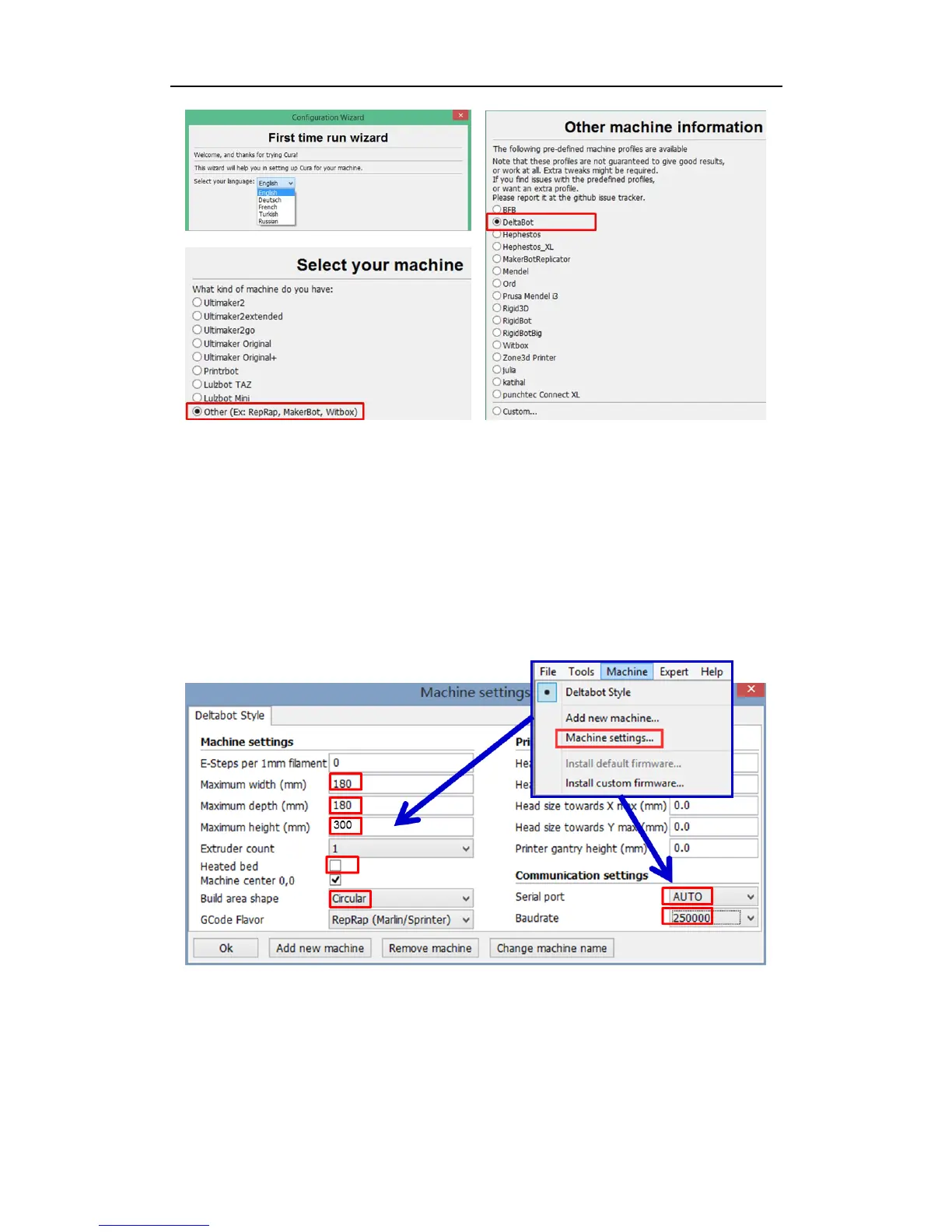
Fig. 40
Step 3. Printing parameter settings. At the home interface of Cura, click „Machine‟ and in
the drop-down menu choose „Machine settings‟ to open the setting interface as Fig. 41
shows. Change the maximum width, maximum depth and maximum height into 180, 180
and 300 respectively (those values should be 230, 230 and 300 if you are setting up the
ANYCUBIC Kossel Plus). Leave the „Heated bed‟ box empty to suit the current machine
version. The serial port can be AUTO, or choose the right port when you have several
devices connected. The baud rate is suggested to be 250000. Then click „OK‟ at the bottom
left to return to home interface.
Fig. 41
Next, as shown in Fig. 42, click „Basic‟ and „Advanced‟ respectively on the top left in home
interface of Cura to change the parameters to suitable values one by one. Note: the
suggested parameters in Fig. 42 may be varying depend on different models.



 To Next Page