EasyManua.ls Logo

Kramer WP-5VH2 - Page 99

Kramer WP-5VH2
101 pages
Print Icon
To Next Page IconTo Next Page
To Previous Page IconTo Previous Page
Loading...
93
93
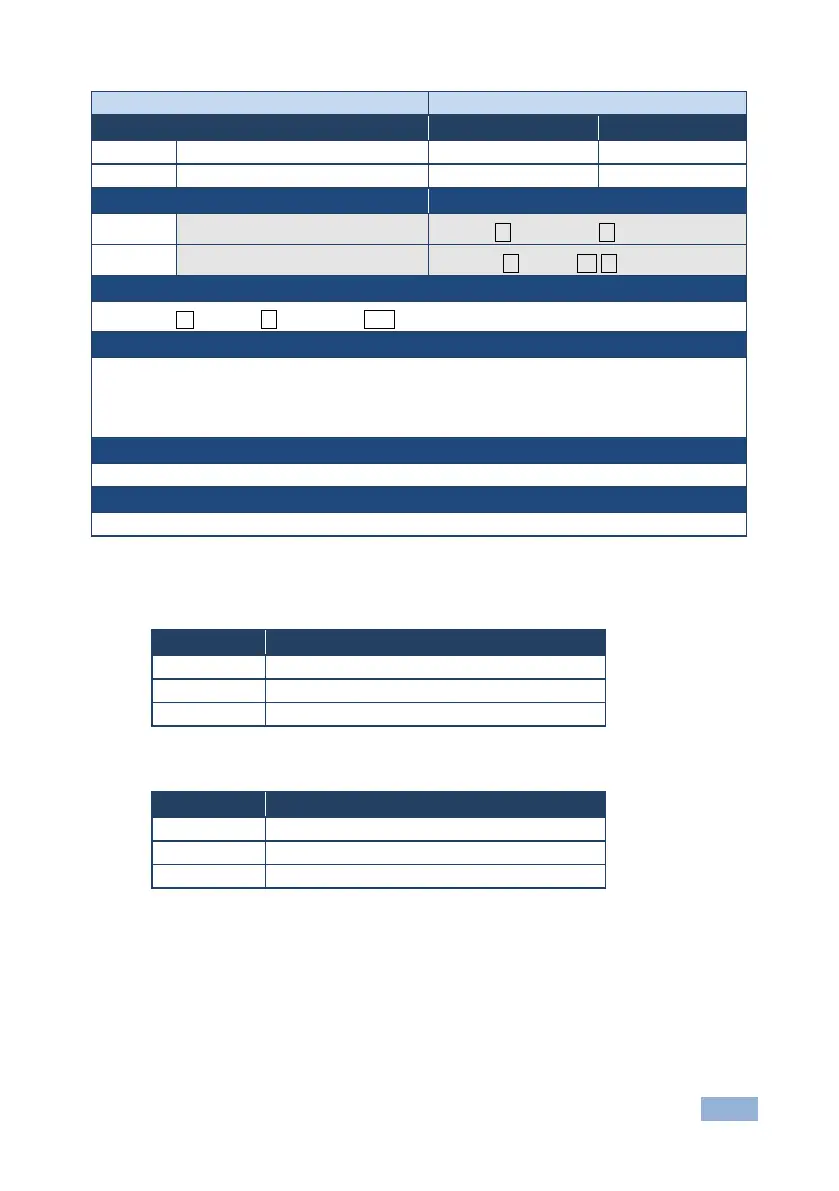
Command - VMUTE
Command Type - Video
Command Name
Permission
Transparency
Set:
VMUTE
End User
Public
Get:
VMUTE?
End User
Public
Description
Syntax
Set:
Set enable/disable video on output
#VMUTEoutput_id, flag
Get:
Get video on output status
#VMUTE?output_id
Response
Set / Get: ~ nn@ VMUTE output_id, flag␍␊
Parameters
output_id - 1….num of system outputs
flag - 0 - disable video on output
1 - enable video on output
2 - blank video
Response Triggers
Notes
13.2.1 EDID Source
Number
Value
0
Input
1
Output
2
Default EDID
13.2.2 Signal Validation
Number
Value
0
Signal or sink is not valid
1
Signal or sink is valid
2
Sink and EDID is valid

Table of Contents

Related product manuals