Page | 34
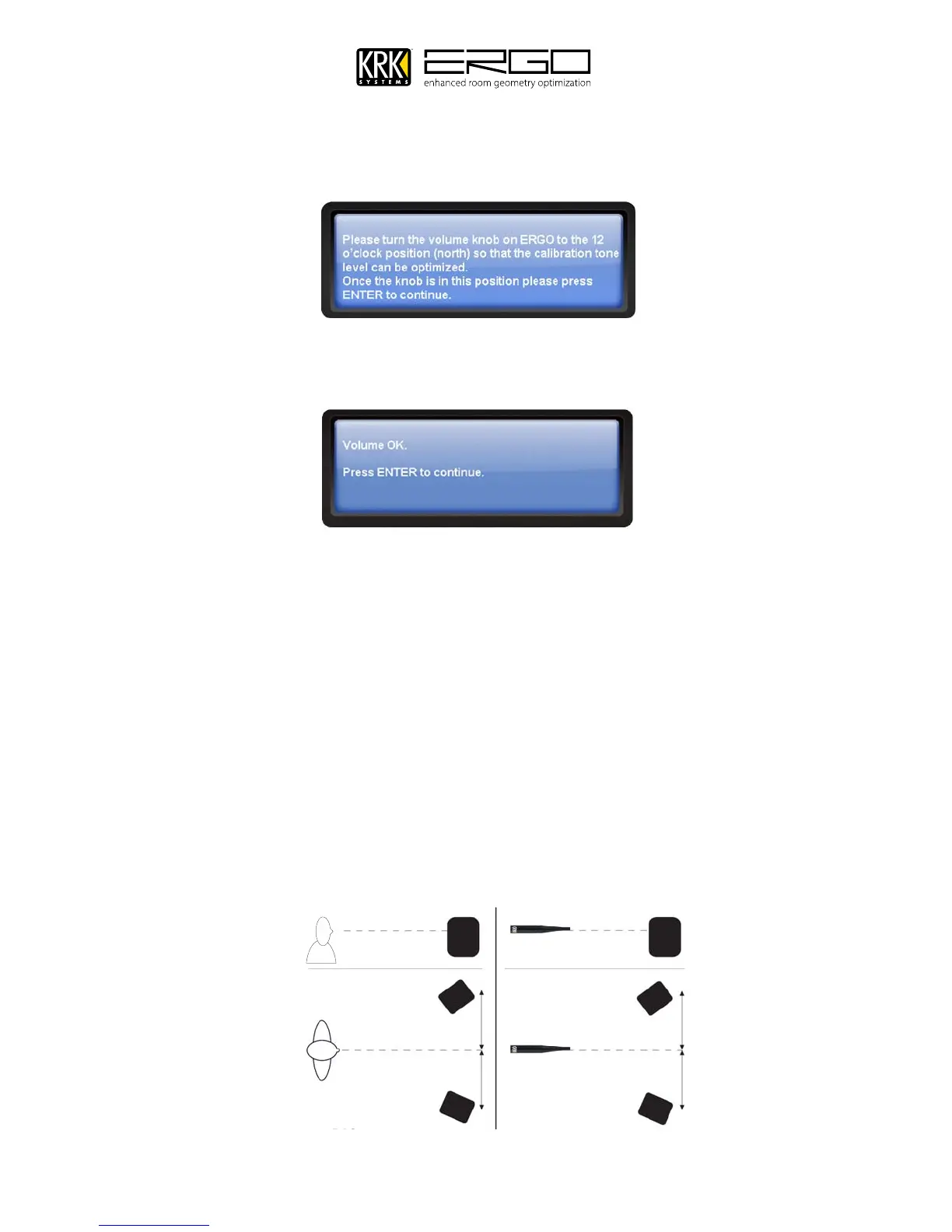
13. You will then see the following message informing you to set the volume knob to the 12 o’clock (or North)
position. This is a necessary step in order to set the position of the volume knob for the first calibration tones, so
that they are at a safe low level. Position the volume knob and press ENTER to continue
14. You will be asked to slowly adjust the knob until the volume is in the correct position, please follow the
instructions on screen until you receive the message below, and then press ENTER to continue.
15. You will then be asked to place the measurement microphone in the FOCUS position. This is the sweet spot of
your monitoring system. Make sure that the height and orientation of the microphone correspond to your typical
listening height and direction as illustrated below. Do not block the line of sight between the microphone and
the loudspeakers. Each measurement is comprised of a low and a high frequency measuring signal first in the
left and then in the right channel.
The length of each measurement depends on a combination of the measurement volume, and the background
noise in your local environment. Typical measuring times for the low and high frequency measuring signals are
25 and 5 seconds, respectively. If an error message is displayed. Make any required corrections to your set up and
follow the prompt to retry the measurement.
Focus Position Measurements must be performed more than 1 m (3 ft) away from the loudspeakers, in an X/Y
orientation, and must not performed behind the loudspeaker. Also, do not sit in the listening position while
Focus measurements are being taken.



 To Next Page