12
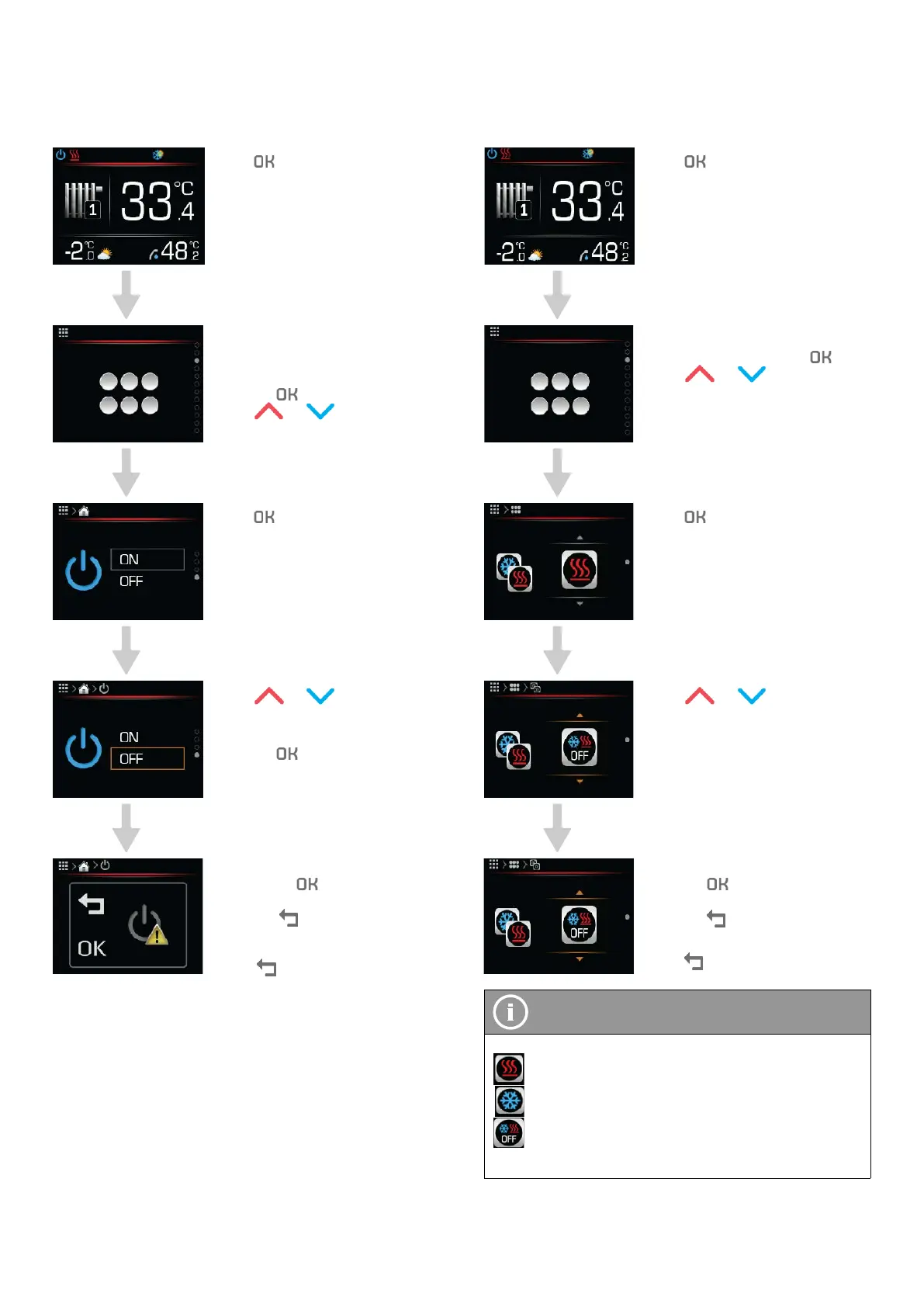
5.2 TURNING ONOFF THE HEAT PUMP
AND HEATING SYSTEM
Press to get to the main
menu
Choose the menu “shortcut”
by pressing the button OK.
Confirm the shortcut menu by
pressing
.
Press
or to find on/off.
Press to begin setting
parameters.
Press or to choose
the setting OFF or ON.
Confirm the settings by
pressing
.
Confirm the parameter value
by pressing
.
Cancel the parameter value by
pressing
To return to the home screen
press
2 times.
5.3 TURNING HEATING AND COOLING
ONOFF
Press to get to the main
menu
Choose the menu “shortcut”
by pressing the button
.
Press
or to find the
operational parameter.
Press to begin setting
parameters.
Press or to set pa-
rameters for the cooling and
heating DHW mode.
Confirm the settings by
pressing
.
Cancel the parameter value by
pressing
To return to the home screen
press
2 times.
NOTE
Heating, cooling and DHW heating modes:
The appliance is in heating and DHW mode.
The appliance is in cooling and DHW mode.
The appliance is not heating or cooling the building,
only DHW and pool heating is active.
Operating instructions
ADAPT, VERSI, ETERA and WPLV systems
17-19-45-6702-07


 To Next Page