37
14 ERRORS, WARNINGS AND
NOTIFICATIONS
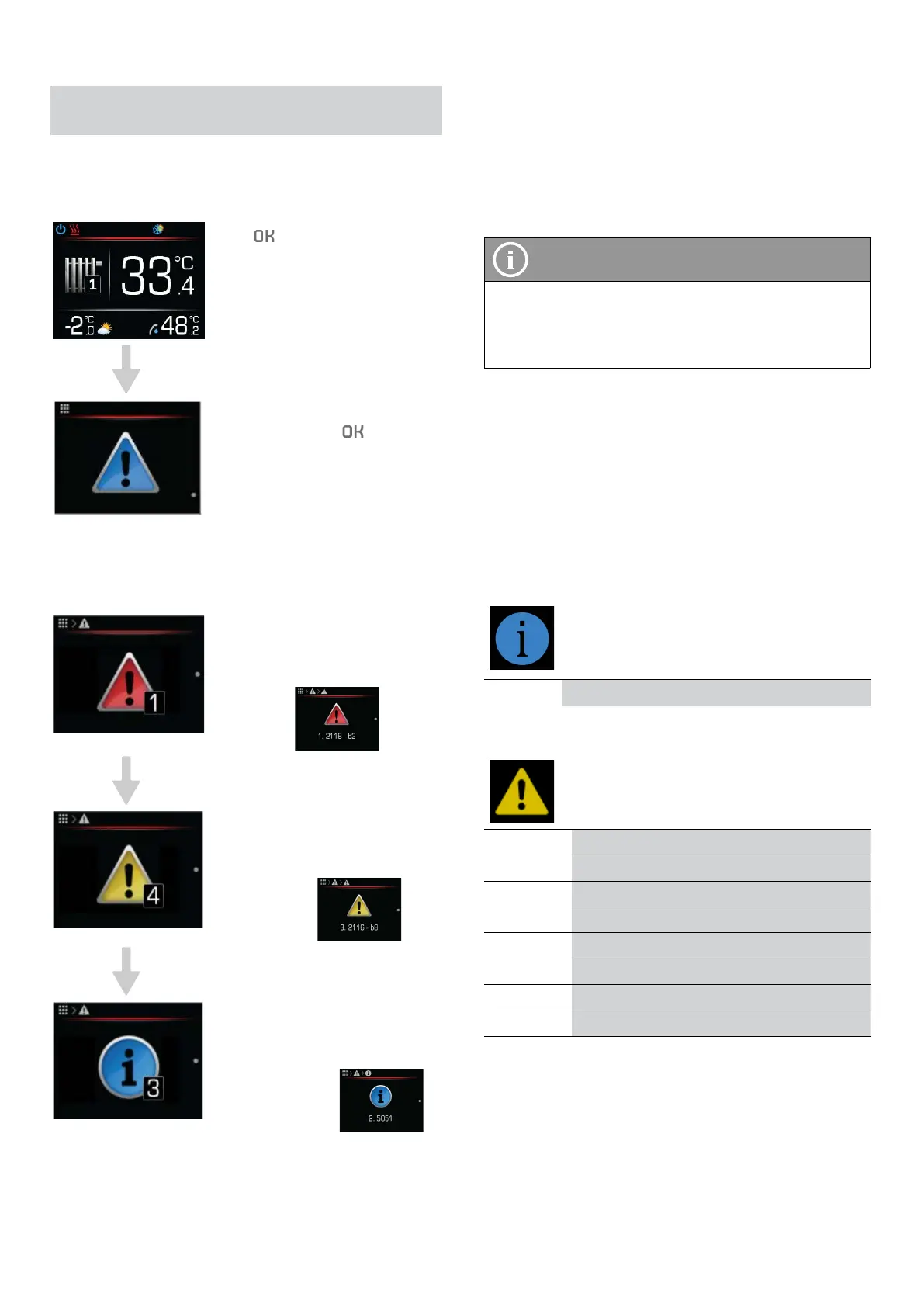
In the alarm menu you will see a list of faults, war-
nings, and notifications that arise during the device’s
operation.
Press to enter the menu.
Choose the offered diagnostic
menu by pressing
.
The following submenu will open. When you make a
selection, you will see the code for faults, warnings, and
notifications.
Error:
An error occurred that shut the
whole system down.
Error code:
Warning: A warning occurred
that did not shut the system
down.
Warning code:
Notification: Important infor-
mation was given during the
appliance’s operation.
Notification code:
14.1 DISPLAYS
All faults, warnings, and notifications are shown as
a code comprised of a 4–digit number and a 2–digit
number/letter combo.
All necessary instructions for parsing and understan-
ding these codes is given below.
NOTE
In case of error or waring showen, reset the error
and restart the appliance. If the error is still active
10 min after auto-reset,, contact installer who
commission the system.
14.2 LIST OF ALARMS
The diagnostic menu records all events during the
appliance’s operation. Priority events are shown in the
status line with a graphic display in the form of a red or
yellow exclamation point. In addition to the recorded
error and warnings, other event codes can also appear
in the diagnostic menu. These can only be resolved by
authorized service.
14.2.1 NOTIFICATIONS
/ /
14.2.2 WARNING LIST
2117-b13 Remote shutdown
2124-b7 No response from cascade modules
2124-b8 Cascade module 1 has to be inspected
2124-b9 Cascade module 2 has to be inspected
2124-b10 Cascade module 3 has to be inspected
2124-b11 Cascade module 4 has to be inspected
2330-b5 Refrigerant loss
2341-b4 Low pressure – heating system
Operating instructions
ADAPT, VERSI, ETERA and WPLV systems
17-19-45-6702-07


 To Next Page