13
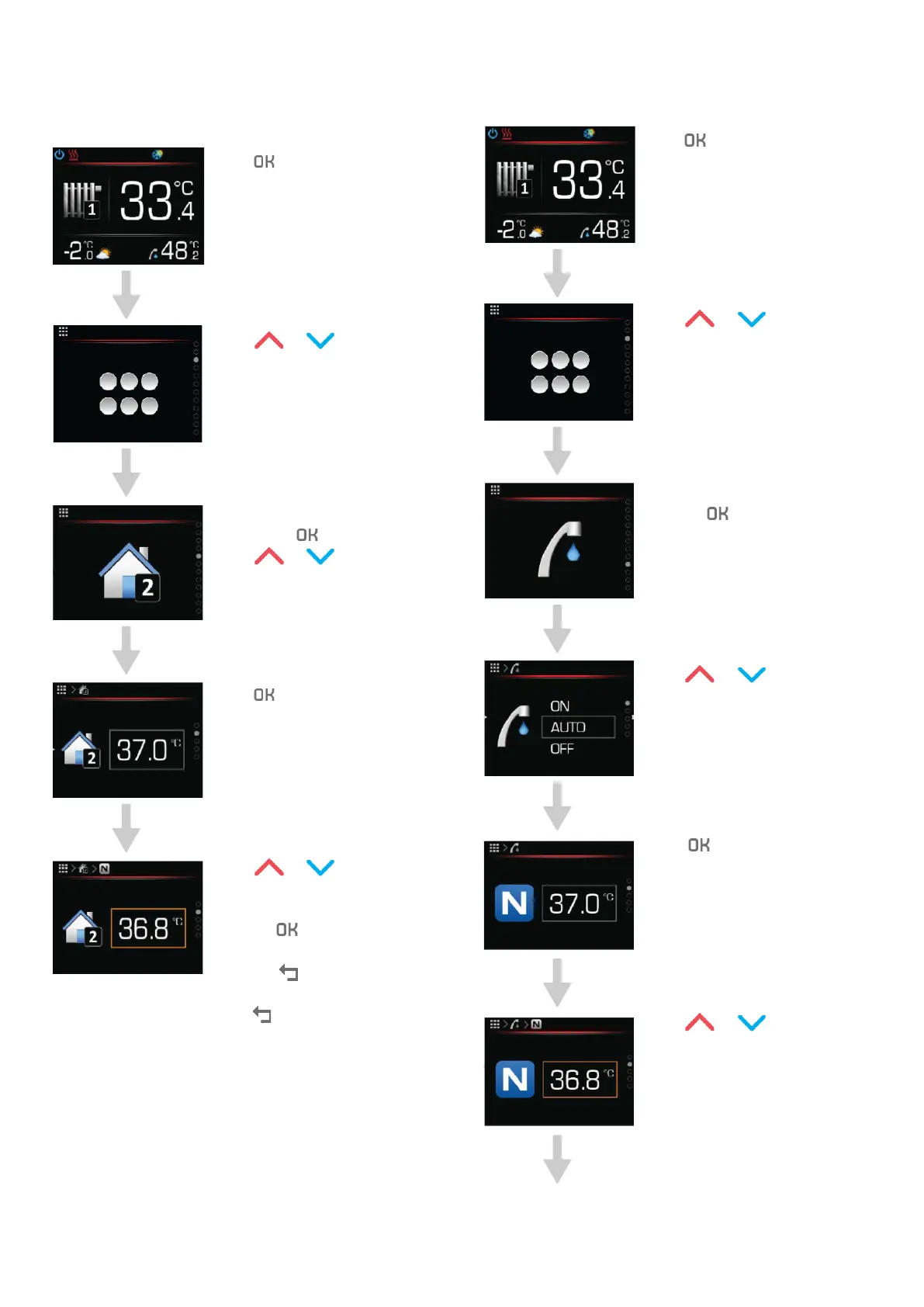
5.4 SETTING THE DESIRED AMBIENT
TEMPERATURE
Press to get to the main
menu
Press or to search for
the heating loop settings.
Choose the heating loop menu
by pressing
.
Press
or to find
the ambient temperature
parameter.
Press to begin setting
parameters.
Press or to set the
desired ambient temperature.
Confirm the settings by
pressing
.
Cancel the parameter value by
pressing
.
To return to the home screen
press
2 times.
5.5 SETTING THE DHW TEMPERATURE
Press to get to the main
menu.
Press or to search for
the DHW settings.
Choose the DHW menu by
pressing
.
Press or to find the
DHW temperature parameter.
Press to stop setting
parameters.
Press or to set the
desired DHW temperature.
Operating instructions
ADAPT, VERSI, ETERA and WPLV systems
17-19-45-6702-07


 To Next Page