8
4.3 SETTING PARAMETERS IN
THERMOSTAT MODE
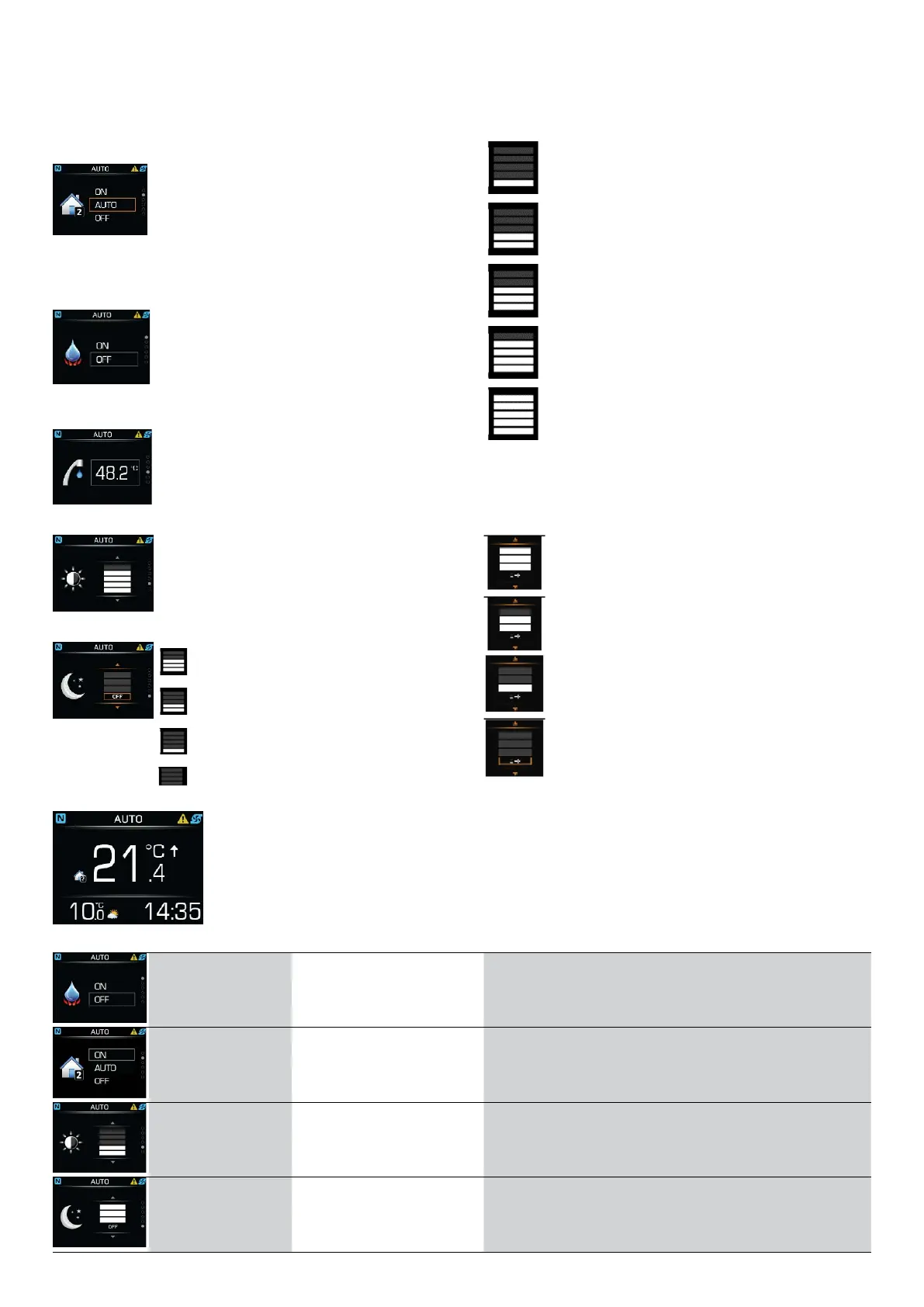
Settings for the heating loop’s operational mode:
ON – the heating loop is working con-
stantly in Normal mode.
AUTO – the heating loop is working
according to schedule.
OFF – the heating loop is not working
Quick heating DHW:
ON – quick heating for DHW is
activated.
OFF – quick heating for DHW is
activated
Setting the DHW temperature.
Setting the display’s brightness.
Night–time screen mode, the screen dims in dark:
The screen dims in 30% dark.
The screen dims in 60% dark.
The screen dims in 100% dark.
The screen stays illuminated.
4.4 MENUS AND PARAMETERS IN THERMOSTAT MODE
Setting parameters
Menu
Parameter name Parameter value range Note
Activating the
quick heating of
DHW.
ON – Turn on.
OFF – Turn off.
Operation mode.
ON – Turn on.
AUTO – Working
schedule.
OFF – Turn off.
Setting
brightness.
0–100 % Values are given in Table 1.
Setting night–
time mode.
0–100 % Values are given in Table 2.
SETTING BRIGHTNESS
Table 1
Brightness 15%.
Brightness 30%.
Brightness 40%.
Brightness 60%.
Brightness 100%.
SETTING NIGHTTIME MODE
Table 2
The screen automatically dims at 30%
darkness.
The screen automatically dims at 60%
darkness.
The screen automatically dims at 100%
darkness.
The screen stays illuminated.
Operating instructions
ADAPT, VERSI, ETERA and WPLV systems
17-19-45-6702-07


 To Next Page