―
28
―
● Model8212systemrequirements
(1)PC/ATcompatiblemachineonwhichMicrosoftWindows
○
R
98/ME/2000/XPcanoperate.
(2)Pentium233MHzormorerecommended.
(3)RAM64Mbyteormore.
(4)SVGA(800X600)ormore.
XGA(1024X768)recommended.
(5)20MBormoreoffreeharddiskspacerecommended.
(6)OnefreeCOMport
(7)CD-ROMdrive(necessaryatinstalling)
● Trademark
Windows
○
R
isaregisteredtrademarkofMicrosoftintheUnited
states.
PentiumisaregisteredtrademarkofIntelintheUnitedstates.
10.BATTERYREPLACEMENT
DANGER
● Neveropenthebatterycompartmentcoverwhilemaking
measurement.To avoid possible electrical shock, disconnect the
testprobebeforeopeningthecoverforbatteryreplacement.
CAUTION
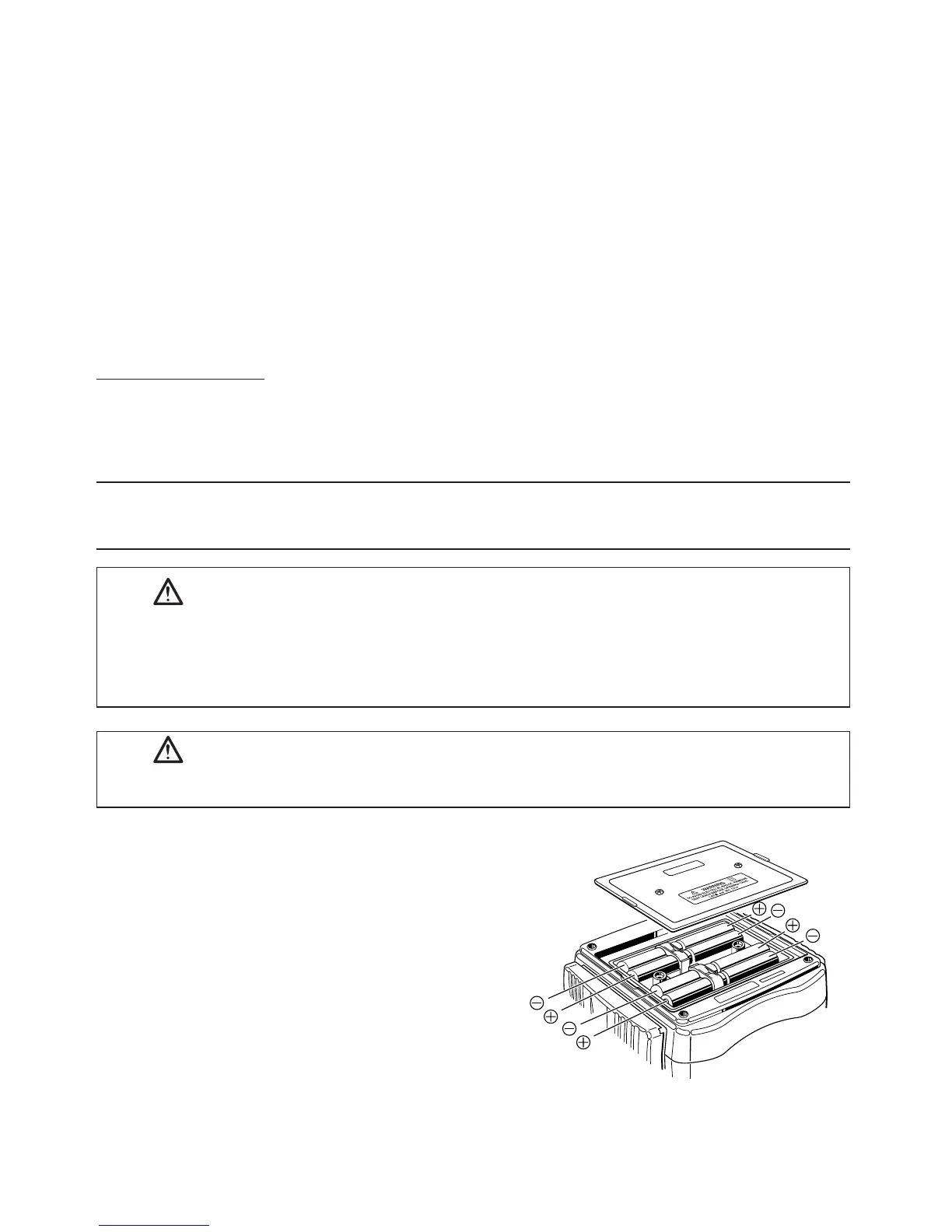
●Installbatteriesincorrectpolarityasmarkedinside.
①DisconnectTestLeadfromthe
instrument.
②Openthebatterycompartment
coverbyunscrewingthemetal
captivescrewtorevealbattery
compartment.Alwaysreplaceall
eightbatterieswithnewonesat
thesametime.
Batterytype:8xR6P,1.5VAAor
equivalent
Fig.19


 To Next Page