Vehicle Super Probe
- 6 -
5. Function Introduction
KM50 has 7 test modes: DC Voltage, AC Voltage, Frequency, Duty Cycle, Fuel
Injection Circuit Detection, Resistance, and Diode. Especially, in AC Voltage,
Frequency, Duty Cycle and Fuel Inject Modes, user can long press the mode button
to switch between Waveform Display Mode and Digital Display Mode. After the power
is turned on, short press the mode button to enter the menu, select the test mode by
pressing the up and down keys, and then press the mode button to enter the desired
test mode.
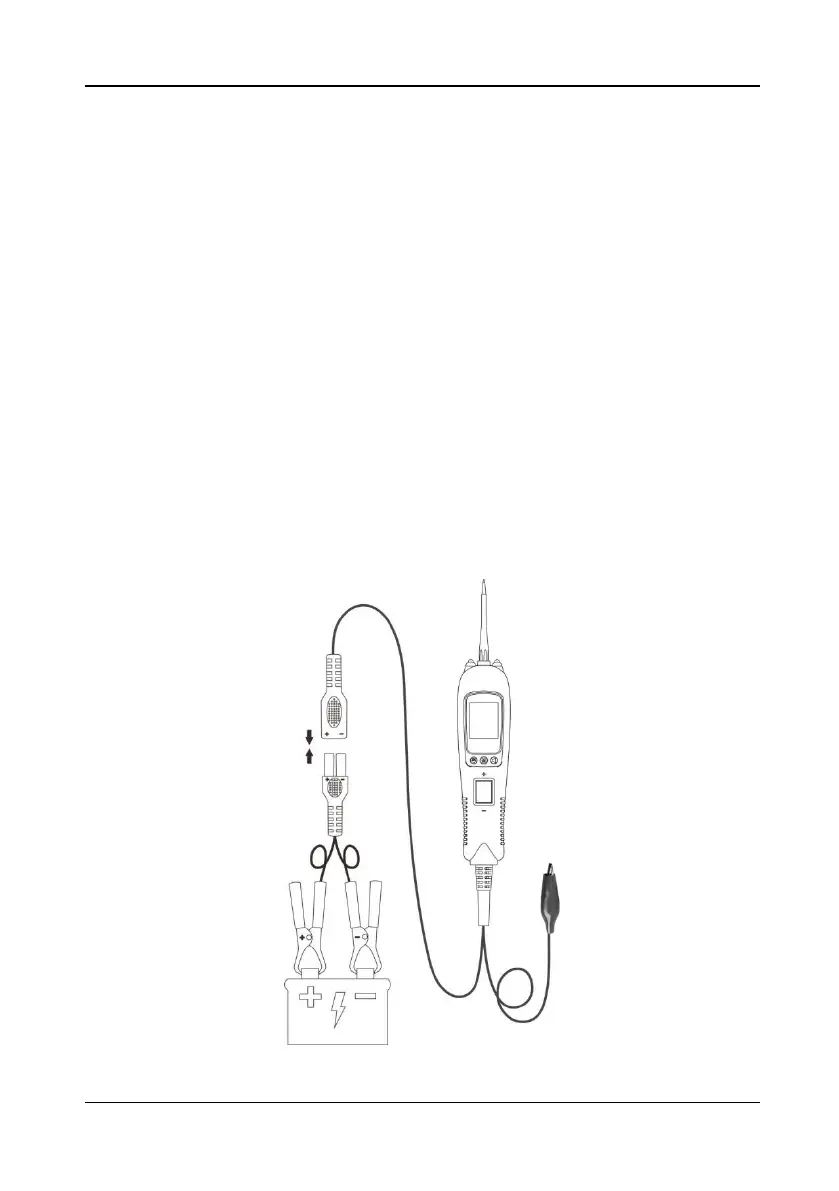
Before testing a circuit or component, make sure your tool is in good order by doing a
quick self-test. Connect the vehicle battery properly to turn the instrument on, the
instrument enters DC Voltage Mode by default, and the fast self-test is performed in
DC Voltage Mode. The rocker switch is an on-off switch located on the tool’s front
side. The positive and negative poles are marked above and below the switch. Press
the Rocker Switch forward to activate the tip with a positive voltage. The Red LED
should light and LCD display will read the battery voltage and tip voltage. A beep tone
will sound. Let go of the rocker switch and the LED will turn off and the tone will cease.
Press the Rocker Switch rearward to activate the tip with a negative voltage. The
Green LED should light and the LCD display will read the battery voltage and 0.0V
(ground). A beep tone will sound. Let go of the rocker switch and the LED will turn off
and the tone will cease. Your tool is working correctly and is now ready for use.
(Figure 2)
Figure 2


 To Next Page