LaCie Network Space 2 • DESIGN BY NEIL POULTON Administering Your LaCie Network Space 2
User Manual page 35
4.1. Dashboard: Accessing
There are two ways to access the Dashboard, using the LaCie Net-
work Assistant and using a browser.
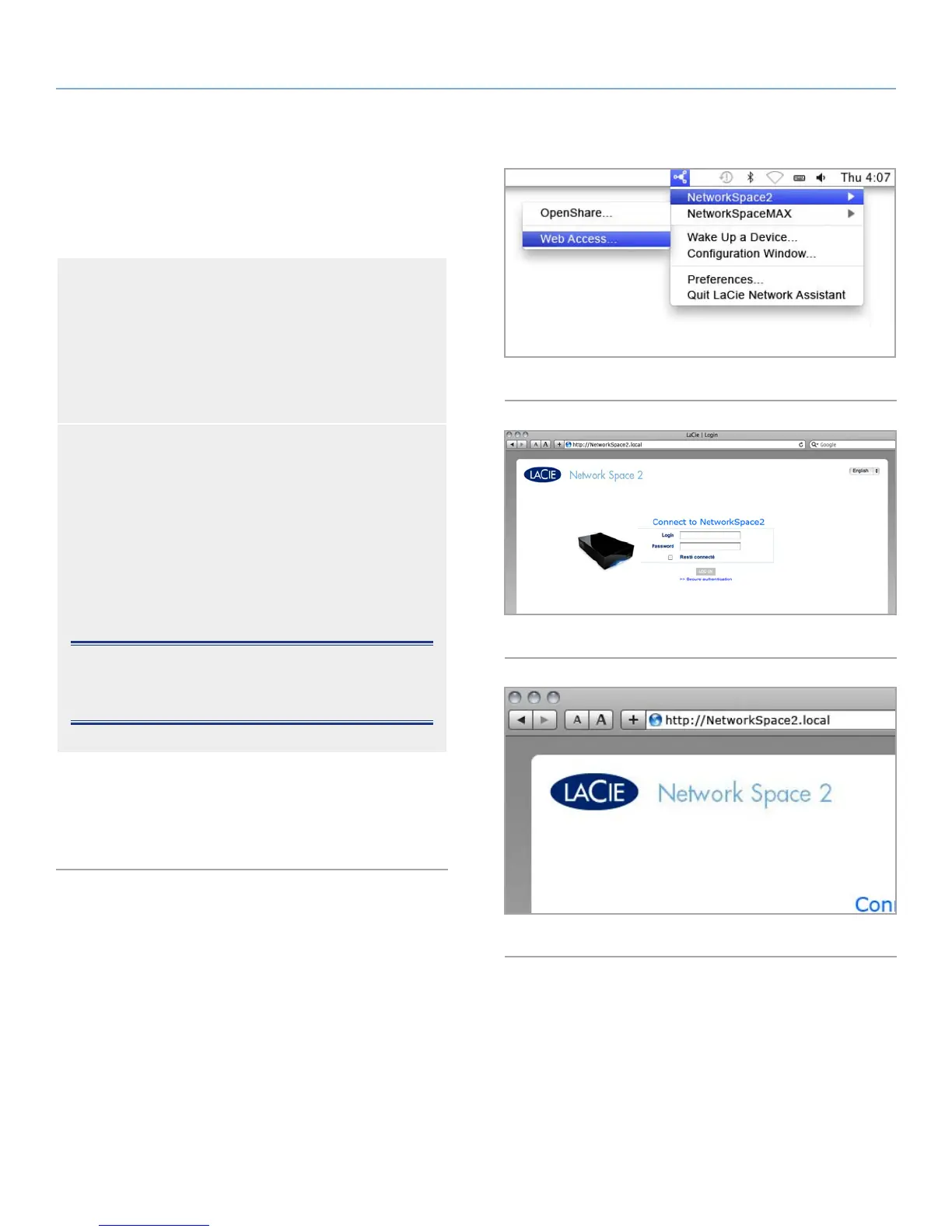
Use LaCie Network Assistant
1. Click on the LaCie Network Assistant icon in the system
tray (Windows users) or menu bar (Mac users) and select
NetworkSpace2 > Web Access (Fig. 47).
The LaCie Network Space 2 login page will open in a new
browser window or tab (Fig. 48). If your browser is not
open, LaCie Network Assistant will open it for you.
Use a Browser
1. Open your Internet browser (Firefox, Internet Explorer, Sa-
fari, etc.) and type your LaCie Network Space 2’s IP ad-
dress or machine name (by default, NetworkSpace2) in the
browser’s URL (web address) field (Fig. 49).
http://[IP address] or
http://NetworkSpace2 (Windows)
http://NetworkSpace2.local (Mac)
NOTE: The IP address of your LaCie Network Space 2 can be
found by clicking on the Network tab of the LaCie Network As-
sistant network Configuration Window.
2. For administrative access, in the login prompt, enter your admin
username and password (case sensitive).
3. Click Login.
Fig. 47
Fig. 48
Fig. 49 - Mac users














 To Next Page