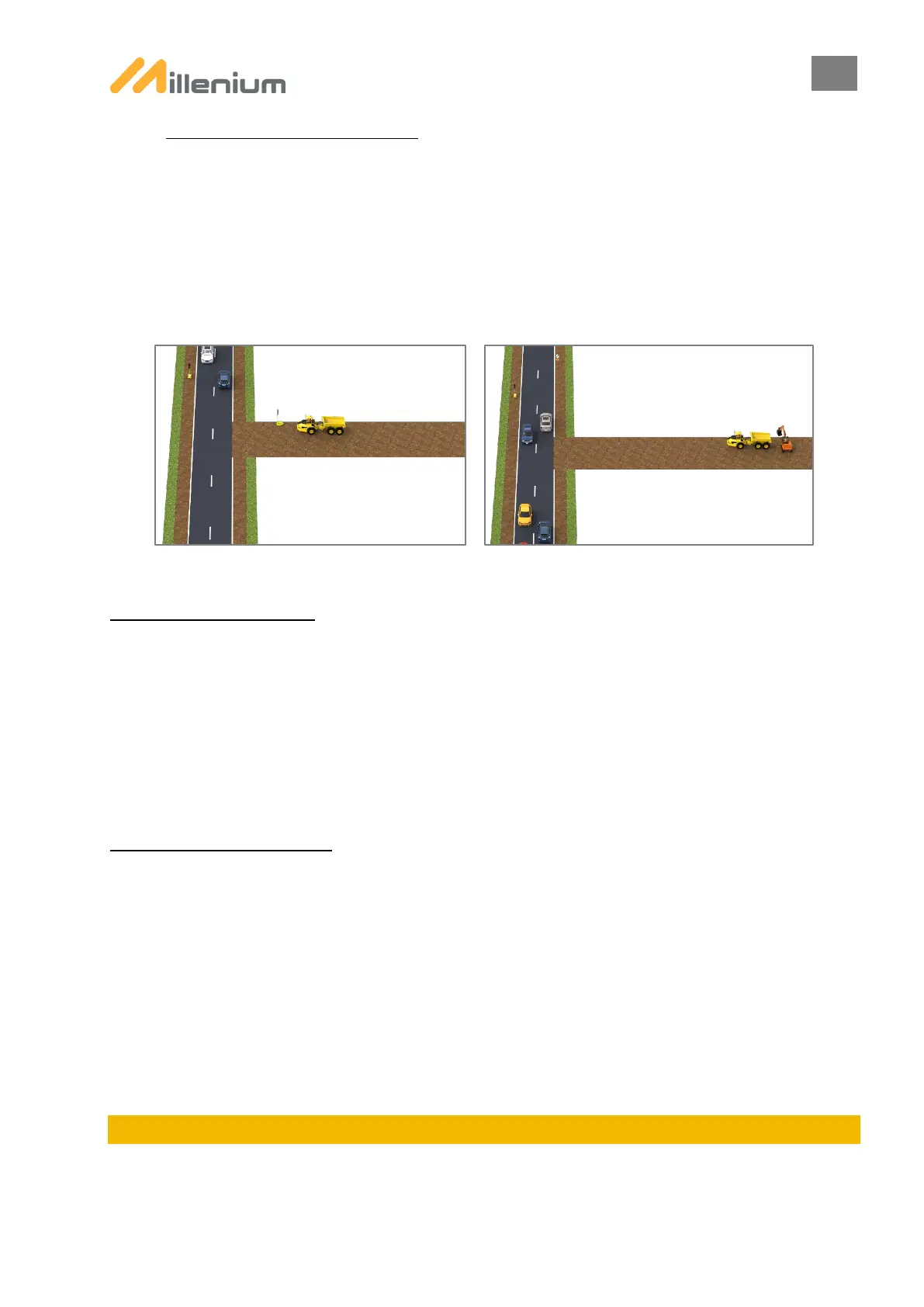
H. PLANT CROSSING FUNCTION:
The plant crossing function involves interrupting current cycles on lanes reserved for traffic to allow worksite vehicles to
safely leave the area.
Plant crossing can be activated or deactivated in all modes once programming has been completed, except for MANUAL
ALTERNATING mode.
There are 2 possible worksite configurations:
- Worksite road(s) equipped with a PTL (see chapter STANDARD + WORKSITE EXIT)
- Worksite road(s) without a PTL
For worksite road(s) equipped with a PTL, select STANDARD + WORKSITE EXIT mode.
Activate PLANT CROSSING:
MILLENIUM:
- manually by pressing the STOP button on the remote control for 5 seconds
SMART MILLENIUM – Traffic Regulation: 2 possible choices (to be defined at the programming stage)
- manually by pressing the STOP button on the remote control for 5 seconds
- automatically when a vehicle is detected approaching the WORKSITE traffic lights (maximum distance between
PTLs : 800m)
Choice of automatic activation is only available in STANDARD + WORKSITE EXIT mode.
Deactivate PLANT CROSSING:
MILLENIUM: 2 possible choices (to be defined at the programming stage)
- manually by pressing the STOP button on the remote control for 5 seconds
- automatically after ALL RED defined based on programming (not available if PTLs are synchronised. Maximum
distance between PTLs : 800m)
SMART MILLENIUM – Traffic Regulation: 2 possible choices (to be defined at the programming stage)
- manually by pressing the STOP button on the remote control for 5 seconds
- automatically: Plant crossing is interrupted when there is no approaching vehicle detected for 8 seconds at the
worksite exit PTL; Plant crossing duration is limited to 30 seconds (maximum distance between PTLs : 800m).
Choice of automatic deactivation is only available in STANDARD + WORKSITE EXIT mode.
8. CYCLE IN PROGRESS
Once programming has been completed, the current programming can be viewed from the remote control. Pressing one
of the keys gives users access to CYCLE IN PROGRESS with details of the current programming.


 To Next Page