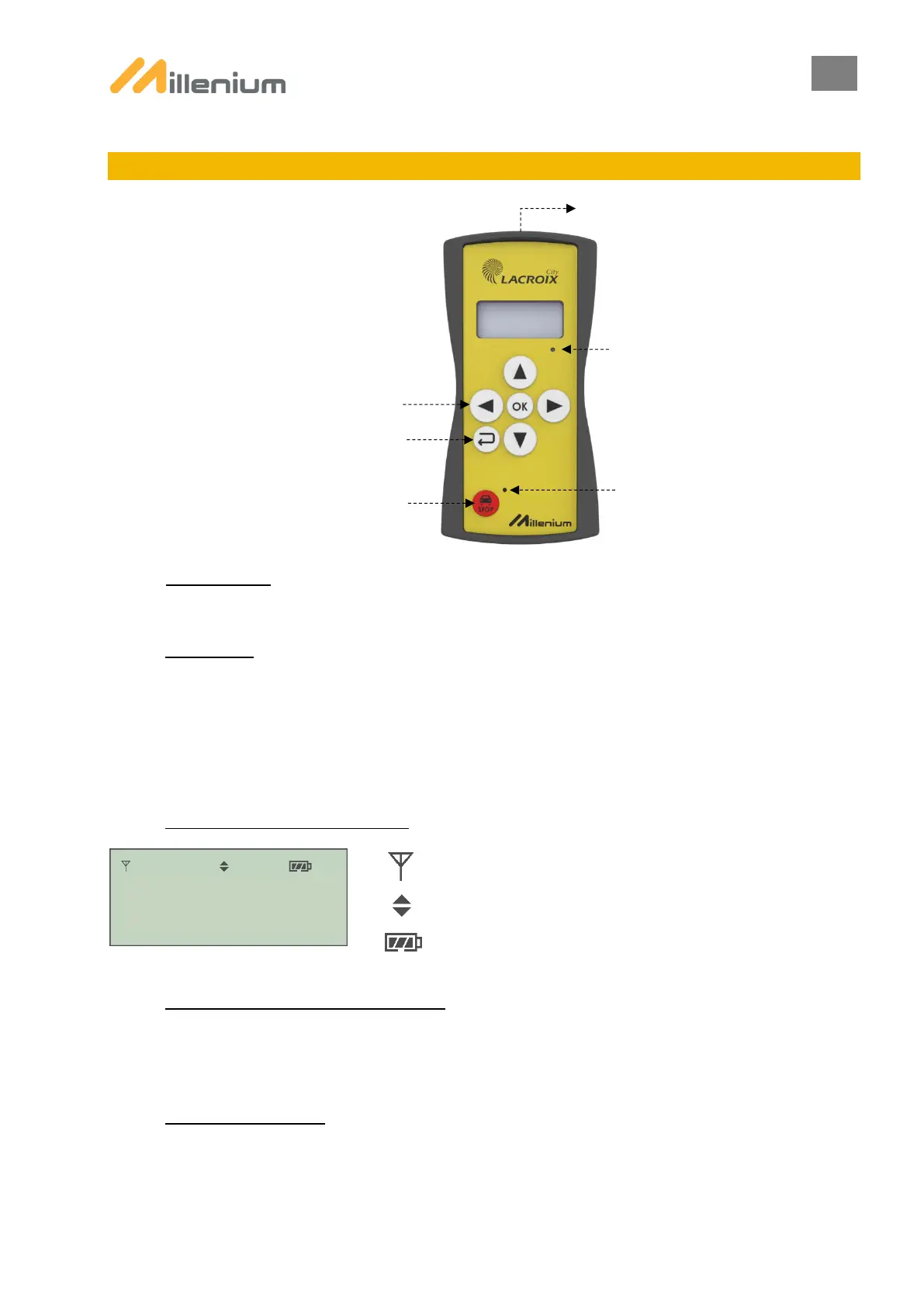
12. REMOTE CONTROL
A. ACTIVATION
The remote control can be activated by quickly pressing on any key.
B. STANDBY:
To optimise the remote control’s battery life, the device is configured by default to enter standby mode after 1 minute.
In order to preserve the remote control’s battery life, it is recommended to select the shortest time to enter standby mode.
The time to enter standby mode can be configured from the remote control’s PARAMETERS menu.
In standby mode, the remote control continues to communicate with the current traffic light system in order to collate alert
messages and inform the user.
C. REMOTE CONTROL SCREEN:
Symbol displayed when PTLs are paired on the remote control
Flashing symbol in case of a radio error
Symbol informing that an up/down choice is possible
Remote control charge
D. SWITCH OFF REMOTE CONTROL:
To ensure a continuous connection with the current PTL system, the remote control cannot be switched off; once the PTL
system has shut down, the remote control enters extended standby mode and stops communicating in order to conserve
its battery.
E. AUDIBLE ALARMS:
The remote control is fitted with an audible alarm to inform the user about an alert or a fault with the PTL system. After
sounding for 5 seconds, the alarm stops automatically. Configured by default, the audible alarm can be deactivated from
the remote control’s PARAMETERS menu.


 To Next Page