10 11
FEATURES
FEATURES
Circulation
Cardiac Features
− Extensive ECG library, pulses from 0-220
− Heart sounds - for every anterior location
− ECG rhythm monitoring (4-connector, 3-lead ECG)
− 12-lead ECG display
− Pacing
− Defibrillation and cardio version using live defibrillators
Defibrillation
− With live defibrillators; energy level and waveform model is
registered by the Patient Simulator
− The energy levels and number of shocks required for automatic
conversion are set in each simulation Patient Case
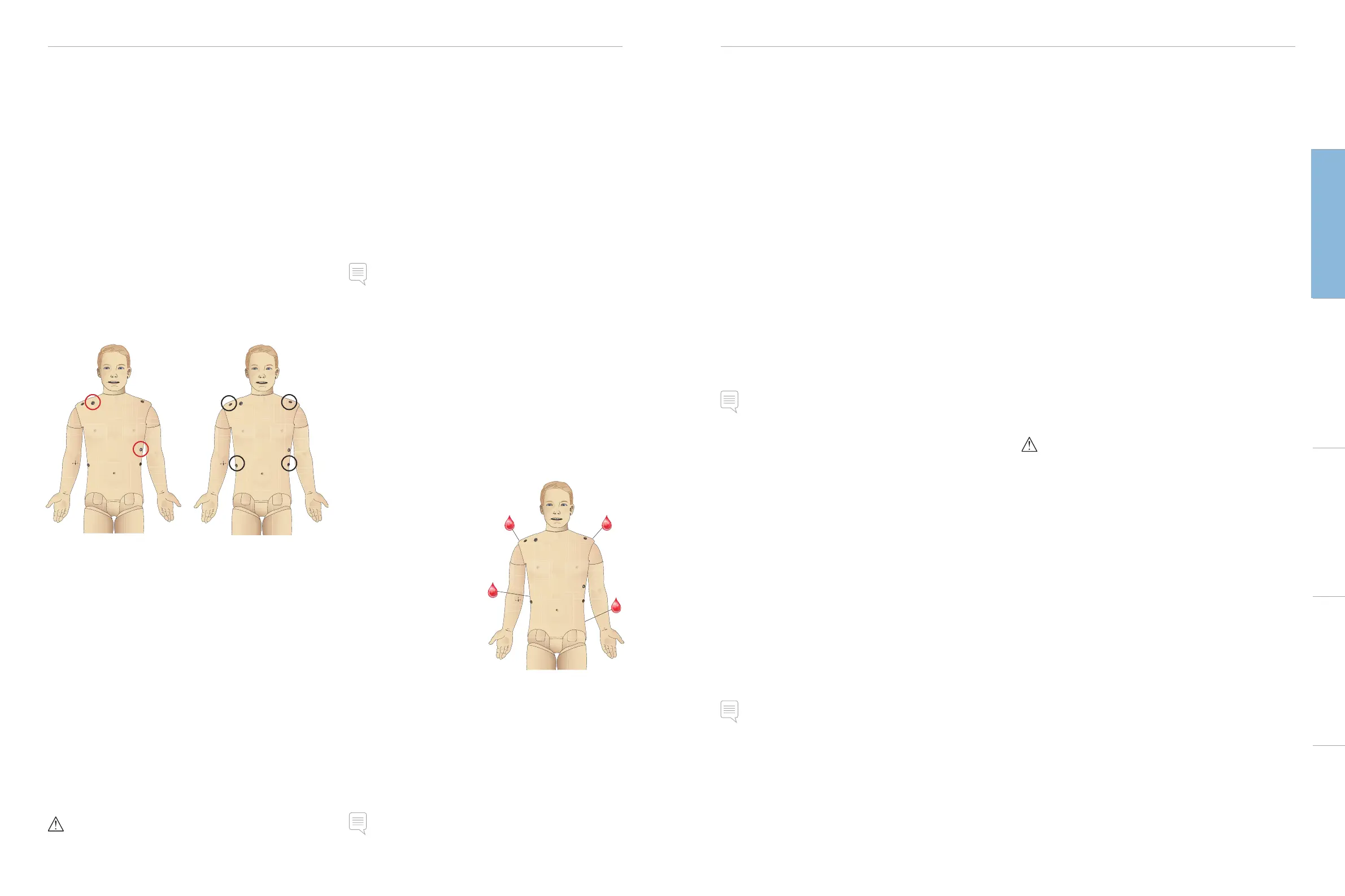
Defibrillation Studs 3-Lead ECG Studs
Circulation Features
− BP measured manually by auscultation of Korotkoff sounds
− Carotid, brachial, radial, femoral, popliteal, dorsalis pedis, and
posterior tibialis pulses synchronized with ECG
− Pulse strength variable with BP
− Pulses are synchronized with ECG when the instructor sets the
pulse strength manually
− Pulse palpation is detected and logged
CPR
− Compliant with 2015 Guidelines
− Compressions generate palpable pulses, blood pressure wave
form, and ECG artifacts
− Realistic compression depth and resistance
− Detection of depth, release and frequency of compressions
− Real-time view of Quality of CPR on the Instructor’s PC
Warning: Do not use automated chest compression machines on
the Patient Simulator.
Patient Monitor Features - Circulation
− ECG (12-lead) and heart rate (HR)
− Pulse
− NBP
− ABP
− PAP
− C.O.
Patient Monitor Features - Temperatures
− TPeri
− Tblood
Note: In LLEAP a variety of settings in the Circulation and fluids
window can be made. See LLEAP Help for further information.
Bleeding
To allow the Patient Simulator to bleed realistically, it has internal
reservoirs for simulated blood. See Setup section.
The four bleeding ports and blood flow can be adjusted
independently from LLEAP:
− Upper/lower bleeding ports
− Venous/Arterial
− Works with various wound modules and moulage kits
Bleeding Treatment
− Bandage
− Pressure point
− Tourniquet
− Surgical Clamps
Vascular Access
− IV access (right arm)
− Intraosseous access (tibia)
− Drugs - use of Automatic
Drug Registration System
(identifies drug & measures
dose) and preprogrammed
drug responses.
Consumables and Spare Parts
− Laerdal Artificial Blood
− Fill Units
− Wound modules
− Replacement trauma arm/leg
Note: In LLEAP a variety of settings in the Circulation and fluids
window can be made. See LLEAP Help for further information.
Sounds
Two types of sounds can be used in a scenario:
– Body sounds
– Vocal Sounds
The sounds can be triggered by the scenario or controlled by the
instructor.
Body Sounds
The body sounds are simulated sounds from a human body, like
heart, lungs, and bowel sounds. The sounds are integrated and
generated in the Patient Simulator and transferred through the
integrated speakers.
Vocal Sounds
The vocal sounds are sounds from the throat like coughing, moaning,
and crying as well as spoken words. The sounds are integrated in
LLEAP and transferred to the Patient Simulator.
In addition, the instructor can communicate through a microphone
and the voice is then transferred to the Patient Simulator through
the VCA.
Note: In LLEAP a variety of settings in the Sounds window can be
made. See LLEAP Help for further information
Eyes Settings and Configurations
The calculated Glasgow Coma Scale score for the Patient Case is
displayed in LLEAP. The following sources of information help the
learner to judge the state of disability:
Eyes
− Blinking eyelids
− Eyelids: open, closed or partially open
− Eyelids can be opened for examination by the learner
− Pupil dilation: constricted, dilated or in between
− Pupillary accommodation
− Synchrony / asynchrony
− Normal and sluggish speed of response
Note: In LLEAP a variety of settings in the Circulation and fluids
window can be made. See LLEAP Help for further information.
Drugs and IV
Drugs used by the scenario and corresponding drug concentrations
can be registered manually by the instructor in the Event window in
LLEAP or automatically, if you use RFID tags. For further information,
see LLEAP Help.
Patient Monitor Features – Drugs
– Train-of-Four (TOF)
– in N
2
O, et N
2
O
– Anesthesia agents
– Lab reports
User-replaceable items, Spare Parts
– IV catheter (US and International versions)
– IV fluid filter
– Intra-muscular pad
Vascular Access (IV and IO) Locations
Intraosseous access with needle insertion is possible through the left
tibia. The IO pads may be punctured numerous times before being
replaced.
To replace the IO modules, see the Simulation Setup section.
Caution: Do not inject fluids into these pads unless approved IO
modules with fluid outlets are in place.
Intra-muscular (IM) Injection
Use the pad placed under the torso skin on the right buttock for
intramuscular injection training.
Cautions and WarningsFeaturesSetupMaintenanceSpare Parts Troubleshooting














 To Next Page